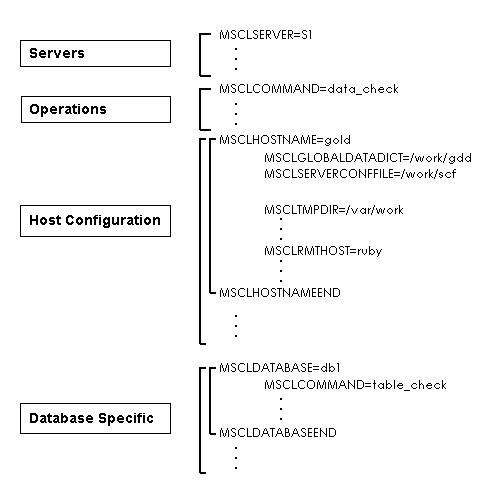
Figure 10-1: Database Integrity Assurance Utility Configuration File Layout
When an Empress process is killed (by a SIGKILL, or a machine crash), it may not have a chance to clean up properly. As a result, for example, locks without owners may be left behind and server connections may not be closed and freed. These problems may cause the database to be inaccessible by other processes.
In a multitasking environment, it is an unacceptable behavior for a process to affect other processes by leaving locks on records or leaving unfinished transactions. To address this problem, Empress introduces a database integrity assurance utility called empclean which checks databases and performs any necessary cleanup operations. The operations are:
Depending on when and how a process is killed, there are several ways a database can become damaged. empclean can perform many classes of repairs; each class is explained in below.
When the machine on which a server is running crashes, the server on that machine disappears. Unless you have the system start your server every time it reboots, your server will not be available until you restart it manually. empclean can check for missing servers for the machine on which it is run and can restart them if necessary.
Clients accessing a server are not removed from the server when the machine on which they are running crashes. When empclean runs, the existence of all clients registered with the server is verified. All clients which no longer exist are removed from the server. This is equivalent to an automatic empsvadm server_name svremove client_id command.
This is important because the server can have only a fixed number of client processes registered with it. Therefore, defunct client processes should be removed regularly.
In the interest of speed, Empress
compiles all information about table schemas and stores this information in individual records within the data dictionary.
empclean can be used to force a re-compilation of the entire data dictionary. This
operation can be slow and can inhibit access to tables for significant periods,
one by one until the process is complete.
10.2.2.2 Partial Re-Compilation
This operation recompiles only tables which are not
compiled in the data dictionary. This inconsistency can occur if an operation
which changes the table schema is interrupted.
10.2.2.3 Remove Dangling Data Dictionary Entries
empclean can remove entries in the data dictionary for tables which don't exist.
empclean removes any dangling:
Note that while this operation is taking place, data definition language (DDL) commands cannot be performed on the database. DDL commands are commands which change the database schema.
The only files which should be in the database directory are Empress database files. If other files exist within the directory, empclean will remove them.
When a server or a client dies unexpectedly, transactions which were in progress at
that time are not resolved. empclean can force a
resolution of those transactions. Completed transactions will be committed;
unfinished transactions will be cancelled. This is equivalent to an automatic empwarm command;
active transactions are not touched.
10.2.4 Clear Dangling Locks
Shared memory and file locks which are held by dead clients may not be cleared. empclean can determine which locks are held by clients that no longer exist and can clear them. This is equivalent to an automatic empadm database_name lockclear client_id, where client_id is the Empress ID of a client which is no longer active.
Files for main record data (.rel files) and files for overflow data (.dtf files) can be repaired by empclean. This includes fixing record counts or the free list for the table.
If a .rel or .dtf file needs to be repaired, it will be changed in place; empclean does not create a new file. If a .rel or .dtf file is damaged and needs repair, empclean recreates the indices (.ix and .ixl files) for that table.
This operation may be very slow on large tables and requires exclusive access to each table as its files are being scanned for problems; the table will be inaccessible until the repairs are completed.
Empress uses temporary files for many purposes. For example, overflow data for bulk attributes are stored in files in a directory below the directory specified by MSTMPDIR (an Empress variable found in the user's environment or in $EMPRESSPATH/config/initfile). When a client is killed abruptly, its temporary files and the directory in which they reside are not removed. empclean can determine which clients no longer exist and remove their temporary files. This operation is not specific to any database.
Please note that this operation requires that the effective user id of the empclean process has permission to remove the files.
With every Empress database there is an associated coordinator. Among other things, the coordinator records which processes are active in the database.
If some Empress processes die without cleaning up properly, empclean can remove their entries from the coordinator file.
When empclean detects missing shared memory partition, it will automatically recreate the shared memory partition.
The database integrity assurance utility, empclean, has the following syntax:
empclean -m congif_file
or
empclean [-verify] database_name [command {command}]
or
empclean [-verify] -f config_file [database_name [command {command}]]
where command is one of:
| data_check | Detect and repairs bad .rel files and bad .dtf files. |
| rebuild_user_indices | Recreate user table indexes. |
| recompile | Recompile the data dictionary entry for tables whose compile entry is null. |
| recompile_all | Recompile the data dictionary entry for all tables. |
| replication_check | Purge logical deleted records from master/replicate tables. |
| table_check | This command does the following:
|
| temp | Remove dangling temporary files. This option requires that the effective user id of the empclean process has permission to remove the files. |
The first syntax with the -m option starts an interactive session in which you build a configuration file which will later be used by empclean. During this session you specify the integrity checks you wish to perform, the host names of machines on which you wish to run empclean, as well as other information related to that host. You may also specify the names of servers, server configuration files and global data dictionaries if you want empclean to perform repairs on or through a server.
The second form of syntax is useful for databases for which you don't want to bother constructing a configuration file. When using this form, you specify the name of a database and an optional set of commands to perform on that database. If you specify the database without specifying a set of commands, a default set of integrity checks is performed. This set checks for the following database inconsistencies:
This is the basic set of operations which will always be performed before other operations. If you provide a list of commands, such as:
empclean mydatabase recompile temp
The commands you list on the command line will be executed for the specified database in addition to the basic set of operations.
The -f option tells empclean to perform the integrity checks specified in a configuration file which you have built with the -m option. Integrity checks are performed on all databases and client nodes specified in the configuration file. Note that running empclean may be time-consuming. You may wish to have several configuration files: one for hourly checks, one for daily checks, one for weekly checks, etc.
If you specify a database with the -f option, for example:
empclean -f myconfigfile mydatabase
The integrity checks are performed on that database (ie. mydatabase in the above example) only, regardless of which databases are specified in the configuration file (ie. myconfigfile in the above example). Note that the database name can be either a physical database name or a logical database name.
When -verify option is specified, empclean does not perform the repairs specified in the configuration file, but reports what problems it found and what actions would be taken if the -verify option had not specified.
The -verify option may be of limited use if:
This section will show steps of creating empclean configuration file, discuss its layout and some customizations to the configuration file.
Invoking empclean with the -m option starts an interactive session during which you will be asked which databases and servers you wish to repair as well as the names of the machines on which they reside. Your answers to the questions are used to construct a configuration file which can then be used by empclean.
The following annotated example walks you through the creation of a configuration file for repairs of a local database on a standalone machine without a database server. The machine name is gold and the database name is physics, located in the /work directory.
To start a configuration session, type:
empclean -m config_file
Here, config_file is the name of the file where the configuration information will be stored. If the file exists, empclean truncates it to length zero (0) before writing the new configuration file.
The configuration starts with the following output:
   This utility will help you create an Empress Cleanup
   configuration file.

   The local host is gold
When you are prompted for the name of your database, enter the full pathname of each local database on which you want to run empclean; enter a blank line to terminate this section of questions.
   Please enter the names of all of your databases.
   (Logical name or full path, one per line.)
   End with an empty line.
   Database: /work/physics
   Database: <Return>
Do not list any server configuration files or servers since you are only interested in local databases. Furthermore, the physical database name is used for this example, so a global data dictionary is not specified.
   Now please list all of your server configuration files.
   Specify the full path.
   Server Conf. File: <Return>

   Which servers should be automatically restarted? (One per line.)
   Server: <Return>

   Please list all of your global data dictionaries.
   Specify the full path.
   Global Data Dict.: <Return>
Next, you are asked which operations you wish to perform on all databases specified in this configuration file. For this example, choose temp and recompile.
   The following cleanup operations are available:
   temp recompile recompile_all table_check data_check

   What operations should be performed on all databases?
   (One per line.)
   Operation: temp
   Operation: recompile
   Operation: <Return>
In the next section, you are asked for information which is specific to each database. For this example, specify that you want data_check operations performed for database physics in addition to the temp and recompile operations you specified in the previous block.
   We will now ask for operations for each database.

   For database '/work/physics':
      Which additional operations should be performed?
      Please choose one or more of the following.
      recompile_all table_check data_check

      Operation: data_check
      Operation: <Return>
The next section checks whether any other hosts will be using this database. Since our database is for local use only, we don't need to specify any other hosts.
      Currently, I know about the following hosts:
      gold

      If there are any other hosts with which Empclean
      should be concerned,
      please enter them (one per line.)
      Host: <Return>

   We are now done with all questions pertaining to databases.
This section prompts for any hosts which have not yet been mentioned. Again, since our database is for local use only, we don't need to specify any other hosts.
   You have mentioned the following hosts:
      gold

   Please list any other hosts about which we should know.
      Host: <Return>
The next section obtains from the user information specific to each host which will be using this configuration file. For databases which are accessed only locally, we say that all hosts (the local host) can be reached from the local host.
   We will now ask for information about each host.

   For host 'gold':

      Are all hosts with which Empclean should be concerned
      reachable by remote shell? (y/n) y
The final question prompts for the names of directories which should be checked for Empress dangling temporary files. This is useful only if you set MSTMPDIR to some value in users' environments, in which case you should list all of the values which MSTMPDIR is given by users who access databases on this host.
      Please specify directories used for Empress
      temporary files.
      Temporary directory: /var/work
      Temporary directory: <Return>
The last two lines inform you of successful creation of the configuration file; we recommend that you check it to ensure that you have not made any mistakes.
   The Empclean Configuration File has been created.
   Please look it over and verify that the information is
   complete.
The configuration file created by this session looks like this:
   MSCLCOMMAND=temp
   MSCLCOMMAND=recompile

   MSCLHOSTNAME=gold
           MSCLTMPDIR=/var/work
   MSCLHOSTNAMEEND

   MSCLDATABASE=/work/physics
           MSCLCOMMAND=data_check
   MSCLDATABASEEND
The following annotated example walks you through the creation of a configuration file for repairs of a database accessed through a server. The physical database name is physics, located in directory /work. The logical database name is physics-db accessed through server physics-srv running on machine gold. Clients on remote host ruby also access the database.
To start a configuration session, type:
empclean -m config_file
Here, config_file is the name of the file where the configuration information will be stored. If the file exists, empclean truncates it to length zero (0) before writing the new configuration file.
The configuration starts with the following output:
   This utility will help you create an Empress Cleanup
   configuration file.

   The local host is gold
Since the database is accessed through a server, enter the logical database name.
   Please enter the names of all of your databases.
   (Logical name or full path, one per line.)
   End with an empty line.
   Database: physics-db
   Database: <Return>
Now you must specify the full pathname of your server configuration file and the host on which it is found.
   Now please list all of your server configuration files.
   Specify the full path.
   Server Conf. File: /work/scf
   On which host?  '*' for all: gold
   Server Conf. File: <Return>
Enter the names of any servers which should be restarted automatically.
   Which servers should be automatically restarted? (One per line.)
   Server: physics-srv
   Server: <Return>
Next, enter the full pathname of your global data dictionaries.
   Please list all of your global data dictionaries.
   Specify the full path.
   Global Data Dict.: /work/gdd
   On which host?  '*' for all: gold
   Global Data Dict.: <Return>
Next, you are asked which operations you wish to perform on all databases specified in this configuration file. For this example, choose temp and recompile.
   The following cleanup operations are available:
   temp recompile recompile_all table_check data_check

   What operations should be performed on all databases? (One per line.)
   Operation: temp
   Operation: recompile
   Operation: <Return>
In the next section, you are asked for information which is specific to each database. For this example, specify that you want data_check operations performed for database physics-db in addition to the temp and recompile operations you specified in the previous block.
   We will now ask for operations for each database.

   For database 'physics-db':

      Which additional operations should be performed?
      Please choose one or more of the following.
      recompile_all table_check data_check

      Operation: data_check
      Operation: <Return>
The next section checks whether any other hosts will be using this database. The database in this example is also accessed from machine ruby; you should enter ruby at the prompt.
     Currently, I know about the following hosts:
     gold

     If there are any other hosts with which empclean
     should be concerned,
     please enter them (one per line.)
     Host: ruby
     Host: <Return>
   We are now done with all questions pertaining to databases.
This section prompts for any hosts which have not yet been mentioned. No other hosts use this database, so just press <Return> at the prompt.
   You have mentioned the following hosts:
      gold ruby

   Please list any other hosts about which we should know.
      Host: <Return>
The next section obtains from the user information specific to each host which will be using this configuration file. For each host, you must indicate which other hosts can be reached by remote shell and which directories - in addition to /work - are used to store Empress temporary files on that host.
   We will now ask for information about each host.

   For host 'gold':

      Are all hosts with which empclean should be concerned
      reachable by remote shell? (y/n) y

      Please specify directories used for Empress temporary files.
      Temporary directory: <Return>

   For host 'ruby':

      Are all hosts with which Empclean should be concerned
      reachable by remote shell? (y/n) y

      Please specify directories used for Empress temporary files.
      Temporary directory: /var/work
      Temporary directory: <Return>
The last two lines inform you of successful creation of the configuration file; we recommend that you check it to ensure that you have not made any mistakes.
   The Empclean Configuration File has been created.
   Please look it over and verify that the information is
   complete.
The configuration file created by this session looks like this:
   MSCLSERVER=physics-srv

   MSCLCOMMAND=temp
   MSCLCOMMAND=recompile

   MSCLHOSTNAME=gold
           MSCLGLOBALDATADICT=/work/gdd
           MSCLSERVERCONFFILE=/work/scf
   MSCLHOSTNAMEEND

   MSCLHOSTNAME=ruby
           MSCLTMPDIR=/var/work
   MSCLHOSTNAMEEND

   MSCLDATABASE=physics-db
           MSCLCOMMAND=data_check
   MSCLDATABASEEND
Although empclean -m sets up a file automatically, discussing the layout will help you to understand how each of the system variables in the configuration file corresponds with the information that you had provided. In the case of quick modification is needed, you can use the system editor to edit the configuration file.
An empclean configuration file consists of several blocks. A block deals with one type of information and contains one or more lines, each of which assigns some value to an Empress variable. While we discuss the blocks in the order in which they are generated by empclean -m, they may appear in any order.
Figure 10-1: Database Integrity Assurance Utility Configuration File Layout
This block specifies the names of the servers to be restarted when using this configuration file. Each server must be specified on a line by itself. Each line has the form:
MSCLSERVER=servername
This block corresponds to the question when running empclean -m:
   Which servers should be automatically restarted? (One per line.)
      Server:
If no server is specified; there will be no entry in this block.
This block specifies the operations performed on all databases; these operations are called global operations. Each line has the form:
MSCLCOMMAND=command
Each command must be specified on a line by itself. This block can have any number of lines, but each command is executed once, regardless of how many times you specify it. If no command is specified; there will be no entry in this block.
If any of the operations in the configuration file result in repairs to the database, a basic set of integrity checks is performed. This basic set checks for the following database inconsistencies:
The possible commands are:
| recompile_all | Recompile the data dictionary entry for all tables. |
| recompile | Recompile the data dictionary entry for tables whose compile entry is null. |
| table_check | This command does the following:
|
| data_check | Detect and repairs bad .rel files and bad .dtf files. |
| temp | Remove dangling temporary files. This option requires that the effective user id of the empclean process has permission to remove the files. |
This block corresponds to the question when running empclean -m:
   The following cleanup operations are available:
   temp recompile recompile_all table_check data_check

   What operations should be performed on all databases? (One per line.)
   Operation:
This block contains host-specific information such as:
Each block contains information specific to one host and is delimited by the following pair of variables:
   MSCLHOSTNAME=host_name
    .
    .
    .
   MSCLHOSTNAMEEND
The variable, MSCLGLOBALDATADICT, for the Global Data Dictionary corresponds to the question when running empclean -m:
   Please list all of your global data dictionaries.
   Specify the full path.
   Global Data Dict.:
   On which host?  '*' for all:
The variable, MSCLSERVERCONFFILE, for the Server Configuration File corresponds to the question when running empclean -m:
   Now please list all of your server configuration files.
   Specify the full path.
   Server Conf. File:
   On which host?  '*' for all:
Normally, empclean determines automatically the command used to start a shell on a remote host. If your remote shell command is in a non-standard place, set MSCLRMTSHELLCMD to the absolute pathname of the command. For example:
MSCLRMTSHELLCMD=/usr/remote/rsh
Temporary directories are for empclean to check for Empress dangling temporary files. These temporary directories are in addition to the temporary directory specified by the MSTMPDIR variable found in $EMPRESSPATH/config/initfile on the host. For example:
   MSCLTMPDIR=/var/work
   MSCLTMPDIR=//usr2/acctg/work
The variable corresponds to the question when running empclean -m:
   Please specify directories used for Empress temporary files.
   Temporary directory:
In order to clean up processes accessing a database server from a remote host, empclean must have permission to start a shell on that host. By default, empclean assumes that a remote shell may be started on all remote hosts. If your site allows some hosts to start shells on others, you may specify a list of remote hosts to which this host can connect by assigning the host name to variable MSCLRMTHOST. If no such entry is specified, empclean will assume that all remote hosts can be reached. If MSCLRMTHOST=LOCAL then empclean will assume that no remote hosts can be reached. The name of each remote host must be on a line by itself; there may be any number of lines in this block. For example:
   MSCLRMTHOST=ruby
   MSCLRMTHOST=diamond
This variable corresponds to the question when running empclean -m:
   Are all hosts with which empclean should be concerned
   reachable by remote shell? (y/n) n

      Of the following hosts, which can be reached for a remote shell?
      host_name1 host_name2 ...

      Please enter the hosts, one per line.
      Host:
   MSCLDATABASE=database_name
    .
    .
    .
   MSCLDATABASEEND
The variable, MSCLDATABASE, corresponds to the question when running empclean -m:
   Please enter the names of all of your databases.
   (Logical name or full path, one per line.)
   End with an empty line.
   Database:
An operation is specified in the same manner as a global operation:
MSCLCOMMAND=command
Each operation must be on a line by itself; there may be any number of operations within the block. This variable corresponds to the question when running empclean -m:
   We will now ask for operations for each database.

   For database 'database_name':

      Which additional operations should be performed?
      Please choose one or more of the following.
      temp recompile recompile_all table_check data_check

      Operation:
Two variables can be set manually within a MSCLDATABASE section in the configuration file. You can set these variables by editing the configuration file you created with empclean -m .
MSCLDATACHECKTABLE allows you to specify that only certain tables should be checked when performing the data_check operation. Each MSCLDATACHECKTABLE must be one table name or one Empress SQL style match pattern.
Table 10-1: Pattern Matching Characters
| Character | Description |
| ? | Matches any character in the position. |
| * | Matches zero or more occurrences of any character. |
| [...] | Matches any of a set of characters in the position. Example: [abc] matches "a" or "b" or "c". |
| {...} | Matches zero or more occurrences of a fixed length pattern. Example: {[a-z]} matches any string of lower case letters. |
| [.-.] | Matches a range of characters in the position. Example: [a-cf-i] matches "a", "b", "c", "f", "g", "h", "i". |
| [^...] | Matches anything but a set or range of characters in the position. Example: [^123] matches anything except "1", "2" or "3"; [^a-d] matches anything except "a", "b", "c", or "d". |
| ...|... | Requires a match on either side of the bar. Example: "ab|cd" requires a match on "ab" or "cd". |
| ...&... | Requires a match on both sides of the ampersand. Example: [a-z]&[^x] matches any letter except "x". |
| \ | Placed before any of the special characters "?", "*", "|", "&", "{", "}", "[", "]", and "\" causes that character to be interpreted as an ordinary character rather than a special one. |
The second variable is MSCLDATACHECKSINCE; it allows you to specify that the data_check operation should only be performed on tables which have changed during the last specified period. If MSCLDATACHECKSINCE is not specified, only tables which have changed since the last check are examined. If MSCLDATACHECKSINCE is set to ALWAYS, the tables will be checked each time empclean is run. Finally, you may specify a period in days, hours or minutes using the following syntax:
MSCLDATACHECKSINCE=nnn units
Here, nnn is a positive, non-zero integer, and units is d (for days), h (for hours) or m (for minutes). For example:
   MSCLDATABASE=physics-db
      MSCLCOMMAND=data_check
      MSCLDATACHECKTABLE=elements
      MSCLDATACHECKSINCE=24 h
   MSCLDATABASEEND
This example specifies that
table elements in database physics-db
should only be checked if it has changed in the past 24 hours.
10.5 Running Database Integrity Assurance Utility Program
You should run Database Integrity Assurance Utility Program empclean, on a database whenever an Empress process accessing that database is killed by the SIGKILL command or by a machine crash. Empress processes killed in this manner are unable to clean up after themselves. In this case, you would invoke empclean from your shell's command line. It is also useful for the DBA to invoke empclean periodically using the UNIX cron facility. Using this facility, you can specify that empclean will be run monthly, weekly or any other period you choose.
Empress recommends against running empclean as user root.
For example, on a Sun Microsystems workstation, a daily entry for cron might look like this:
   15 1 * * * EMPRESSPATH=/usr2/empress/v8.62 $EMPRESSPATH/bin/empclean -f
   /home/empress_dba/cleanup > $HOME/cleanup.log 2>&1
This example assumes that Empress is installed in /usr2/empress/v8.62 and results in an invocation of empclean -f /home/empress_dba/cleanup at 01:15 every day. All output (standard output and standard error) is redirected to the file cleanup.log in the user's home directory. Remember that empclean will run under the user ID of the account from whose crontab file it is invoked.
When you run empclean, it logs to the standard error the steps it took to correct the problems it found. When run using the first configuration file:
   MSCLCOMMAND=temp
   MSCLCOMMAND=recompile

   MSCLHOSTNAME=gold
           MSCLTMPDIR=/var/work
   MSCLHOSTNAMEEND

   MSCLDATABASE=/work/physics
           MSCLCOMMAND=data_check
   MSCLDATABASEEND
empclean would produce the following output if no errors were found. It logs the user name of the person who invoked it as well as the start time, then executes various phases. If a problem is encountered, further information is printed. In the example below, we see that the temp operation did not find any dangling temporary files.
   EMPCLEAN version 8.62
     started by empress_dba : 15 Jan 2000  10:26:49
     NEXT PHASE : Check directories for temporary files
   /work/EMP_* not found
   /var/work/EMP_* not found
     NEXT PHASE : Restart server
     CHECKING DATABASE : /work/physics
       NEXT PHASE : Recreating shared memory as necessary
       NEXT PHASE : Find all clients which terminated improperly
   Checking host: 'gold'
       NEXT PHASE : Check semaphores
       NEXT PHASE : Resolve transactions
       NEXT PHASE : Remove dangling server clients
       NEXT PHASE : Resolve locks
       NEXT PHASE : Check compiled data dictionary REL file
       NEXT PHASE : Generate compile entries for data dictionary
       NEXT PHASE : Check data dictionary REL/DTF files
       NEXT PHASE : Recompile null entries in data dictionary
       NEXT PHASE : Check REL/DTF files
       NEXT PHASE : Check coordinator
   EMPCLEAN end : 15 Jan 2000  10:26:52
When run using the configuration file from the second example:
   MSCLSERVER=physics-srv

   MSCLCOMMAND=temp
   MSCLCOMMAND=recompile

   MSCLHOSTNAME=gold
           MSCLGLOBALDATADICT=/work/gdd
           MSCLSERVERCONFFILE=/work/scf
   MSCLHOSTNAMEEND

   MSCLHOSTNAME=ruby
           MSCLTMPDIR=/var/work
   MSCLHOSTNAMEEND

   MSCLDATABASE=physics-db
           MSCLCOMMAND=data_check
   MSCLDATABASEEND
empclean would produce the following output for a database whose server has died.
EMPCLEAN version 8.62
  started by empress_dba : 15 Jan 2000 10:32:52
  NEXT PHASE : Check directories for temporary files
/work/EMP_* not found
  NEXT PHASE : Restart server
Starting server 'physics-srv' if it is not running
Successfully restarted server: physics-srv

  CHECKING DATABASE : physics-db
    NEXT PHASE : Recreating shared memory as necessary
    NEXT PHASE : Find all clients which terminated improperly
Checking host: 'gold'
    NEXT PHASE : Check semaphores
    NEXT PHASE : Resolve transactions
    NEXT PHASE : Remove dangling server clients
    NEXT PHASE : Resolve locks
    NEXT PHASE : Check compiled data dictionary REL file
    NEXT PHASE : Generate compile entries for data dictionary
    NEXT PHASE : Check data dictionary REL/DTF files
    NEXT PHASE : Recompile null entries in data dictionary
    NEXT PHASE : Check REL/DTF files
    NEXT PHASE : Check coordinator
EMPCLEAN end : 15 Jan 2000  10:33:03
You may notice that the operations were not performed in the order in which we specified them. Regardless of the order in which you specify the operations, they are performed in a fixed order. This happens because some operations depend on others. Furthermore, because of this, empclean may perform operations you do not specify explicitly, and always performs the basic set of operations.
The following is a list of empclean operational constraints:
If all slots in the Lock Manager are held by active processes, empclean cannot obtain locks and will not run.
If all slots in the coordinator are held by active processes, empclean cannot register itself with the coordinator and will not run.
If an active process holds a table lock on sys_dictionary, empclean cannot lock it and will be unable to perform the recompile, recompile_all and table_check operations.
If an active process holds a table lock on some other table, empclean cannot lock that table and will be unable to perform the data_check operation.
If .rel or .dtf files or shared memory partitions are damaged in such a way as to render them unrecognizable, empclean cannot repair them.
If a shared memory partition is damaged, empclean prints a message and skips the database. The DBA must use the following empadm commands to delete and recreate the shared memory partition manually:
When checking remote hosts, the remote account reached using the remote shell command must have $EMPRESSPATH set in its operating system environment.
If a table uses null locking, the table must be idle when you run empclean with the data_check option.
empclean does not clean up directories into which database files have been moved using the LOCATE IN clause of the SQL ALTER statement.
empclean cannot clean up clients on hosts which cannot be reached from the machine on which you run empclean. You must run empclean locally on each such machine.
If all remote hosts can be reached, run empclean only on the host on which the server is running; remote hosts will be cleaned automatically.You must specify all remote hosts (or none), or empclean may report errors about information from Empress clients on those remote hosts.
You must be the server administrator in order to restart a server using empclean.
You must be the Database Administrator (DBA) in order to perform the following operations:
partial or full recompile of sys_dictionary
remove dangling data dictionary entries
remove dangling database files
remove non-database files in the database directory
verify the integrity of and repair .rel and .dtf files
Dangling database files can be removed only if the DBA has operating system permission to remove those files.
If you are not the DBA, you can perform only the following operations:
clear your own transactions
clear your own locks
clear your own coordinator information
remove your own temporary files
remove your own dangling clients
Since cleaning of a remote host is implemented by starting a shell on the remote machine, you must ensure that spurious output is not generated by the remote shell. For example, never put stty commands in your .cshrc or .profile files.