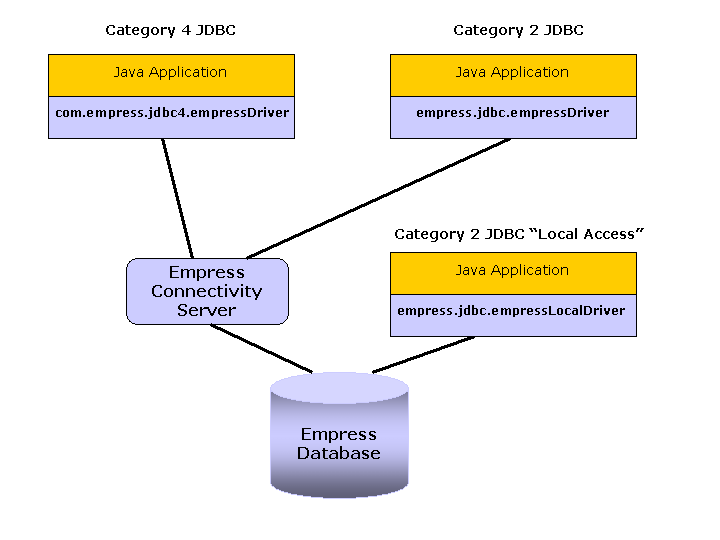
Figure 1-1: Empress JDBC Scenarios
JDBC is a JavaTM API for executing SQL statements. It consists of a set of classes and interfaces written in the Java programming language that makes it easy to send SQL statements to virtually any relational database. One can write a single program using the JDBC API, and the program will be able to send SQL statements to the appropriate database. And, with a program written in the Java programming language, one also doesn't have to worry about writing different programs to run on different platforms. The combination of Java and JDBC lets a programmer write the program once and able to execute it anywhere.
Java, being robust, secure, easy to use, easy to understand, and automatically down loadable on a network, is an excellent language basis for database applications. What is needed is a way for Java applications to talk to a variety of different databases. JDBC is the mechanism for doing this.
JDBC extends what you can do in Java. For example, with Java and the JDBC API, it is possible to publish a web page containing an applet that uses information obtained from a remote database. Or an enterprise can use JDBC to connect all its employees (even if they are using a conglomeration of Windows, Macintosh, and UNIX machines) to one or more internal databases via an intranet. With more and more programmers using the Java programming language, the need for easy database access from Java is continuing to grow.
MIS managers like the combination of Java and JDBC because it makes disseminating information easy and economical. Businesses can continue to use their installed databases and access information easily even if it is stored on different database management systems. Development time for new applications is short. Installation and version control are greatly simplified. A programmer can write an application or an update once, put it on the server, and everybody can access to the latest version. And for businesses selling information services, Java and JDBC offer a better way of getting out information updates to external customers.
In summary, the JDBC API is a natural Java interface to the basic SQL abstractions and concepts. It builds on ODBC so programmers familiar with ODBC will find it very easy to learn. JDBC retains the basic design features of ODBC; in fact, both interfaces are based on the X/Open SQL CLI (Call Level Interface). The difference is that JDBC builds on and reinforces the style and virtues of Java, and, of course, it is easy to use.
Empress JDBC Interface contains both a category 2, and a category 4 JDBC driver. JDBC driver categories/types and the general usage of a JDBC driver are defined by the JDBC API Specification and will not be further documented here.
This document explains the specifics of Empress drivers, and the architecture of the Empress JDBC scenarios.The basic scenarios are shown below:
Figure 1-1: Empress JDBC Scenarios
Category 2 and Category 4 Drivers are both used in the two tier system directly accessing the Empress Connectivity Server. Category 4 Driver is a pure java implementation and does not require any shared libaries whereas Category 2 Driver does.
It is used in two tiers:
Java application/servlet and the empress.jdbc.empressDriver.
empress.jdbc.empressDriver is a mixed Java/C interface that is platform dependent.
The Empress Connectivity Server.
Writing a Java application or servlet that uses the Empress JDBC driver requires only two Empress specific Java methods:
Load the Empress JDBC Driver:
Class.forName ("empress.jdbc.empressDriver")
Connect to an Empress Connectivity Server:
DriverManager.getConnection ("jdbc:empress:SERVER=Connectivity_Server_Name;PORT=Connectivity_Server_Port; DATABASE=Empress_Database", uid, pwd)
1.4 Category 2 JDBC "Local Access" Driver
A scenario that utilizes a Category 2 JDBC "Local Access" Driver is
a single-tier system.
If the client Java application can access the database locally, there is no
need for the Empress Connectivity Server. In this case a special Empress JDBC
Driver called Empress Category 2 JDBC "Local Access" Driver can be
used. This scenario reduces the network overhead and improves the access
performance.
Setting a Java application or a servlet that uses an Empress Category 2 JDBC "Local Access" Driver is the same as setting a Java application for an Empress Category 2 JDBC Driver, with a single change:
Class.forName ("empress.jdbc.empressLocalDriver")
Another way to overcome the above restriction is to run multiple JDBC "Local Access" applications simultaneously , each having one connection at the time.
It also should be noted that JDBC "Local Access" supports
Callable Statements.
1.5 Category 4 JDBC Driver
The usage of the Category 4 Driver is preferred over the usage of the Category
2 Driver. The Category 4 Driver can be used with
Applets inside HTML browsers, and is more suited to be used in
heterogeneous computer environments.
A scenario that utilizes a Category 4 Driver is a two-toer system. The two tiers are:
Your application/applet is part of the same process space as the pure Java client and is therefore platform independent. This means that your application can run on any O/S that has a Java Virtual Machine (JVM), whereas your applets can run inside any browser that is conformant to the Javasoft specification for JVM.
Running an application using the category 4 driver is the same as for category two. And an application written for category two can be used with the category 4 driver with only two changes in code.
Change which Empress JDBC driver is loaded by changing:
Class.forName ("empress.jdbc.empressDriver");
to:
Class.forName ("com.empress.jdbc4.empressDriver");
Change the CLASSPATH path variable to include:
$EMPRESSPATH/jdbc/classes_cat4/empressJDBC_cat4.jar
When you run an Applet the Java Applet is first loaded into an Internet/Intranet browser, or an Applet Viewer, and then a connection is set with the Connectivity Server.
A typical communications protocol is shown below. Note that the HTTP server is optional - the browser could also load the HTML page using the file:// protocol).
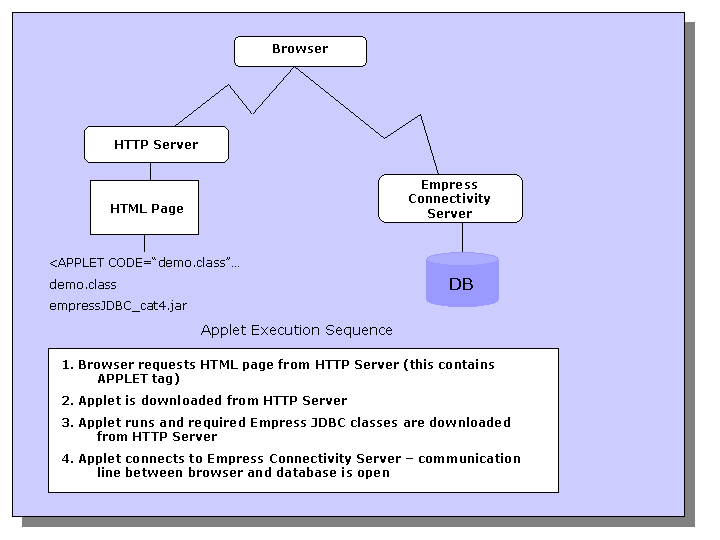
Figure 1-2: Empress JDBC Interface Communication Protocol