CHAPTER 1: Introduction
1.1 What is Empress 4GL?
Empress 4GL is an application development environment containing
a fundamental programming language and a set of tools to help you develop
your application quickly.
The Empress 4GL language is an event-driven language which uses
the following basic structures as building blocks to construct complex
applications which may be used as prototypes or finished products.
-
Forms
-
Windows
-
Fields
-
Keys
-
Scripts
The Empress 4GL development tools consist of:
-
Default Application Generator
-
Application Generator
-
Application Manager
-
Form Manager
-
Source Debugger
-
Executable Builder
-
Compiler
-
Linker
1.2 Capabilities of Empress 4GL
Using Empress 4GL you can design and run applications that may access
Empress databases. Your application may be simple, allowing you
to retrieve information from a single database table, or it may be sophisticated,
accessing several databases and processing the data in complex ways. In
addition, an application can act as a menu interface to the operating system
and to Empress database.
Empress 4GL offers several advantages as a design environment.
It is easy to use, it improves productivity, and your applications will
be easy to maintain and enhance. It is particularly useful for the development
of screen-intensive applications. The facilities for screen control that
you will be using are centered on two powerful concepts: screen painting
and windowing.
-
Screen painting is the ability to design a screen format by simply painting
it directly on the screen. When the application is run, the screen format
will appear just as it was painted. This means that you need not do any
programming to position things where you want them.
-
Windowing is a technique for dividing the screen into independent regions
so that you can see and do different things in the different regions. Each
region is called a window and shows a format you have painted. Windows
can be programmed to appear when required, become larger or smaller at
the touch of a key, or even to move around.
If you wish to use Empress 4GL to do simple Query Language operations
on a database table, you can generate a default application for the table
of your choice. Empress 4GL will create an application that will
allow you to select, update, delete and insert records in the table.
If you wish to design a more sophisticated application, Empress 4GL
provides a simple language with which you can write scripts to do the processing
you require. With scripts, you can access tables in databases, do computations
and comparisons on the data, create and control windows, and effectively
do anything you could do with another programming language.
1.3 Features of Empress 4GL
The programming language of Empress 4GL is used to write scripts
that allow the application to respond to user or system events. Some example
are: pressing a function key, moving between fields in a window, and responding
to errors and operating system signals.
Empress 4GL provides:
-
Commands to select, insert, update and delete records from database tables.
Additionally, there are commands to define and set variables, evaluate
expressions, perform iterative processing, conditional testing and comparison
operations.
-
Convenient and efficient screen handling functions that allow you to define
windows which you can display and remove from the screen with single commands.
-
A convenient means of attaching scripts to function keys, so that users
of your application can control windows and processing with a minimum number
of keystrokes.
-
A series of functions designed to facilitate the programming of multiple
record displays showing "pages" of records - line movements and paging
can be controlled with single commands.
When you start writing applications, you will find it easy to make your
applications user-friendly. Here are some of the features of Empress
4GL:
-
Any command or set of commands may be bound to any function key.
-
Windows can be shown or removed with a single command. Any number of windows
can be displayed at one time and these may overlap on the screen.
-
Windows can be zoomed or moved on the screen by using simple script commands.
These actions can be controlled by key scripts.
-
Field characteristics can be customized to enable easy data entry. Users
do not need to have knowledge of the underlying structure of the database
or its tables.
-
Access to all operating system commands with ability to escape to a sub-shell
or SQL.
-
Reports can be generated by using the Empress Report Writer.
-
Records can be selected from one or more tables in sorted or unsorted order
using the SQL compatible select statement. The selection can be qualified
with one or more conditions.
-
Database access is provided through insert, update, delete and select commands.
As well as, support for moving forwards and backwards through a selected
context of records.
-
Using the completely programmable 4GL interface, any combination of functionality
can be provided or restricted.
-
One or more records can be displayed on the screen at once.
-
Menu applications can be created which can invoke other menus or applications.
1.3.1 Features that do not Require Programming
-
You can change the screen format of the application. Screen formats are
painted on "forms" and these can be edited without having to change the
application logic. Text, video regions, boxes and lines can be entered
anywhere on a form. The fields through which data interchange occurs can
be moved or resized on the form without having to modify the application
logic.
-
Window positions can be altered simply by changing its coordinates in the
window definition table.
1.4 Invoking Empress 4GL
In order to invoke Empress 4GL, a database must exist and it must
be initialized for Empress 4GL. To initialize a new or existing
database, use the following command at the operating system level:
emp4init database
where:
database is any valid database name.
If the database does not exist, emp4init will create the database first
then proceed with the initialization.
For example, to initialize the database repairs for Empress 4GL,
use the following command:
emp4init repairs
You will see the following response on your terminal screen as the result
of the initialization:
Creating Database 'repairs'

Importing 4GL Tables

   IMPORT V6.0

   Copyright Empress Software Inc. 1983, 1992

sys_4gl_application

sys_4gl_compile

sys_4gl_domain

sys_4gl_field

sys_4gl_form

sys_4gl_key

sys_4gl_link

sys_4gl_script

sys_4gl_window

sys_ag_attribute

sys_ag_definition

sys_ag_function

sys_ag_menu

sys_ag_menu_item

sys_ag_parameter

sys_ag_qual_list

sys_ag_qualification

sys_ag_screen

sys_ag_screen_attr

sys_ag_table

sys_attr_privs

sys_attrssys_dictionary

sys_privs

sys_tables
These are the Empress 4GL system tables where all the information
describing an application is stored. If the circumstances require it, you
can use Empress SQL commands to acquire information from these tables.
Note: The database only needs to be initialized once. If you
apply emp4init on a database which has already been initialized, the following
error message will occur:
Importing 4GL Tables

   IMPORT V6.1

   (c) Copyright Empress Software Inc. 1983, 1992

sys_4gl_application

*** User Error *** table 'sys_4gl_application' already exists

sys_4gl_compile

*** User Error *** table 'sys_4gl_compile' already exists

sys_4gl_domain

*** User Error *** table 'sys_4gl_domain' already exists

sys_4gl_field

*** User Error *** table 'sys_4gl_field' already exists

sys_4gl_form

*** User Error *** table 'sys_4gl_form' already exists

sys_4gl_key

*** User Error *** table 'sys_4gl_key' already exists

sys_4gl_link

*** User Error *** table 'sys_4gl_link' already exists

sys_4gl_script

*** User Error *** table 'sys_4gl_script' already exists

sys_4gl_window

*** User Error *** table 'sys_4gl_window' already exists

sys_ag_attribute

*** User Error *** table 'sys_ag_attribute' already exists

sys_ag_definition

*** User Error *** table 'sys_ag_definition' already exists

sys_ag_function

*** User Error *** table 'sys_ag_function' already exists

sys_ag_menu

*** User Error *** table 'sys_ag_menu' already exists

sys_ag_menu_item

*** User Error *** table 'sys_ag_menu_item' already exists

sys_ag_parameter

*** User Error *** table 'sys_ag_parameter' already exists

sys_ag_qual_list

*** User Error *** table 'sys_ag_qual_list' already exists

sys_ag_qualification

*** User Error *** table 'sys_ag_qualification' already exists

sys_ag_screen

*** User Error *** table 'sys_ag_screen' already exists

sys_ag_screen_attr

*** User Error *** table 'sys_ag_screen_attr' already exists

sys_ag_table

*** User Error *** table 'sys_ag_table' already exists

sys_attr_privs

sys_attrs

sys_dictionary

sys_privs

sys_tables
To invoke Empress 4GL, use the following command at the operating
system level:
emp4gl database
where:
database is any valid database name previously initialized for
use with the 4GL.
For example, to invoke Empress 4GL on the database repairs, type
in the following:
emp4gl repairs
After the copyright messages, the following screen will appear on the terminal:
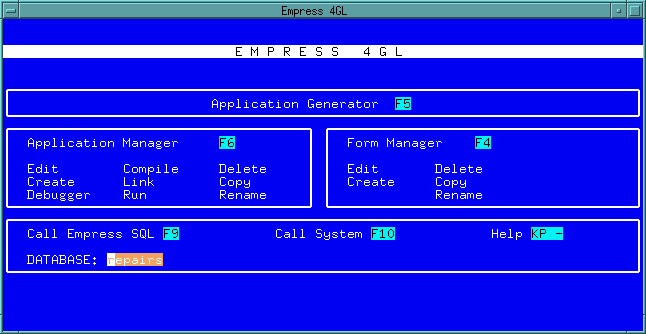 Figure 1-1 Application Development Main Menu
This is the Empress 4GL Application Development Main Menu. Through
this Main Menu, you access all the Empress 4GL tools to create your
applications.
Note: The key labels (for example F5, F6, F4, etc.,) are terminal
dependent. You may have different key labels displayed on your screen.