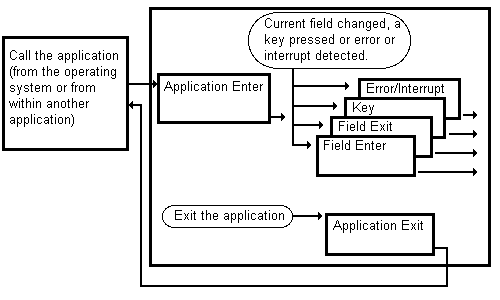
Figure 2-1 Flow of control in an application
One of the features that makes the Empress 4GL different from a procedural language is that Empress 4GL applications are event-driven.
In a procedural language, the flow of control is totally managed by the program. You make sure that the program knows the order in which to perform functions.
In an event-driven application, the order in which things happen does not depend on the program. Instead, the application responds to certain events. You do not need to write code to detect events, only to define the responses.
When writing an application, you should understand the types of events that Empress 4GL can act upon. This helps you determine what types of scripts you should create to achieve the desired results.
When Empress 4GL waits for events to happen, control passes to the application. When an event occurs, control passes to the script that has been defined for that event.
Figure 2-1 Flow of control in an application
For example, opening tables and setting up menus is typically done in the application enter script. Also, the application enter script is one of two types of scripts that can take parameters (the other is subscripts). Parameters that can be passed to the application must be defined within this script. External and global variables are also defined in this script. You will find that when dealing with linked applications, the application enter script is also used during linking even though the script itself may never execute.
The script you attach to this event should clean up before the application exits completely. You can use it to close tables, return a value to a calling application, or perform any other termination activities.
The script for a field enter event is part of a field definition for a window. Note that the same field may be called by two different windows, and therefore, have different field enter scripts for each window.
The field enter script is a useful place to setup defaults or display field related help information.
This is important because with field exit script you can validate the information you enter. For example, when you press a key in order to update the database, it is important that a validation in the field exit script be performed. The field exit event precedes each key event - which is the event that occurs when you press a key - unless you define it as otherwise by defining a disable exit script in the key script.
The script for a field exit event is part of the field definition for a window. Note that the same field may be called by two different windows, and therefore, you may have different field exit scripts for each window.
These events usually occur to let you control what happens in the application. For example, after changing information on the screen, you can update the database by pressing a key that you have assigned a script to perform an update.
Remember, a key event can be preceded by a field exit event. The field exit event can validate the data you enter by checking for any restrictions on the data. For most cases this is useful, but if you enter data that does not really need to validated, such as clearing the field or screen, you can set the key event to ignore the field exit.
If you do not use a command, Empress 4GL will use its own error handling routines which usually print an error message and terminate the script that was executing. Control then returns to the application.