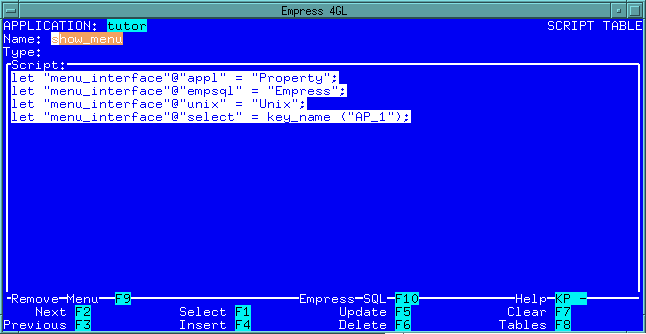
 Figure 7-1 Subscript Window
Subscripts are procedures that you can call from any event script in an application or even from another subscript. They are very useful for functions that are repeated throughout many different events. You can also use them to modularize large sections of code.
To define a subscript, you need the name of the subscript, the return
type (if there is one), and the script itself. The Subscripts
window can be used to enter data into the sys_4gl_script table:
Figure 7-1 Subscript Window
7.1 Calling a Subscript
The name of the subscript can be anything you choose, as long as it is
unique in the application. Other scripts will call the subscript
by using the statement:
CALL subscript ([param {, param}])
where:
| subscript | is the name of the subscript you would like to call |
| param | is the parameter you would like to pass to the subscript. |
The statement can also be used as part of an expression if it is used to return a value.
If a subscript is to accept parameters, a parameters declaration must be the first line in the script that is not a comment. This code will define the number of parameters, the data type for each parameter, and the name that the parameters will be referred to in the script.
For example, the following code segment would indicate that a script is to have two parameters: a character string called _name and a date type called _date.
PARAMETERS
char _name;
date _date;
END;If this was a subscript called validate_name it could be called by the statement:
CALL validate_name ("Bob", "Dec 1 1990")
Note that this example does not include any return values. If the subscript did return values, like an integer that was 0 for valid or 1 for invalid, the values could be assigned to a variable or used as part of an expression.
Once you define a subscript to have a return value, you must set up a mechanism to actually return a value. You do this by using the following statement:
RETURN [expr]A RETURN statement followed by any expression will cause the script to terminate and pass the value of the expression back to the calling script. It is important that the expression evaluate to the return type or at least to a value that Empress 4GL can convert to the return type.
The calling script can then ignore the value or use it as part of an expression. In the previous example, if the validate_name subscript returned a value, this value could be used as part of an expression. The following example uses it as part of a conditional statement.
IF validate_name ("Bob", "Dec 1 1990") = 0
...If you use the RETURN statement without any expression, or no return value, then the script simply terminates without giving a value. This allows the RETURN statement to be used as a control statement within any script even if the script cannot give a return value, such as the case of the key script.
Only subscripts and application exit scripts can pass return values although you can use the RETURN statement in any type of script.