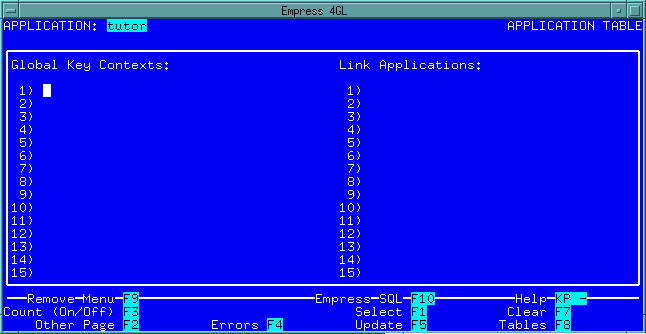
 Figure 9-1 Application Window
Within Empress 4GL, one application can make use of another. There are two possible ways this may happen. One is through linked applications and the other is through called applications, which behave as subroutines. It is even possible to combine the two and link an application which will be called as a subroutine.
A link application is simply a library of subscripts, windows, forms, field definitions and key scripts. They behave in a similar fashion to libraries in 3GLs. Any application that uses the contents of a link application need only refer to it in the appropriate manner and include the application name in the link section of the Application window.
The link applications that are listed in this section are linked into the object code that is created in the link stage of building an application. Note that the entire link application is included whether it is all used or not. It may be advantageous to split the various subscripts and so on into smaller library applications. This will reduce the loading time and memory requirements of an application.
Link applications are specified on the second page of the Application
window:
Figure 9-1 Application Window
9.1.1 Treating Variables
An important part of the discussion of linked applications is the treatment
of variables, contexts, open tables, and so on.
Most variables within an application are local. Their scope lies within the script in which they are declared. Any reference to them by another script will result in an error.
However, it is possible to declare a variable to be global, meaning the variable would be available to any script in the entire application. This doesn't include any applications that are linked with it or that link it to themselves.
In order for a variable to be available in the entire linked application, you must use an external declaration. Declaring a variable as "external" indicates it is a global variable in one of the other applications that will be linked to it. The variable must be declared as a global in exactly one of the applications that makes up the finished product and as an external in any others that will be using it.
When dealing with table instances, selected contexts and attributes, these can be assumed to be external. Every application that is linked together will be able to share these. Fields are also considered external, therefore they are available to all of the applications that are linked together.
Also, any item that is referenced but not included will cause an error. The errors that result usually happen at runtime when the item is referred to.
CALL APPLICATION application_name ([param {, param}])
where:
application_name is the name of the application in quotes.
Also, if the application returns a value (i.e. has a RETURN expr in its application exit script), you can use this as part of an expression:
APPLICATION application_name ([param {, param}])
The returned value will be substituted.
Called applications are useful for designing menu applications. You can display the menu choices on a form and when the user selects one, the appropriate application is called. When the called application is finished, the menu application will continue where it left off.
As well, called applications can be useful for gathering information from the user as part of a script. The application can request information from the user and return a value to the script or place values in fields or attributes. It can be very useful for data confirmation and other purposes.
When an application is called, all the windows, forms, table instances, selected contexts, and scripts that were available in the calling application can be passed on. This allows the called application to use the data that is available in the calling application instead of having to open its own tables and perform its own selects, etc. It also allows the called application to pass data back through fields or attributes as well as return values.
This is accomplished by using the IMPORT and EXPORT commands in the application enter scripts. They are used in a similar fashion as the global and external variable declarations.
These commands have the following format:
|EXPORT| struct_type name {; struct_type name} [;]END|
|IMPORT|
The struct_type can be a form, window, select, table, or script.
First of all, the time it takes for a called application to come up is reduced. It makes the application appear more like a pop-up within the calling application.
As well, there can be global/external variables used to pass information back and forth.
Calling a linked application gives the benefits of linking applications (with the overhead cost as well) and the benefits of calling applications.