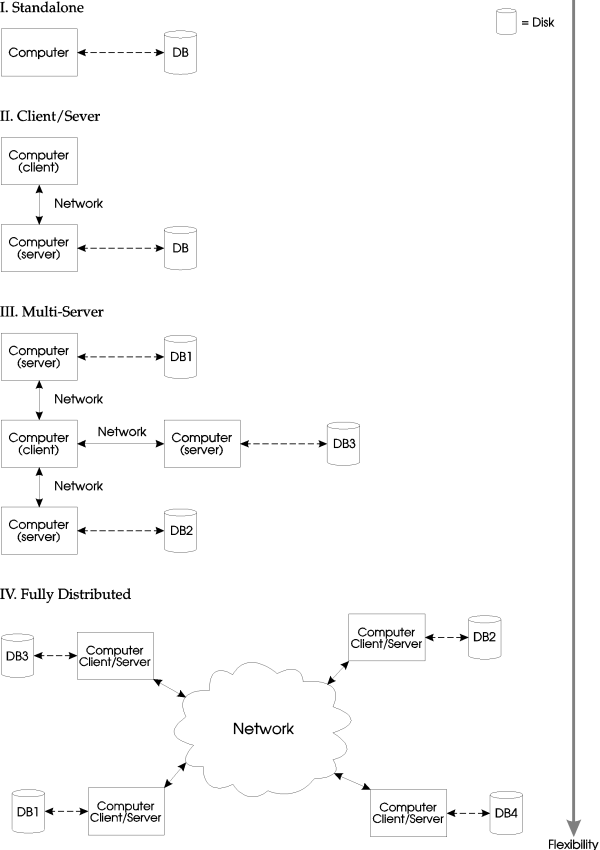
In an intensive information processing environment, the Empress Database Server aids in resource manipulation to improve the efficiency of the overall data processing procedure. What does this mean? To explain further, we must explore the following questions:
Information processing is a set of procedures used to transform a particular set of data. The data going into the process is known as input data, and conversely, the data coming out of the process, is known as output data. Most information processes yield output data in a form that is more usable than its related input data. As a matter of fact, the sole purpose of data processing is to have unusable data transformed into usable data.
For example, data is collected from a survey of a brand new chocolate bar. This data is not useful in its present form. All it currently represents are individual ratings of the chocolate bar. However, the producer of the chocolate bar likes to know how the population rates the chocolate bar. The collected survey data is transformed into percentages of excellent, good and bad ratings.
Needless to say, computers perform the work. But what type of computers are doing the work? Today, an industry drive exists to re-organize the data processing methodology from mainframe computers to micro computers linked together by networks. This is commonly known as down-sizing. The primary objective of down-sizing is to obtain a better price/performance ratio by utilizing multiple micro computers rather than a single mainframe. The idea derives from the simple divide and conquer theory. A problem is broken down into many smaller problems and each small piece is solved individually. Solving problems in this manner is known as distributed processing.
To make down-sizing work, networking (communication) between micro-computers is an asset. However, physical communication between micro-computers is not enough. Software capabilities must exist so that different processes on different machines that are on the same network, can communicate with each other. Communication must be organized so that tasks different machines are correlated.
A client/server model is established to coordinate activities between programs. A client can be thought of as any program that requests a service. A server is any program that responds to requests from clients. A more detailed discussion on clients and servers follows later.
Distributed processing implies multiple programs will work in concert on multiple machines. Previously, it was mentioned that information processing involves the transformation of data. Computer programs are instructions for the transformation. If the programs are spread out into different machines, then it would also make sense to spread the data across multiple machines. Hence, the idea for distributed data to satisfy distributed processing. Distributed data describes data being spread through multiple machines. The goal of distributed data is to have data close to their users. The locality of the data will enhance access to the data.
The Empress Distributed Server is a product that provides distributed data capability. It allows the ability for multiple machines to access data (information) amongst themselves. The distributed data must be stored within an Empress database. With data being distributed, programs on separate machines can process the data either independently or in co-operation with other programs. This results in better use of processing power across the network. With centralized data storage, a bottle neck exists with the single entry point to the data. As a result, the Empress Distributed Server manipulates resources by distributing data across a fully distributed environment. By placing data in places where they will be most utilized, other processing units are freed up to do other tasks.
Fully distributed database technology (as seen in the Empress RDBMS) is based on a much broader model of clients and servers than that of traditional RDBMSs. The traditional approach is characterized by two general ideas. The first is that database applications can operate in either a standalone or client-server environment. The second idea is that a machine may take on the role of a client or server, and once that role is established it cannot be changed. However, great improvement in the power and flexibility of an RDBMS can be achieved if the traditional approach is supplemented with the new concepts of multi-server and fully-distributed environments.
In the case of the standalone environment, the client (i.e., the database application) and server (i.e., the operating system) run on the same machine, with the server giving the client access to the locally stored database. Here, access means being able to use any of the standard SQL functions such as SELECT, INSERT, UPDATE, and DELETE. This machine may have a number of users running separate applications needing to access the same database.
In the client-server environment, the database application runs on a client machine, usually a workstation. The client machine is connected by a local area network to a more powerful server machine on which the database resides. Applications on client machines may then access the database by sending requests to the server machine. The traditional levels at which most RDBMSs operate are standalone and client-server environments.
A fully-distributed database such as Empress operates not only in the traditional environments, but also in two successively richer environments: the multi-server and fully-distributed environments. The multi-server environment can be thought of as many client-server environments with the addition that the servers have "peer to peer" communication ability. Thus, a database application running on a given client machine can access data attached to any of the servers on the network. However, even in the multi-server environment, the roles of machines as clients or servers are still distinct and unchangeable.
In a fully-distributed system, any machine can act as a server, or as a client, or both. This is of immense importance to the database user, since it means that one can access data as if it were on the user's host machine, even if that data is in fact physically stored on remote machines, the user's own machine, or any combination of these. The fully-distributed system has the additional benefit of being configurable so as to optimize performance in a multi-CPU environment.
Figure 1-1
As an example, let us assume that our fully-distributed system consists of a number of machines each having its own locally stored data. Then, users on any of these machines can simultaneously run applications requiring access to any of the data regardless of whether it is stored locally or on any of the remote machines. In this case, each machine can act as both a client and a server.
The technology required for a fully-distributed system is significantly more involved than is needed for the traditional RDBMS environment. In particular, one requires:
The above requirements are explained in detail in the following sections.
As a result, SQL access on a fully-distributed system allows the application to:
By defining and serving the four concepts of the standalone, client-server, multi-server and fully-distributed database environments, the Empress database makes the best use of multi-user, multi-processor resources, while also being able to serve the more traditional needs of RDBMS users.
The following terms will be used throughout this manual:
An Empress client is a process that accesses an Empress database through a Distributed Server. The client process may run on any node within the network, including the node on which the server is located. The client runs on a client node or a client machine.
An Empress Server, also referred to as a Distributed Server, is a set of processes that receive and process database requests from the client processes and either returns data to the client process or updates data in the database. The server runs on a server node or a server machine.
A Distributed Server consists of at least two distinct processes. A spooler/scheduler process receives the requests from client processes and relays these requests to one or more server sub-processes. The server sub-processes are the actual processes that access the physical databases. The server sub-process returns acknowledgement of requests to its client(s), and sends requested data to its client(s).
The Global Data Dictionary (GDD) is an ASCII file containing the entries defining the logical database names which client processes can use to access the physical databases through the servers.
The Empress environment variable MSGLOBALDATADICTIONARY must be set to the location of the Global Data Dictionary.
The Server Configuration File (SCF) is an ASCII file containing the entries defining the characteristics of database servers. The information in this file includes the name of the server, the server node, the number of server sub-processes, the server administrator and, optionally, the server security and retry and timeout parameters used in server communication. The Empress environment variable MSSERVERCONFIGFILE must be set to the location of the Server Configuration File which must be known to both client and server processes.
The Data Format Code (DFC) is a 4-digit code that defines the format in which data is stored in database files. This code is used to determine whether conversion to a local format must be performed on data retrieved from or written to a database. The Data Format Code is defined by the variable MSDBDFC which is located in the tabzero file for the database.
Empress Version 8.62 features the Empress Distributed Server on networks of heterogeneous nodes. In other words, a database can reside on a Sun Sparc station and can be accessed from another Sun Sparc station, a Hewlett-Packard workstation, a Silicon Graphics workstation and so on. Since the data in the databases from different platforms have different representations, Empress identifies the characteristics of the different hardware platforms, using a Data Format Code (DFC). This can be specified during the creation of a database (see empmkdb). For example, a database can be created on a Silicon Graphics machine with the Data Format Code of a Sun machine. This is desirable in the case where the Silicon Graphics machine functions as a file server having Sun stations as clients. Once the database is created, the DFC is stored in the tabzero of the database.
If the database's DFC and the client machine's DFC are different, then the Distributed Server will automatically and transparently convert the data to a form that is compatible for both client and server machines.
Empress Version 4 is a homogeneous Distributed Server. Homogeneous servers can only communicate with machines that are of the same make and architecture. Unlike Version 6, no DFC is required.
This section is not intended to give the reader a full set of lecture notes on networking design and theory. It is hoped that by reading this section, the reader can gain certain background information which will aid them to understand better the Empress Distributed Server. Readers who already possess this information should continue on to the next section. However, readers who are encountering networks for the first time are strongly recommended to read this section to achieve more insight into the topic before proceeding.
A fully distributed database environment requires a network. A network is simply defined as a communication medium among computers. For actual communication to occur between the computers, protocols must exist among the participating computers.
There are many levels of protocols. The most fundamental layer is the hardware protocol that is used to communicate between the network interfaces on the computers. Popular examples of hardware protocols are Ethernet and Token Ring.
On a higher level, there exists a network protocol. One of these protocols is the Internet Protocol (IP). The IP protocol's function is to perform routing and traffic direction between the computers on the network. The difference between a hardware protocol and a network protocol is that the hardware protocol is more concerned with the shipping and packaging of the information that is sent out to and received from the network. In contrast, the network protocol is more concerned with destinations and addresses of the recipient machines.
Why have two distinct layers of protocol? The hardware protocol is essential for physical communication between two or more machines that are on the same network. The network protocol provides a means to generalize communication between networks that do not share the same hardware protocol. This enables different networks to be interconnected as long as they share the same network protocol. Although the network protocol's functionality depends on the hardware protocol, the point is that the same network protocol can be supplied for different hardware protocols. Hence, software applications can rely on the network protocol to communicate with machines that share the same network protocols. The advantage is that as long as the machines use the same network protocols the application has the means to communicate with them. The underlying hardware connecting the machines may differ, but communication is still possible.
For software to utilize the network and hardware protocol, an interface must exist so that the software's intention can be relayed to the two protocols. This interface is known as the User Datagram Protocol (UDP). UDP is a virtual protocol providing an interface for software applications to the IP protocol.
The Empress Distributed Server interfaces with UDP and transmits its information via the IP network protocol. Currently, this is the only network protocol that Empress supports, however other protocols are being investigated.
The above description of protocols is analogous to people communicating via mail. The information being transferred is the data written within the letter. The physical medium is the paper on which the information rides. The hardware protocol is analogous to the method in which the letter is being packaged and sent, either by truck, air or sea. The network protocol is analogous to the addressing system that the world uses. The address on the letter directs the post office to the desired destination.
The Empress Distributed Server uses the network to communicate among its respective clients. Each Empress Client (i.e., empsql) will request information from the database server for information. The requests and replies are transferred along the network (see Figure 1-2).
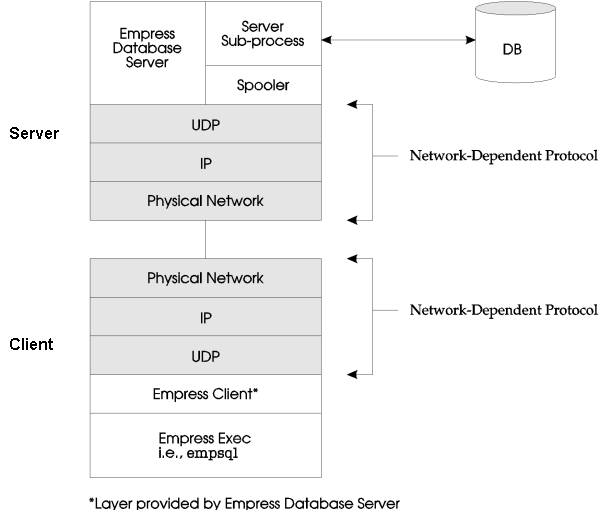
Figure 1-2: Implementation of the Empress Distributed Server
Networks may contain machines of different architectures and make. The Empress Distributed Server comes in two styles. The homogeneous Distributed Server can only communicate with machines of the same make. The heterogeneous Database Server can communicate with machines of different architectures and makes.
The database request is composed of messages, which are in turn composed of one or more packets. As the server spooler-scheduler receives the packets, it sends acknowledgements to the client. When all the packets for a message have been received, the server spooler-scheduler will acknowledge receipt of the message. Special timeout and retry parameters may be set up to control the request. These parameters can be set up for each server in the Server Configuration File. Replies to the client from the server sub-process are also made up of messages.
The server receives requests though an Internet port address which is composed of the machine address (as indicated in /etc/hosts) and the Internet port number. This is the port through which the server will accept requests and return acknowledgements. The Internet port number is chosen arbitrarily by the server administrator and can be any port number between 5001 and 65534. This port number must be unique to the machine on which the server is running. No other Distributed Server on the machine may use the same Internet port number. The client will send requests and receive acknowledgements through its own Internet port address. The client's port number is assigned by the operating system in the range of 1024 to 5000. There cannot be a conflict with server port numbers since the ranges are mutually exclusive.
Distributed databases are databases that contain data that are located on several machines. The host machines that contain the data are connected by a network. So:
This section tries to answer questions like the ones just mentioned. The discussion uses the four concepts (configurations) of the client/server model that were described earlier in the introduction. The Empress Distributed Server is best described by the fully distributed configuration. However, let us describe the other three configurations first, so that the benefits of the fully distributed configuration are better understood and appreciated.
The standalone configuration consists of a single processing unit (one computer) that is connected to one or more disk drives. Depending on the operating system, the disk drives can be perceived as a single storage entity. Nonetheless, one or more databases can reside on the local disk drive. The standard Empress product works well within this environment. In this configuration, no software database server is required.
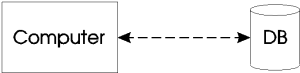
Figure 1-3
Since the disk drives are local, the overhead in accessing the disk drives is the latency time to retrieve the data from the magnetic media, and the processing time required to find the data. Hence the access speed on data query is relatively fast in comparison with the other three configurations.
The data is centralized so that archiving and backup can be performed in a much more simple manner.
Most magnetic media are of limited size, and most computers have limited capacities in magnetic storage. The data may outgrow the hardware capacity, and force upgrades to either bigger disk drives or bigger computers.
The number of entries to view and/or modify the data is limited by the single computer that is connected to the database. Entry by other host computers are physically impossible. This makes the transfer of data cumbersome.
Since all data is in one location, the data is more vulnerable to hardware failures. To compensate for this, data stored in this configuration must be frequently backed up.
Since only one computer is connected to the database, the single computer must process all requests and handle all I/O activities. The processing power must be split between displaying and presenting the data, as well as searching and fetching the data. If the computer is running a multi-user environment, such as UNIX, heavy disk activity as a result of frequent database access may hamper the response time of the operating environment as a whole. This may affect both the database users and the non-database users.
The traditional client/server approach is meant to remove some of the database processing work from one computer and place it on another. The idea is to have the client do all the work in displaying and validating data entry, and to have the server handle all requests for the database. The client computer may be a machine with very little processing power in comparison with the server computer that hosts the database. Multiple client machines can then access the server machine that contains the database.
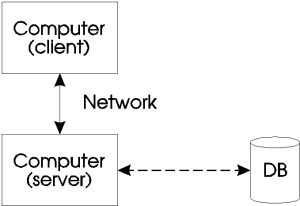
Figure 1-4
Processing is now split, and two or more computers are sharing the work load. Each machine can concentrate on a focused task. Hence, the machines can be configured accordingly.
When a user is not accessing the database, the user's performance is not affected by any third party who is accessing the database.
The data is still being stored in a centralized location, hence all the problems related to centralized storage still remain with this configuration. This includes the higher probability of data loss due to physical and hardware failures, which necessitates frequent backups.
When all the clients require data from the database at the same time, during peak access periods, the server machine is the bottle neck, and the same performance degradation exists as with the standalone configuration.
The clients remain as clients and cannot switch roles with the server machine. Hence, the nature of the computational task for each machine is limited.
In this configuration, the data can be distributed among multiple machines. Any one client machine has the ability to access one or more server machines with different or identical data. In this scenario, many possibilities exist to combat the disadvantages discussed in the previous configurations. The data can be logically grouped, so that data access traffic is balanced across the network. The data can be replicated on multiple servers for higher survivability.
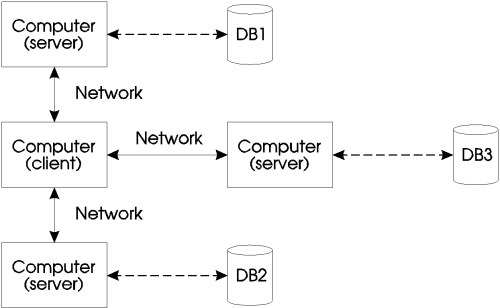
Figure 1-5
This configuration also inherits all the advantages of the client and server configuration described above.
With replication of data and mirroring of data across multiple server machines, the data is less vulnerable to physical and hardware failures. The redundancy of the data also offers multiple access points to the data.
By separating and grouping the data across different machines, the data is no longer limited to the storage capacity of a single machine.
Separating data on to different machines offers the database administrator the ability to incorporate a better security scheme.
Performance degradation exists and new bottle necks are created if client accesses are not balanced across the servers. For this configuration to be effective, all servers should be equally utilized by all clients. By distributing the data accordingly, the load can be balanced throughout the network.
The clients remain clients and cannot switch roles with the server machine. Hence, each server cannot directly access data from another server. Therefore data transfer between server machines must be coordinated by a client machine.
The Empress Server Database operates under this configuration. One can see from the diagram that this type of configuration incorporates the above three configurations. In a fully-distributed configuration, each machine running the Empress Distributed Server is able to act as a client or a server. Hence, local databases and remote databases can be accessed transparently. When configured properly, this configuration can achieve the same benefits as the other three configurations.
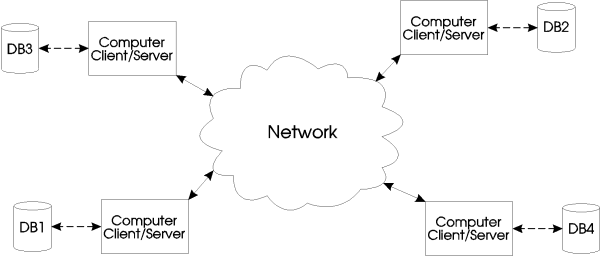
Figure 1-6
With a fully-distributed configuration, the advantages of the traditional client/server and the multi-server configurations are automatically inherited.
The performance advantage of the standalone configuration is also obtained by placing the most-used data on the machine that requests it. Data that is not used frequently by a machine can be placed elsewhere. By distributing the data in an effective manner, better performance, higher survivability, and higher capacity can be achieved.
The complexity of database administration is increased.
When a RDBMS supports multiple access from multiple clients, the correctness of the data within the database must be ensured. The operations on the data must produce consistent results. In a fully-distributed environment, this is further complicated by multiple databases with multiple clients.
Before describing the fully-distributed environment, let us explore the standalone case first. In order to keep the data within a database consistent, transactions are used.
Transactions are sets of uninterruptable operations on the data within the database.
The key is that when a transaction begins its operations, no other actions are allow to interrupt or pre-empt the transaction in progress. The database must know when a transaction is started and completed.
The user usually explicitly signals the database when starting or completing a transaction. There are two ways to complete a transaction.
Example
Below is an example where data may become inconsistent if interruptible transactions were allowed.
The bank stores all account balances within a database. Each of these transactions must be performed in such a way so that it cannot be interrupted until the transaction is completed. Such transactions are known as "atomic" transactions.
If this is not the case, then here is a possible erroneous scenario.
There exists a chance that both will read the same previous balance value prior to the calculation of their transaction.
At this point two final balances exist. However, there is only one place to store the resulted balance. So if Julie's final balance gets into the database first, then Sam's final balance will overwrite hers.
This results in the bank giving Julie the $200 and not recording it! The bank loses the money (see figure 1-7).
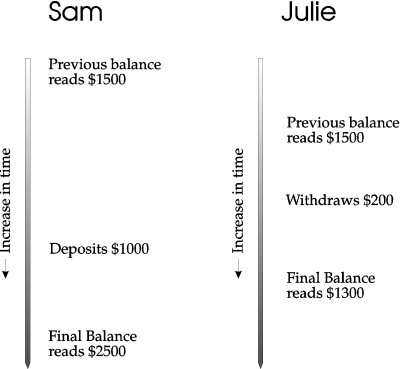
Figure 1-7: Bank's final balance = $2500
If Sam's final balance is written first, then Julie's final balance will overwrite Sam's. In this case, the final balance from the bank's perspective would be $1300. The bank takes in $1000 with no record of the transaction in the database. Poor Sam loses $1000! The bank made a profit (see Figure 1-8).
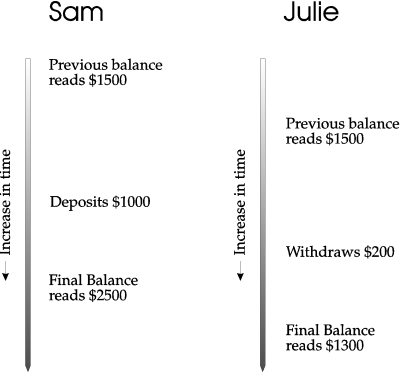
Figure 1-8: Bank's final balance = $1300
To prevent the above mishaps, one transaction must lock out the other transaction while it is still in progress. With a standalone implementation, this is accomplished through ownership of locks. Each transaction must obtain a lock prior to starting the operations on the data.
If a transaction requests a lock that is already taken then it must wait until the other transaction releases it. When a user begins a transaction, the very first operation is to request the appropriate locks within the database.
Once the transaction is completed, either successfully or unsuccessfully, the lock is released.
In a fully distributed networking environment, there is a potential for a transaction to contain multiple operations on multiple database servers.
Not only do the individual databases on each server have to be consistent, but all the databases viewed by the client must be synchronized. The data across database servers must also be consistent as well. To accomplish this, the two-phase commit protocol is developed. Figure 1-9 and 1-10 outlines the process of a single transaction with two-phase commit. The whole transaction is broken up into smaller parts.
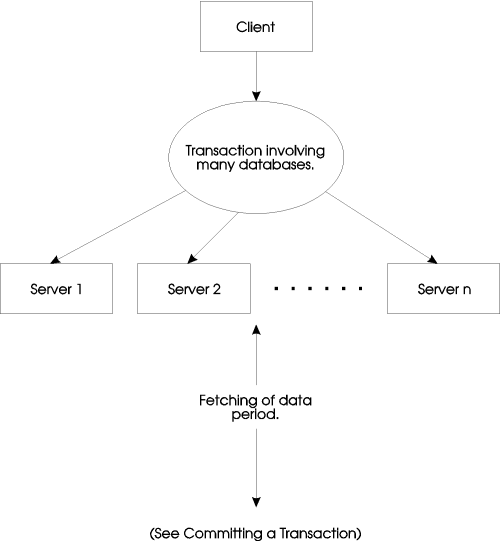
Figure 1-9: Starting a transaction
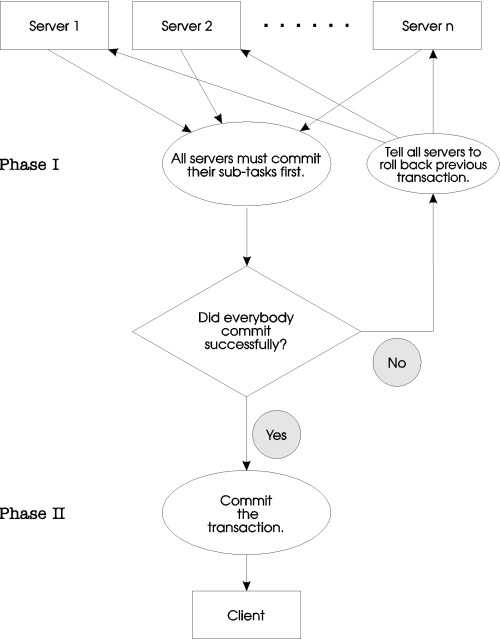
Figure 1-10: Committing a transaction
The relevant parts are delegated to the server responsible for the data required. The server then returns to the client the result of its operations. The first phase of the two-phase commit procedure involves responses of the participating database servers.
The second phase depends on the result of the first phase.
Note
If at least one participating database server is unable to perform its task, then all participating database servers are instructed to roll back.
Note
If all participating database servers succeed in their tasks, then a final commit is done by the client, and the transaction is completed. The two-phase commit is essential to a fully-distributed database architecture if database consistency is required.
Without the two-phase commit, each database server can lose synchrony with the other participating database servers, just like Sam's bank account, which lost synchrony with the activities of the real world.
The Empress Distributed Server provides fully-distributed, client/server and multi-server architectures across homogeneous and heterogeneous networks.
The Distributed Server is designed to be run in LAN configurations, typically Ethernet, and does not rely on any type of underlying distributed file system, such as NFS, TFS or DECnet. Communication across the network uses the Internet protocol.
The Distributed Server is implemented as a multi-process server. This feature enables the server to run efficiently on multi-processor CPUs. Within a network, a node can be configured to run one or more servers, and a server can access one or more databases located on that node. Servers can process requests from clients located anywhere in the network. A node may also run one or more client processes, which can access databases through servers running on nodes located throughout the network.
The Distributed Server uses a Global Data Dictionary which defines the logical database names which client processes use to access the physical databases located throughout the network. To access any database which has a server associated with it, the client does not need to know the physical location of the database, or even the node on which the database resides.
A client process accessing a database using the logical database name will use the Distributed Server automatically and transparently.
An Empress Distributed Server consists of a server spooler-scheduler and one or more server sub-processes. The server spooler-scheduler receives database requests from all clients for one or more databases. It allocates database requests from various clients to as many server sub-processes as have been made available. The server spooler-scheduler will attempt to balance the workload by spreading the client requests over all the server sub-processes. Each server sub-process may execute on an independent CPU.
The server sub-process will execute the requests and return the database information directly to the client. A client will be serviced by a single sub-process until its request is completed.
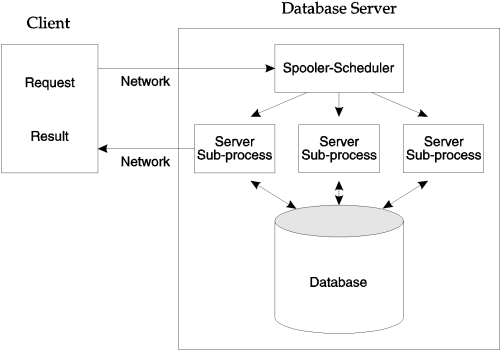
Figure 1-11: The Distributed Server