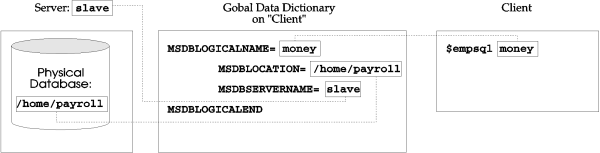
One essential element for implementing a fully distributed database environment is a Global Data Dictionary. This is a file that maps the client's logical database names to the physical database names on particular servers. A logical database name is the name of the database that the client uses. A physical database name is the actual name of the database that is on the server. In this fashion, the client will be able to access multiple databases on multiple servers.
The Global Data Dictionary is like an address book for the client. It tells the client the physical location of the required database. The client refers to these locations by an arbitrary logical name.
With this implementation, the client application can reference the database via the logical name. The advantage is that if the physical database location is changed, then only the Global Data Dictionary must be updated. No changes to the application are necessary.
The Global Data Dictionary must be set up on the client (local) machine. Once it is set up, users can refer to a database by its logical name. The location and the actual database name will be provided to Empress, or the Empress client process, through the Global Data Dictionary.
Any client process accessing a database whose name matches a logical database name in the Global Data Dictionary will be using the Distributed Server automatically and transparently, except if the variable MSDBSERVERNAME is defined as "LOCAL".
The Empress environment variable MSGLOBALDATADICTIONARY must be set to indicate the location of the Global Data Dictionary. The Database Administrator can set up a Global Data Dictionary for everybody, or each user can set up their own. In other words, a user may set up more than one Global Data Dictionary and access them by setting the variable MSGLOBALDATADICTIONARY to its full pathname.
The format of the Global Data Dictionary is as follows:
MSDBLOGICALNAME=xxxxxx
   MSDBLOCATION=/xxx/xxx/xxx
   MSDBSERVERNAME=xxxxxx
MSBDLOGICALEND

MSDBLOGICALNAME=yyyyyy
   MSDBLOCATION=/yyy/yyy/yyy
   MSDBSERVERNAME=yyyyyy
MSDBLOGICALEND
   .
   .
   .
The Global Data Dictionary may contain more than one logical database name block. A logical database name block starts with MSDBLOGICALNAME and ends with MSDBLOGICALEND.
MSDBLOGICALNAME is the logical database name. This can be any name by which the database will be known within the network.
MSDBLOCATION is the full pathname of the database on the machine where the physical database resides. Since the Empress database is a system directory, the name of the database will be included in the path, for example, /usr/empress/db_name.
MSDBSERVERNAME is the name of the server accessing the database. The server name must match one of the servers configured in a Server Configuration File. If MSDBSERVERNAME is "LOCAL", then there is no server servicing this database. This provides the facility for mapping logical database names to physical database locations without the use of a server, i.e., accessing a local database.
MSDBLOGICALEND is the end marker for the logical database name block.
Note that there may be several logical database name blocks for one physical database, and one physical database may have several servers accessing the database.
Examples
Figures 2-1, 2-2, and 2-3 depict examples of the three configurations that the Empress Distributed Server can provide. These configurations are:
Each example is a valid setup of the Global Data Dictionary for that particular configuration. These examples are verbose enough so the users can expand on them to suit their own needs.
This is a simple example that includes one client and one server named slave. The physical database is named /home/payroll. The Global Data Dictionary is set up so that the client is able to access /home/payroll on slave by using the logical name, money. In the example the client is accessing the remote database by executing the "empsql money" command at the operating system prompt.
Figure 2-1: Client/Server
In this example, there are two servers, slave1, and slave2. The server slave1 has the same database from the previous example, /home/payroll. The server slave2 has two databases named, /home/revenue, and /home/expense. The Global Data Dictionary is shown so that the client can access all three databases transparently. On the client, the following is executed:
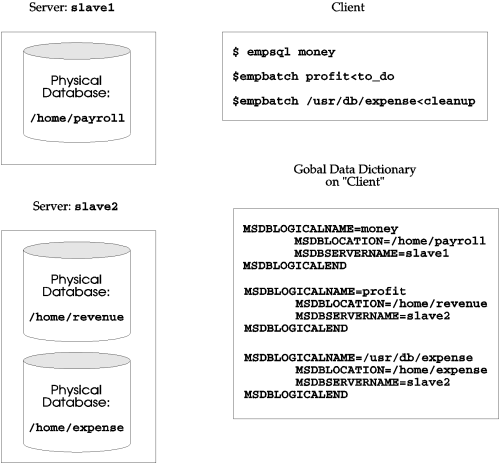
Figure 2-2: Multi Server
In this example, two machines are used, one named copper, the other named gold. Both machines have the ability to act as either a client or a server. The Global Data Dictionary is set up on each individual machine so that each machine can have the option of accessing databases either locally or remotely.
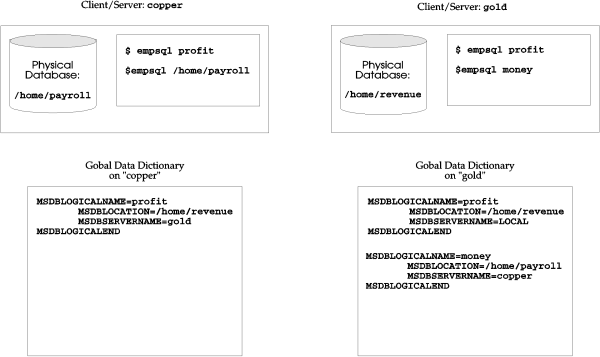
Figure 2-3: Fully Distributed
On copper:
A physical database /home/payroll exists on the local disk drive. The depicted Global Data Dictionary allows copper, to access /home/revenue on gold by using the logical name profit. copper can also access the local database /home/payroll, simply by using its physical name. When Empress cannot find /home/payroll within the Global Data Dictionary on copper, it automatically searches the local disk and treats the name as if it is a physical database name.
On gold:
A physical database /home/revenue exists on the local disk drive. Within the Global Data Dictionary on gold, both databases are defined. The logical name money is used to access the remote database /home/payrollon copper, and the logical name profit is used to access the local database /home/revenue. This example illustrates that the logical name can be used to map both remote and local databases.