ODBC stands for Open Database Connectivity. It is a widely accepted application programming interface (API) for database access. It is based on the Call-Level Interface (CLI) specification from X/Open and ISO/IEC for database APIs and uses Structured Query Language as its database access language. It allows PC Client Applications running from MS Windows 98, MS Windows NT, MS Windows 2000 and MS Windows XP (referred to as "Windows" in the text) and Unix Client Applications to access data (Data Source) in a variety of database management systems (DBMS's).
The Data Source consists of the DBMS, the platform on which the DBMS resides and the network used to access that platform. All Client Applications written using the ODBC API Standard can access any Data Source providing that a driver exists to support that Data Source. The Data Source usually resides on a remote Server platform connected by an appropriate network.
ODBC was created by Microsoft Corporation to provide formal, well-defined connection between database applications and database engines. The goal was to encapsulate and standardize the link between applications and data, so developers could write programs that are independent from the characteristics specified by any given database platform. Programs written in this fashion can use different vendors' databases through the ODBC Interface. For example, an application can extract data from an Empress database on one server machine and insert data into a database (from other vendors) on a different server machine and vice versa.
Empress provides application development tools (Dynamic SQL, mr Routines, Empress 4GL ... etc.) that allow developers to create many diverse applications, such as, image processing, configuration management, accounting system and many other embedded systems applications. With the Empress ODBC Interface, you now have the opportunity to use a variety of ODBC compliant MS-Windows products to write applications. Visual C++, Visual Basic, Excel, MS Access and PowerBuilder are some examples of the products that support the ODBC standard.
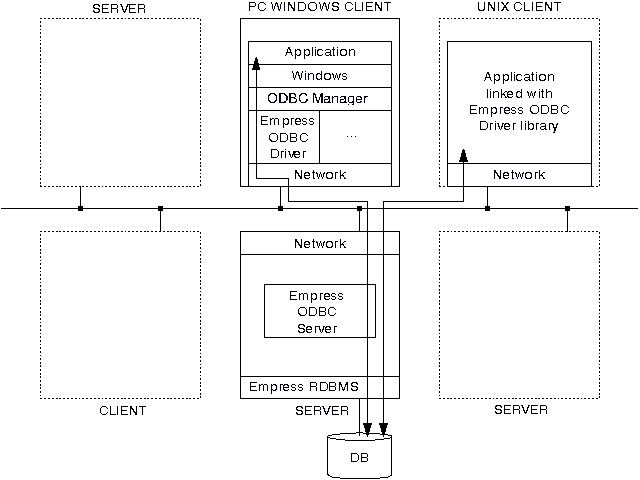
Figure 1-1 illustrates how the Empress ODBC Interface operates. It shows all the components involved on the client machines and the server machine for ODBC applications to properly perform database tasks with Empress RDBMS. On the UNIX platforms, the client application is linked with the Empress ODBC Driver (library).
Figure 1-1: Empress ODBC Interface
Empress ODBC Driver conforms to the ODBC 3.0 (Microsoft ODBC 3.0 Programmer's Reference and SDK Guide). It performs the following tasks:
Empress ODBC Interface and Empress ODBC Driver are used interchangeably throughout the text of this manual to refer to the ODBC interface for a client/server scenario.
Empress Connectivity (ODBC) is a standby network server which provides an ODBC service interface for the Empress RDBMS. The ODBC client issues the ODBC "connect call" to the Connectivity (ODBC) to establish the connection over the network. Here is the illustration.
Empress ODBC Driver/Library |
Physical Network |
Empress Connectivity (ODBC) |
||||
|
 |
|
||||
Host A |
Host B |
When an ODBC client accesses the database locally, Empress offers an ODBC Local Access functionality which doesn't require Empress Connectivity (ODBC) . Empress ODBC Local Access Driver combines the ODBC client and Connectivity (ODBC) functionality in one. The usage of this driver can dramatically reduce the network overhead and greatly improve the performance. Here is the illustration for Empress ODBC Local Access Driver.
Empress ODBC Local Access |
||
|
Host V |