This chapter explains Empress Servers. Empress Servers are Empress Replication Master Server and Empress Connectivity (ODBC) Server. Configuring and using the utility that administrates these servers, empsvadm is explained. The utility to analyze the logfile generated from the history of the operations performed by Empress Servers, empsvlogstat is also described.
An Empress Server contains several components which are a Spooler, an Administration Server and one or more Service Servers.
Spooler is controller which spawns and controls other components. Execution of an Empress Server is controlled by requests sent through Empress Server Administration Utility (empsvadm). Empress Server listens to the requests from its clients. Administrative requests are handled by the Administration Server and service requests are passed by the Spooler to one of the Service Servers. The user configures the number of Service Servers that are controlled by each Spooler of an Empress Server.
The clients of an Empress Server do not need to know about the Spooler, Administration Server, and Service Servers. They can simply refer to them as an Empress Server.
                Spooler
                  |
                  |
                  |
      ____________|____________________  ....
     |      |          |          |
     |      |          |          |
  Admin   Service    Service   Service   ....
  Server  Server1    Server2   Server3
|
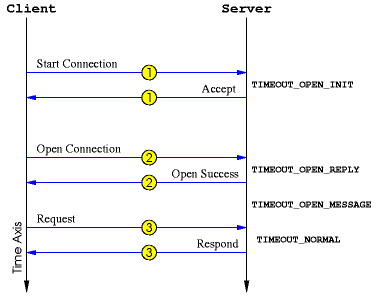
An Empress Server can be assumed to be running on a remote machine, with clients accessing to it through network. Thus there are some handshaking between a client and server, in order to ensure a connection between them. Here is a sample of how an Empress Server and its client handshake with each other.
|
|
As shown in [Figure 6-2:Handshaking and Timeouts
of Empress Server and its Client], a Client sends a "Start Connection" signal
to a Server. The server replies by an "Accept" signal. The client then
requests for "Open Connection", and the server replies by "Open Success"
signal. After these signals and establishing a connection, the client starts
sending the "Requests", and the server "Responds" to those requests. Note that
there are some Timeout settings between each request and respond, so that the
client wouldn't wait longer than expected for a reply. There is also a timeout
between the time that a "Open Success" is sent by the server, and the time
that the client starts its "Requests". These timeouts are explained in [Network Configuration].
6.2 Empress Server Administration Utility
Empress Server Administration Utility is called empsvadm.
The usage of this utility is to start, stop and
administrate Empress Servers.
This utility is used to administrate Empress Servers, including
Empress Replication Master Server and Empress Connectivity (ODBC) Server.
This utility is also used to administrate an Empress Database Server.
This manual only describes the commands that are used for Replication
Master Server and Connectivity (ODBC) Server.
The name of an Empress Server must be specified for any execution of empsvadm. The general usage of this utility is:
empsvadm servername command
1. servername is the name of the Empress Server. The default server name is set in $EMPRESSPATH/config/netserver.cfg file by NAME. For a Replication Master Server the default servername is emprepsv, and for ODBC (Connectivity) Server the servername must be empodbcsv.
2. command is one of the followings:
An Empress Server needs to be configured for its start up. The
settings, environment variables and configuration for Empress Servers are
given in
[
Configuring Empress Server and its Clients].
Complete explanation of Empress Server Environment Variables,
contents of Configuration Files and the default values of Configuration
Variables are given in
[
References: Empress Servers Environment Variables].
6.2.1 Starting an Empress Server
For starting a Empress Server, use the start command of Empress
Server Administration Utility empsvadm:
empsvadm server_name start [option]
When an Empress Server is started, an Execution log of the start and execution of the Empress Server is kept. Specifying the Empress Server Log file in network configuration file and the contents of the log are given in the [ References: Empress Server Log File]. A utility to analyze an Empress Server Log File is explained in [Empress Server Log Analyzer Utility]
The [option] can be used to specify starting options.
For a Replication Master Server, the option is:
-f Rep_Server_Start_Config_File
The contents of the Rep_Server_Start_Config_File is given in [Replication Master Server Start Configuration File]. When starting a Replication Master Server with specifying a Replication Server Start Configuration File option, the database and tables specified in Replication Server Start Configuration File must be existent and accessible by the Replication Master Server. The tables must be Replication Tables and must have at least one Replication Replicate Entry defined for them.
An Example for starting a Replication Master Server named emprepsv is given:
empsvadm emprepsv start -f Server_Start_Config_File
For an ODBC (Connectivity) Server, the option is:
-f odbc_Server_Config_file
An Example for starting an ODBC (Connectivity) Server named emodbcsv is given:
empsvadm empodbcsv start -f odbc_Server_Config_File
empsvadm servername close client_id
| client_id is: | the ID that is given to a client, when the connection between the client and the Empress server is established. This ID is valid for the duration of the execution of a service. A new client_id is assigned for each client connection. |
empsvadm server_name info
empsvadm emprepsv info
Example for getting information on a running ODBC Server named empodbcsv can be:
empsvadm empodbcsv info
empsvadm servername servers min [max]
| min is: | The number of servers that the spooler will initially spawn. |
| max is: | The optional number of additional servers that the spooler will spawn when the min servers are all busy. The default for max is min. The spooler will maintain between min and max servers. There is currently no provision for the spooler to reduce the number of servers automatically back to min when the servers become idle. min and max can not be set to "0". Also they can not be set to a number greater than the Empress Server process number which is specified in the license. |
The initial maximim and minimum number of servers that will be spawn by an
Empress Server are in Network Configuration Files, specified by
configuration attributes NUM_SERVERS_MIN and NUM_SERVERS_MAX in
either
MSNETTYPE or MSNETSERVER configuration blocks. The minimum number of these
service servers, along with one Administration Server is started, at the time
of initial start of an Empress Server, and are controlled by this
Spooler.
If NUM_SERVERS_MIN Service Servers are busy, the Spooler will spawn up to NUM_SERVERS_MAX more Service Servers to serve the clients of an Empress Server.
6.2.5 Stopping an Empress Server
To stop the already running Empress Server, use the stop command of
Empress Server Administration Utility empsvadm:
empsvadm server_name stop [force]
Example for stopping a Replication Master Server named emprepsv can be:
empsvadm emprepsv stop
Example for stopping an ODBC (Connectivity) Server named empodbcsv can be:
empsvadm empodbcsv stop
empsvadm servername refresh
empsvadm servername interrupt server_id
| server_id is: | the ID number of the server component, assigned by Empress Server |
The command to change the password is:
empsvadm servername change_password [login]
| login is: | The login name of the Empress Server Administrator. If the <login> is not given, the Empress Server Utility will prompt for the login name. |
The environment variables that are used for configuring Empress Servers are described here. The complete list of these variables are also given in [References: Empress Server Environment Variables]. In this section the following environment variables are described in detail:
The file pointed by value of MSNETSERVERCONFIGFILE is called network server configuration file (netserver.cfg), and the file pointed by value of MSNETTYPECONFIGFILE is called network type configuration file (nettype.cfg). These two files contain configuration attributes that are used for network connections of Empress Servers, so we call them generally as network configuration files.
The default Network Configuration Files are found in $EMPRESSPATH/config directory. The name of these files are set in $EMPRESSPATH/config/inifile as:
   MSNETSERVERCONFIGFILE=netserver.cfg
   MSNETTYPECONFIGFILE=nettype.cfg
Empress Server looks for files specified in these two environment variables. If they can not be found by their name, the pathes specified by environment variable MSCONFIGFILEPATH are appended to the name of the network configuration files, in their order of appearance. MSCONFIGFILEPATH is explained in [Path for Configuration Files].
Changing the default names of Network Configuration Files, requires setting these environment values to the new names. e.g. in C Shell:
setenv MSNETSERVERCONFIGFILE new_netserver.cfg
Most of the configuration attributes in netserver.cfg and nettype.cfg are the same, with some exceptions. The main difference between them is that each block in a nettype.cfg file contains configurations for all of the servers of the same kind. But each block in a netserver.cfg file contains configurations for only one server, for example server named "empodbcsv". Considering the network configuration settings for a specific Empress Server, the value of the configuration variables in network server configuration file override the ones in network type configuration file.
So, whenever the administrator of an Empress Server decides to change the value of a network configuration attribute, it is recommended to set the attribute value in network server configuration file, and not to change the preset value of the attributes in network type configuration file.
Each nettype.cfg contains blocks that start with MSNETTYPE and end with MSNETTYPEEND. Each nettype.cfg block describes configuration information about one type of Empress Server. The mandatory contents of each nettype.cfg block are:
Any configuration attribute which is set in a nettype.cfg block is valid for all the servers of a specific type. For example the configuration attributes that are set in a block with:
MSNETTYPE
   TYPE=odbc
   ....
MSNETTYPEEND
The mandatory contents of each netserver.cfg block are:
Highly recommeded to be set
Any configuration attribute which is set in a netserver.cfg block is valid only for one specific server. For example the configuration attributes that are set in a block with:
MSNETSERVER
   NAME=empodbcsv
   TYPE=odbc
   SECURITY_PASSWORD_FILE=password_file
    ...
MSNETSERVERENDCaveat:
Following is a list of Network Configuration Attributes that can be set in either netserver.cfg or nettype.cfg.
For the four variables CLIENT_SNDBUF_SIZE, CLIENT_RCVBUF_SIZE, SERVER_SNDBUF_SIZE and SERVER_RCVBUF_SIZE, the default value for most of the systems is set to nothing. This means that the Empress Server uses the default value of the system. However there are some systems that may need to set a value for better performance. Users are not recommended to change the values of the last four attributes.
The administrator of an Empress Server is the only user that has the authorization to perform administrative operations on an Empress Server. Administrative operations are described in [Empress Server Administration Utility], as "An Administrative Command". The commands that are not indicated as "An Administrative Command" are treated like client requests.
The Administrator of an Empress Server decides whether the authorization of the clients should be checked. A client of an Empress Server is either a utility sending requests to a running Empress Server, or a user of [Empress Server Administration Utility], performing non-administrative operations on an Empress Server. The authorization of the client is a combination of a login name and password. If the Empress Server is configured to check the authorization, it prompts the user for a login name and password. It checks this login name and password with contents of a password file. This password file is specified when running the Empress Server, and is readable and writable by that Empress Server. If the login is not authorized, it gives an error message and refuses to proceed with request.
For an Empress Server a "Empress Server login name" is the name to login to the Empress Server. This is the name provided by the user when prompted for login name. The "user name" is the name to login to the operating system. Regularly a user with any "user name" who knows a correct combination of a "Empress Server login name" and password approved by an Empress Server, can access that Empress Server. The administrator of an Empress Server can enforce the "Empress Server login name" to be the same as "user name".
The configuration attributes in Network Configuration File which their value is used for authorization purposes are as follows:
ADMINISTRATOR=admin_name
admin_name is the name of administrator of the Empress Server
SECURITY_CHECK_PASSWORD=X
Forces Empress Server to check for login name and password of the users
SECURITY_PASSWORD_FILE=password_file
password_file is readable and writable by Empress Server and is checked to authorize users of Empress Server. password_file can be created using the utility [emppassword].
SECURITY_ENFORCE_USERNAME=X
Forces the "user name" to be the same as "Empress Server login name".
Each User Authorization Configuration File contains User Authorization blocks that start with MSUSERAUTH and end with MSUSERAUTHEND. Each User Authorization Block contains Empress Server Name , Login Name and Password.
The default value of MSUSERAUTHCONFIGFILE is null. If this environment variable is set to a User Authorization Configuration File, for every request to an Empress Server, the contents of User Authorization Configuration File are passed to that Empress Server. If an Empress server needs to do user authorization check, the contents of User Authorization Blocks passed to that server, are checked. This removes the necessity of typing the login name and password of the requester, for every request to an Empress Server.
Following is a list of configuration attributes set in User Authorization Configuration File. The explanation of User Authorization Configuration File is given in [References: User Authorization Configuration File].
Contents of User Authorization Configuration file:
MSUSERAUTH
   SERVER=server
   LOGIN=login
   PASSWORD=password
MSUSERAUTHEND
MSCONFIGFILEPATH=path_to_config_files
The default value of MSCONFIGFILEPATH (as set in $EMPRESSPATH/config/initfile) is:
MSCONFIGFILEPATH="$HOME/.empress;$HOME;${EMPRESSPATH}/config"
So Empress Server looks for Empress Server configuration files (namely nettype.cfg, netserver.cfg and user authorization configuration file) in the value set by their corresponding environment variables: MSNETSERVERCONFIGFILE, MSNETTYPECONFIGFILE and MSUSERAUTHCONFIGFILE. If they can not be found by their name, the pathes specified by environment variable MSCONFIGFILEPATH are appended to the name of the network configuration files, in their order of appearance. Also note that the first path in MSCONFIGFILEPATH has the highest priority to be searched for the Files matching the names set by the environment variables.
For example if you have netserver.cfg file in both $HOME/.empress directory and ${EMPRESSPATH}/config directory, the former one will be used. If you want to use other directories, set the value of MSCONFIGFILEPATH to contain that directory as its first path.
MSNETSERVERCONFIGFILE=netserver.cfg
MSCONFIGFILEPATH="$HOME/.empress;$HOME"
It contains useful information that could be used in order to get more insight in the usage of the particular Empress Server. Empress Server Log Analyzer Utility empsvlogstat is implemented to give users additional capability to analyze the contents of the log file and display aggregate statistical results for the time frame in question. empsvlogstat could give answers to the following questions and to many other:
The Empress server log analysis functions are performed by empsvlogstat which has the following syntax:
empsvlogstat logfile_spec [keywords]... [start_time end_time [interval]] [dump]
| logfile_spec can be either of: |
|
| keywords can be any combination of: |
|
| start_time | start point to analyze statistical data, with following input format :
|
| end_time | end point to analyze statistical data, with following input format :
|
| interval |
|
| dump | option which suppresses most of the labels and forces printing values alone. The values are separated by the special separator character CTRL-V. |
empsvlogstat sv1
empsvlogstat sv1 user
empsvlogstat sv1 user start end 00:00:10
empsvlogstat -f svlogfile.log user 11:15:00 end dump
start time : 2000-03-22 10:09:06
end   time : 2000-03-22 10:10:14
interval   : 00:00:07

Name                                                        #Conn  Avg Duration
------------------------------------------------------  --------- ------------
robert(robert@localhost)                                        1    00:00:01
robert(robert@apple.empress.com)                                3    00:00:20
steven(steven@orange.empress.com)                               4    00:00:35

Total #Unique Users: 3
empsvlogstat sv1 up
start time : 2000-03-22 10:09:06
end   time : 2000-03-22 10:10:14
interval   : 00:00:07

                      #Up
                     -----
10:09:06                4
10:09:13                4
10:09:20                4
10:09:27                4
10:09:34                4
10:09:41                4
10:09:48                4
10:09:55                4
10:10:02                4
10:10:09                4

                      #Up
                     -----
Min                     4
Max                     4
Avg                     4
empsvlogstat sv1 idle
start time : 2000-03-22 10:09:06
end   time : 2000-03-22 10:10:14
interval   : 00:00:07

                     #Idle
                     -----
10:09:06                 3
10:09:13                 3
10:09:20                 3
10:09:27                 2
10:09:34                 3
10:09:41                 2
10:09:48                 3
10:09:55                 3
10:10:02                 3
10:10:09                 3

                     #Idle
                     -----
Min                      2
Max                      3
Avg                      3
empsvlogstat sv1 idle
start time : 2000-03-22 10:09:06
end   time : 2000-03-22 10:10:14
interval   : 00:00:07

                     #Used
                     -----
10:09:06                 1
10:09:13                 1
10:09:20                 1
10:09:27                 2
10:09:34                 1
10:09:41                 2
10:09:48                 1
10:09:55                 1
10:10:02                 1
10:10:09                 1

                     #Used
                     -----
Min                      1
Max                      2
Avg                      1
empsvlogstat sv1 conn
start time : 2000-03-22 10:09:06
end   time : 2000-03-22 10:10:14
interval   : 00:00:07

                      #Conn
                     --------
10:09:06                  1
10:09:13                  1
10:09:20                  1
10:09:27                  2
10:09:34                  1
10:09:41                  2
10:09:48                  1
10:09:55                  1
10:10:02                  1
10:10:09                  1

                      #Conn
                     --------
Min                       1
Max                       2
Avg                       1

Total Connections:                 4
empsvlogstat sv1 dur
start time : 2000-03-22 10:09:06
end   time : 2000-03-22 10:10:14
interval   : 00:00:07

                       Conn Dur
                     ----------
10:09:06               00:00:01
10:09:13               00:00:14
10:09:20               00:00:00
10:09:27               00:00:17
10:09:34               00:00:00
10:09:41               00:00:28
10:09:48               00:00:00
10:09:55               00:00:00
10:10:02               00:00:00
10:10:09               00:00:00

                       Conn Dur
                     ----------
Min                    00:00:00
Max                    00:00:28
Avg                    00:00:06

Avg Duration for All Connections:  00:00:15
empsvlogstat sv1 lic
start time : 2000-03-22 10:09:06
end   time : 2000-03-22 10:10:14
interval   : 00:00:07

                     #Rejected
                     ---------
10:09:06                     0
10:09:13                     0
10:09:20                     0
10:09:27                     0
10:09:34                     0
10:09:41                     0
10:09:48                     0
10:09:55                     0
10:10:02                     0
10:10:09                     0

                     #Rejected
                     ---------
Min                          0
Max                          0
Avg                          0

Total Connections Rejected:        0
We suggest using a user-created password, as it provides more functionality and more specific control, required for Empress Server users. By using a user-created password file, the control of Empress Server users will be done by Empress DBA instead of the operating system administrator.
If you want to use the operating system's default password file and do not want to expose services other than database usage to a user, one solution is to specify the login shell of that user to an exit program (immediately logout after login).
An Empress Server expects the Empress Password File to be in the location set by SECURITY_PASSWORD_FILE configuration attribute in [Network Configuration Files]. Users usually have to change the value of this configuration attribute in netserver.cfg file to point to their own created Empress Password File.
Empress provides emppassword utility to manage the user-created password files used by Empress Server.
emppassword -f password_file create
If a running Empress Server is accessible, and the user wants to create a password file similar to the one accessed by that running Empress Server, the following command can be used:
emppassword server_name create
emppassword -f password_file add user_login_name [options]
If a running Empress Server is accessible, and the user wants to deal with password file accessed by that running Empress Server, the following command can be used:
emppassword server_name add user_login_name [options]
To delete a user from the password file, the following command can be used:
emppassword -f password_file del user_login_name
If a running Empress Server is accessible, and the user wants to deal with password file accessed by that running Empress Server, the following command can be used:
emppassword server_name del user_login_name
emppassword -f password_file list [user_login_name]
If a running Empress Server is accessible, and the user wants to deal with password file accessed by that running Empress Server, the following command can be used:
emppassword server_name list [user_login_name] [-fast]
emppassword -f password_file upd user_login_name [options]
If a running Empress Server is accessible, and the user wants to deal with password file accessed by that running Empress Server, the following command can be used:
emppassword server_name upd user_login_name [options]
Here are the [options] that can be used with some of the commands of emppassword utility.
 -accept [+-]HOST[,...] Add or remove hostname from the accept control list.
 -accept off            Turn off accept control. The accept control list
                        is ignored and is not modified by the option.
 -accept on             Turn on accept control.
 -c COMMENT             specify the comment about the user LOGIN
 -fast                  This option is for the 'list' operation. If this
                        option is specified, the host name will not be
                        printed with the ip address.
 -p                     prompt for password (in update operation)
 -reject [+-]HOST[,...] Add or remove hostname from the reject control list.
 -reject off            Turn off reject control. The reject control list
                        is ignored and is not modified by the option.
 -reject on             Turn on reject control. The reject control list
                        is ignored and is not modified by the option.
The keyword HOST used in above specification has the following format:
localhost               The string 'localhost'.
HOSTNAME                The host name of the machine. It will be translated
                        to an IP address in numbers-and-dots notation.
HOSTNAME.DOMAIN         The host name of the machine. It will be translated
                        to an IP address in numbers-and-dots notation.
xxx.xxx.xxx.xxx         The IP address in numbers-and-dots notation.
xxx.xxx.xxx.*           The wild card specification to cover all IP address of a
                        class C network.