Actions in a GUI application can be either script or C actions. For a script action, the text of the action can be entered in the action editor directly. For a C action, only the name of the action and its description are entered in the action editor—the code for a C action is not entered in the action editor.
Usually, all the routines for C actions are entered in a single program file using any text editor (such as vi or emacs), to facilitate global search/replace, use of global variables, compiling and linking.
In the $EMPRESSPATH/rdbms/gui directory, there are two files which are used as prototypes.
The file action.c is a prototype of a program file to contain the routines used for C actions. It has an action table that contains entries relating action names to the corresponding C routines. The last entry on the table is a null entry.
action_tab_entry  my_action_table[] =
{
        /* Action name,       C routine */
        {  "next_record",     next_rec       },
        {  "previous_record", prev_rec       },
        {  "enter",           initialize     },
        {  "exit",            cleanup        },
        {  CHARNIL  }
};
The file acttab.c is a prototype which contains the user_action_table array that specifies which action tables are used by which modules. The last entry in the array is a null entry. If actions in the PUBLIC GENERAL MODULE are used (such as empgui_public_exit ), then there must be an entry for that module.
static  action_tab_def  user_action_table[] =
{
        /* Module name,               Action table */
        {  "PUBLIC GENERAL MODULE",   msgui_public_action_table },
        {  "my_module",               my_action_table           },
        {  CHARNIL  }
};
When incorporating C actions into a GUI application, take the following steps:
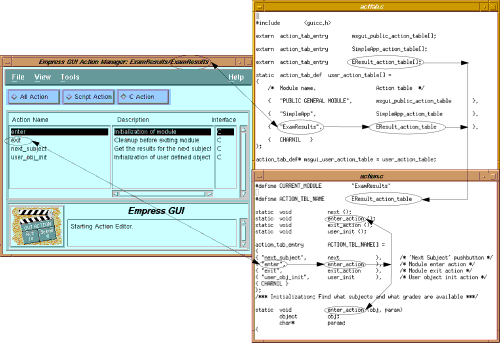
The C routines can take up to four arguments, as follows:
static  void   my_routine  ( obj, param, argc, argv )
        object obj;
        char*  param;
        int    argc;
        char*  argv[];
The first argument is the object which was activated when the action was executed. For example, if a toggle button has a C action associated to it, when it is activated, the corresponding C routine will be executed, and the first argument passed to it will be the toggle button object itself.
The second argument is a string which is the parameter property of the object in question. This parameter property is specified in the Property Editor of the object (refer to the Empress GUI: Tools Manual).
The last two arguments are usually optional. They are useful when a C action needs to call another C action using the empgui_c_action_execute() function. Additional parameters can be passed as elements of string array argv, and argc would indicate the number of elements in the array. If the action is the enter action of the module, argc and argv can also be set when calling the module using the empgui_c_module_run() function.
For the enter action of the main module of an application, argc and argv depend on the command line arguments. For example, if an application my_app in database my_db is started as follows:
empgui my_db my_app Hello World
then, in the enter action of the main module of my_app, argc is set to 2, argv[0] = "Hello", and argv[1] = "World".
The utility empguicc must be used to compile the action.c and acttab.c files. Note that you may have more program files, especially if you have several modules which use C actions. empguicc creates an executable, which consists of the empgui code plus all your routines:
empguicc -o my_gui acttab.c action.c { action.c }
This executable file can be run. Like empgui, it takes as arguments the database name and the module to execute.
my_gui db_name my_module
That empguicc calls the standard C compiler (usually /bin/cc)
to perform the compilation. Any argument that empguicc does not
recognize is passed on to the C compiler.