When you borrow a book, you take it to the "Check-Out" desk, and the library registers who is checking-out which book. Subsequently, that particular book cannot be borrowed (checked-out) by anybody else. When you return the book, you take it to the "Check-In" desk, and the library makes the book available to other borrowers.
However, the GUI registry takes the concept several steps further. There are two types of objects that can be checked-out/in: applications and modules. There are two modes for checking-out an object: "read" and "update". There are two methods of checking-out/in objects: "implicit" and "explicit". And there are two types of users that can check-out/in objects: the DBA (database administrator) and the non-DBA user.
If you check-out an object in update mode, you will be allowed to modify its contents. Nobody else will be allowed to check-out that object, whether for read or update.
This scheme is similar to Empress' database locking scheme, but it uses an entirely different mechanism.
When a module is checked-out, other processes are prevented from editing the same module. This means that only one process can change the contents of a module at a time, ensuring that all changes are saved (when the module is checked-in) before someone else can make changes to that module.
These automatic (implicit) check-out and check-in operations are transparent to the user, who does not need to be aware of the registry mechanism (until he or she is prevented from editing an application or module because it is already checked-out).
In addition to implicit check-out and check-in, you can also explicitly check-out and check-in applications and modules. This method is also called "session check-out", because the objects that are explicitly checked-out remain checked-out until you explicitly check them in, or until you end the session by exiting Empress GUI Builder.
Explicit check-out is useful when you need to make sure that nobody will edit an application or module even when you are working on something else. Registry menus in the Application Manager, Module Manager, and the Application Module Manager allow explicit check-out and check-in of applications/modules.
Objects that have been explicitly checked-out can be explicitly checked-out again by the same process. This allows the check-out mode of the object to be changed. For example, if an application was explicitly checked-out for read, the user can check it out again for update; the check-out mode of the application will be upgraded to "update" (if possible).
When using the Registry Manager, any non-DBA user will be allowed to check-in objects that were checked out by the same user (even if the process id is different). However, the DBA will be allowed to check-in any object, even those that were checked-out by other users.
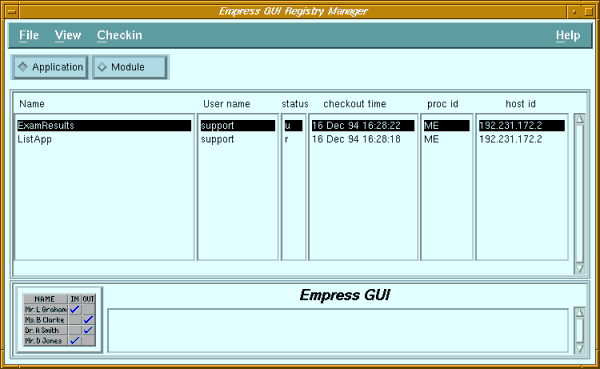 Figure 7-1 Registry Manager
Purpose
If an Empress GUI Builder session is terminated abruptly, it may be unable to check-in applications and modules that were checked-out by that process. While outstanding locks, server connections, coordinator entries etc., can be cleaned up by utilities such as empclean and empadm, the registry is not affected by these utilities.
Hence, an object may remain checked-out even though the process that checked it out is no longer running, and other processes are prevented from editing it. The Registry Manager allows the user or the DBA to display these objects and check them in manually.
Called From
Menu Options
| File | ||
| Exit | Return to the previous screen. | |
| View | ||
| Refresh | Update the screen to display any changes in the registry table. | |
| Checkin | Allows entries in the registry to be checked-in. | |
| For current session: | ||
| Entry | The highlighted entry is checked-in if it was checked-out during the current session. | |
| Current session entries | All entries (applications and modules) checked-out during the current session are checked-in. | |
| For user: | ||
| My entry | The highlighted entry is checked-in if it was checked-out by the current user. | |
| My process' entries | All entries (applications and modules) checked-out by the highlighted entry's process are checked-in, provided that the process belonged to the current user. | |
| All my entries | All entries (applications and modules) checked-out by the current user are checked-in. | |
| For DBA: | ||
| Any entry | The highlighted entry is checked-in. | |
| Application | The highlighted application entry is checked-in. | |
| Module | The highlighted module entry is checked-in. | |
| Any process' entries | All entries (applications and modules) checked-out by the highlighted entry's process are checked-in. | |
| User's entries | All entries (applications and modules) checked-out by the highlighted entry's user are checked-in. | |
| All applications | All application entries are checked-in. | |
| All modules | All module entries are checked-in. | |
| All entries | All entries (applications and modules) are checked-in. | |
| Application | Display applications that have been checked-out. |
| Module | Display modules that have been checked-out. |
| Name | Name of object that was checked-out. |
| User name | Login name of the user that checked out the object. |
| Status | Mode in which the object was checked-out: 'r' read, 'u' update. |
| Checkout Time | Date and time at which the object was checked-out. |
| Proc ID | ID of the process that checked out the object. If it was checked out by the current process, "ME" is displayed. |
| Host ID | Network ID of the host on which the process was running. |