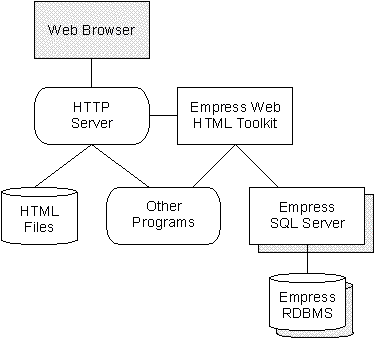
Figure 1-1: Process Communications
Hypertext Markup Language (HTML), the standard hypertext language for Web documents, is used on the Internet for Web server to display static documents and links to other pages or servers. It contains plain text with embedded instructions for formatting and displaying.
The eXtensible Markup Language (XML) extends the processing capabilities of Web server for allowing data markup (expressing structure in data) as well as document markup.
The Common Gateway Interface (CGI) is a mechanism that allows Web servers execute other programs and incorporate their output into the text, graphics, and audio sent to Web browser.
Empress Relational Database Management System (RDBMS) is a flexible and powerful database engine together with a line of sophisticated data management software.
In order to give useful Internet access to their RDBMS, Empress has developed a set of interface tools, known collectively as Empress Web HTML Toolkit. It consists of a set of interfacing CGI programs that link the power of the Empress RDBMS engine to state-of-the-art multimedia and hypermedia applications.
The Empress Web HTML Toolkit (Toolkit) operates at the server end of Hypertext Transfer Protocol (HTTP) servers, and interacts with the Web server via the Common Gateway Interface (CGI). The advantage of maintaining all functionalities of the Toolkit at the server is that all documents produced by the Toolkit and passed back to clients are fully conformant with a user specified format that can be read by standard document readers such as Netscape NavigatorTM for HTML, or XML enabled browsers for the various XML languages.
It is also possible to use the Toolkit to process queries embedded into documents that contain other text based formatting or markup languages; for example vCard, or Rich Text Format (RTF) documents.
The Empress Web HTML Toolkit derives the following advantages from the use of Markup Languages:
From the Empress RDBMS, the Empress Web HTML Toolkit derives these advantages:
Together they provide dynamically generated documents based on standard HTML templates resulting in:
The real power of this system lies in the complete separation of the document markup system from the underlying data storage system. The HTML/XML deals with the portable text and data sets, while the RDBMS sticks to what it does best: data management.
The Empress Web HTML Toolkit (Toolkit) uses the Empress Connectivity Server to connect to databases, and the Common Gateway Interface (CGI) to connect to Hypertext Transfer Protocol (HTTP) servers. The HTTP Servers can in turn connect to HTML/XML browsers, either on the local host, across a LAN or across the Internet. The Toolkit can issue SQL statements to fetch and update data, and can call and run any other executables.
|
|
|
Figure 1-1: Process Communications |
The advantages of the Empress Web HTML Toolkit are:
Empress uses standard HTML with the addition of a small number of Empress specific processor markup tags (these process instruction tags are processed on the server, and never transmitted to the browser). This means that developers only need to know HTML, and do not need to learn proprietary authoring scripts to merge the RDBMS and hypertext technologies.
The Empress Web HTML Toolkit can construct and execute standard SQL statements for fetching and updating database data. Again, this is a standard language readily understood by users of RDBMSs.
Any browser that can read HTML documents can be used. However, the quality of the data rendering will be dependent on the power of the browser.
The Empress RDBMS has the ability to store and manage any type of data that can be stored on a computer. This includes unconventional data such as video, graphics, and sound.
Association of a MIME type interpretation file (similar in format to a UNIX magic file) allows on-line analysis of data retrieved from a database; thus allowing a properly configured Web Browser to render the binary data.
Storing data in an Empress database which will be shown in an HTML document, can be advantageous relative to hard-coding the data directly into the page. Dynamic retrieval and update of RDBMS data means that the document can always be completely up-to-date. As information in the database is updated (from any source) the document retrievals will also fetch completely up-to-date information.
The use of templates can make the display of different sets of data easy and consistent in look and feel. The same template can be used for different data depending on the selection criteria.
HTML was devised for use on the Internet and it is the main reason for the growth in popularity of the World Wide Web (Web). However, it has also become extremely popular for building Intranets in the business community. The addition of XML to the scene has increased the business communities interest in this method of maintaining and disseminating data.
The Empress Web HTML Toolkit is, extremely useful in any context where HTML and XML are used in association with dynamic data sets. Therefore it can be used in Internet and Intranet systems, and even with a standalone workstation; because of the power and general utility of HTML browsers for displaying and hyperlinking information which can come from databases.
1.3 Toolkit CGI Program
The Empress Web HTML Toolkit Toolkit is embodied in two programs:
ehsql.cgi and ehlink.cgi.
ehsql.cgi is the most commonly used program.
ehlink.cgi provides the same functionality in a
session-based environment.
ehlink.cgi is discussed in the chapter
Session-based Application of this manual.
Both tools, ehsql.cgi and ehlink.cgi, are syntactically equivalent, except for the log on and transaction control capabilities of ehlink.cgi.
The individual tools in the toolkit are shown in the table below.
| Tool | Description |
| select | Database Query Tool: used for retrieving database records based on HTML form information. This is suitable for use with HTML. |
| update | Database Record Updating Tool: to insert a new record, or update a current one, based on HTML form information. This is suitable for use with HTML. |
| writer | General tool used for generating dynamic data sets, or updating a database,
by embedding SQL commands into text files. It processes Empress markup tags
inside the text files. These tags are processed be the tookiit and used
to place data from a database into the HTML display, modify the database, or run third party applications. This is suitable for use with any text based markup language. |
| get_bulk | Specialized tools for retrieving (and interpreting) single binary objects from a RDBMS table. |
The method of specifying which tool you wish to use for a given request has changed over the years. The old syntax is still support. But the current methods are:
writer
This is the default tool.
update and select
These are specified as options in the HTML form using the eh-mode keyword. For example:
<TYPE="HIDDEN" NAME="eh-mode" VALUE="update">
or
<TYPE="HIDDEN" NAME="eh-mode" VALUE="select">
get_bulk
Specified as the first argument on the URL. For example:
HREF="xxx?get_bulk+datasource+table+attribute+index_value+mime_type"
As well as user input from forms and URL parameters, the tools usually take the path to an output or template file, which makes use of the database operations provided by the tool. Within these files, HTML style formatting tags can be used to display the database information in any way desired. These paths are again from DocumentRoot, and are concatenated onto the path to ehsql.cgi. The name of the tool comes after both pathnames.
Example below shows how the Toolkit CGI program can be invoked:
The ACTION of the input.ehtml form is:
<action="/My-bin/ehsql.cgi/docs/output.ehtml">
This is the correct URL, despite its strange appearance. Notice that the path to the template file (docs/output.ehtml) directly follows the path to ehsql.cgi (My-bin/ehsql.cgi), there is no separator.