Figure 9-1: The relationship between PIN, POUT, DIN and DOUT and the Global Buffer
This chapter describes the capabilities of the database administration utility - empadm. This utility is used to perform administrative functions for a database. Using empadm, the Database Administrator (DBA) can:
The empadm utility provides two options that allow the Database Administrator to disable the database for other users accessing the database:
dbamode option allows multiple DBA processes to access the database. All non-DBA processes will be restricted from accessing the database.
singlemode option allows only one DBA process to access the database. Other processes will be restricted from accessing the database.
DBA Mode means the database access is restricted to the Database Administrator (DBA) only. There can be multiple DBA processes access the same database. The following command can only be issued by the Database Administrator:
empadm database_name dbamode [on] [-i N| -q]
From this point,
Although the reporting interval is N seconds, empadm checks for non-DBA processes every second. If N is 0 or -q is specified, empadm will not print the user list.
Use the following command to enable the database for all privileged users:
empadm database_name dbamode off
Single User Mode means the database access is restricted to one single DBA process that makes the request. The following command can only be issued by the Database Administrator:
empadm database_name singlemode [-i N| -q] ["shell_command"]
From this point,
While empadm is waiting for all processes signed off from the database, it prints a list of users who are currently accessing the database every N seconds. The number of seconds is defined by the -i option. The default is 10 seconds. empadm will not notify users to sign off from the database, the DBA has to inform the users manually or choose to wait.
Although the reporting interval is N seconds, empadm checks for processes every second. If N is 0 or -q is specified, empadm will not print the user list.
If shell_command is not specified, empadm will run in an interactive mode. Otherwise, it will run in a batch mode invoking the defined shell command.
Database lock activity is reported using the following options of the empadm utility:
The lockinfo option provides information about Lock Managers, active locks and the processes holding those locks:
empadm database_name lockinfo [table_name ...]
Here is a sample output:
   Lock Managers

   Table name              Lock Man. Name  Type           MAXPROCS NBUCKETS   NLOCKS
   sys_attr_privs          00005.lck       F                    32       11      200
   sys_attrs               00003.lck       F                    32       11      200
   sys_dictionary          00001.lck       F                    32       11      200
   sys_privs               00004.lck       F                    32       11      200
   sys_tables              00002.lck       F                    32       11      200
   t1                      00006.lck       F                    32       11      200
   t2                      00007.lck       F                    32       11      200

   Active Locks

   Table name              Type       Record#      Status     Empress ID

   sys_dictionary          ADMIN          ---      r          2086626528
   sys_dictionary          ADMIN          ---      r           957829758
   sys_dictionary          RECORD           6      r          2086626528
   sys_dictionary          ALLRECS        ---      rr         2086626528
   sys_dictionary          ALLRECS        ---      rr          957829758
   sys_dictionary          RECORD           7      r           957829758
   t1                      ALLRECS        ---      rr         2086626528
   t1                      ADMIN          ---      r          2086626528
   t1                      RECORD           2      r          2086626528
   t1                      RECORD           1      r          2086626528
   t2                      ADMIN          ---      r           957829758

      Empress ID   Process ID      Username
       957829758         4261      joe@gold.empress.com
      2086626528         4281      joe@gold.empress.com
The Lock Managers sub-report displays information about the Lock Manager for each table.
Lock Man. Name is the file name in which locking information for a table is kept.
The Type field indicates the type of the Lock Manager; it will be:
MAXPROCS is the maximum number of processes which can access the table simultaneously.
NBUCKETS is the number of hash buckets in this Lock Manager.
NLOCKS is the maximum number of simultaneous locks which can be managed by this Lock Manager.
The Active Locks sub-report displays information about any locks which are active within the database.
Type is lock type. They are: ADMIN, CRIT, RECORD and ALLRECS.
The Record# field indicates which record of the table is locked; --- means that the lock applies to the table as a whole.
The Status field can be one of r (read), rr (deferred read), u (update) or uu (deferred update).
The Empress ID field indicates which Empress process is holding the lock.
The last sub-report helps the user to determine the operating system identity of an Empress process.
The Empress ID field indicates which Empress process is holding the lock.
User name is the operating system name of the user running the Empress process.
Process ID is the operating system process id of the Empress process.
Host ID is the network address of the machine on which the Empress process is running.
The lockbrief option provides information about active locks and the processes holding those locks:
empadm database_name lockbrief [table_name ...]
Here is a sample output:
   Active Locks

   Table name              Type       Record#      Status     Empress ID
   sys_dictionary          ADMIN          ---      r          2086626528
   sys_dictionary          ADMIN          ---      r           957829758
   sys_dictionary          RECORD           6      r          2086626528
   sys_dictionary          ALLRECS        ---      rr         2086626528
   sys_dictionary          ALLRECS        ---      rr          957829758
   sys_dictionary          RECORD           7      r           957829758
   t1                      ALLRECS        ---      rr         2086626528
   t1                      ADMIN          ---      r          2086626528
   t1                      RECORD           2      r          2086626528
   t1                      RECORD           1      r          2086626528
   t2                      ADMIN          ---      r           957829758

      Empress ID   Process ID      Username
       957829758         4261      joe@gold.empress.com
      2086626528         4281      joe@gold.empress.com
The Active Locks sub-report displays information about any locks which are active within the database.
Type is lock type. They are: ADMIN, CRIT, RECORD and ALLRECS.
The Record# field indicates which record of the table is locked; --- means that the lock applies to the table as a whole.
The Status field can be one of r (read), rr (deferred read), u (update) or uu (deferred update).
The Empress ID field indicates which Empress process is holding the lock.
The last sub-report helps the user to determine the operating system identity of an Empress process.
The Empress ID field indicates which Empress process is holding the lock.
User name is the operating system name of the user running the Empress process.
Process ID is the operating system process id of the Empress process.
Host ID is the network address of the machine on which the Empress process is running.
The lockmanagers option provides information about Lock Managers and active locks:
empadm database_name lockmanagers [table_name ...]
Here is a sample output:
   Lock Managers

   Table name              Lock Man. Name  Type     MAXPROCS NBUCKETS   NLOCKS
   sys_attr_privs          00005.lck       F              32       11      200
   sys_attrs               00003.lck       F              32       11      200
   sys_dictionary          00001.lck       F              32       11      200
   sys_privs               00004.lck       F              32       11      200
   sys_tables              00002.lck       F              32       11      200
   t1                      00006.lck       F              32       11      200
   t2                      00007.lck       F              32       11      200

   Active Locks

   Table name              Type       Record#      Status     Empress ID
   sys_dictionary          ADMIN          ---      r          2086626528
   sys_dictionary          ADMIN          ---      r           957829758
   sys_dictionary          RECORD           6      r          2086626528
   sys_dictionary          ALLRECS        ---      rr         2086626528
   sys_dictionary          ALLRECS        ---      rr          957829758
   sys_dictionary          RECORD           7      r           957829758
   t1                      ALLRECS        ---      rr         2086626528
   t1                      ADMIN          ---      r          2086626528
   t1                      RECORD           2      r          2086626528
   t1                      RECORD           1      r          2086626528
   t2                      ADMIN          ---      r           957829758
The Lock Managers sub-report displays information about the Lock Manager for each table.
Lock Man. Name is the filename in which locking information for a table is kept.
The Type field indicates the type of the Lock Manager; it will be:
MAXPROCS is the maximum number of processes which can access the table simultaneously.
NBUCKETS is the number of hash buckets in this Lock Manager.
NLOCKS is the maximum number of simultaneous locks which can be managed by this Lock Manager.
The Active Locks sub-report displays information about any locks which are active within the database.
Type is lock type. They are: ADMIN, CRIT, RECORD and ALLRECS.
The Record# field indicates which record of the table is locked; --- means that the lock applies to the table as a whole.
The Status field can be one of r (read), rr (deferred read), u (update) or uu (deferred update).
The Empress ID field indicates which Empress process is holding the lock.
The locksactive option provides information about active locks only:
empadm database_name locksactive
Here is a sample output:
   Active Locks

   Table name              Type       Record#      Status     Empress ID
   sys_dictionary          ADMIN          ---      r          2086626528
   sys_dictionary          ADMIN          ---      r           957829758
   sys_dictionary          RECORD           6      r          2086626528
   sys_dictionary          ALLRECS        ---      rr         2086626528
   sys_dictionary          ALLRECS        ---      rr          957829758
   sys_dictionary          RECORD           7      r           957829758
   t1                      ALLRECS        ---      rr         2086626528
   t1                      ADMIN          ---      r          2086626528
   t1                      RECORD           2      r          2086626528
   t1                      RECORD           1      r          2086626528
   t2                      ADMIN          ---      r           957829758
The Active Locks sub-report displays information about any locks which are active within the database.
Type is lock type. They are: ADMIN, CRIT, RECORD and ALLRECS.
The Record# field indicates which record of the table is locked; --- means that the lock applies to the table as a whole.
The Status field can be one of r (read), rr (deferred read), u (update) or uu (deferred update).
The Empress ID field indicates which Empress process is holding the lock.
Statistical information about the database's Lock Managers is reported using the lockstats option of empadm:
empadm database_name lockstats [table_name ...]
By default, these statistics are unavailable. In order for Empress begin gathering statistics, the Database Administrator must set the variable MSDBLOCKSTATS in the data dictionary tabzero file.
This variable may be set to anything (e.g., MSDBLOCKSTATS=on) in order to begin collection of statistics. By default, it is turned off because of the overhead required by statistics gathering.
To reset the cumulative lock statistics, use the lockrststats option:
empadm database_name lockrststats
After running this command, all lock statistics are initialized to 0 and will begin to be accumulated again.
The following is a sample output of lockstats:
   Table name: temperatures

   Lock Man. Name  Type     MAXPROCS NBUCKETS    NLOCKS
   00018.lck       F              32       11       200

   NPROCS  MAXNPROCS       CURNLKS MAXNLKS  EFFICIENCY
        1          2             0       4        100%

   # buckets       % of hits
           2             73%
           3             87%
                         97%

   # hits          # buckets       bucket #
        0                  6         0,   1,   3,   4,   5,
                                     9
       14                  1        10
       54                  1         2
       74                  1         7
      150                  1         8
      244                  1         6

   Max. chain length       # buckets       bucket #
                   0               6         0,   1,   3,   4,   5,
                                             9
                   1               4         2,   8,   7,  10
                   2               1         6
The following is a description of the fields:
The Lock Man. Name is the name of the Lock Manager. For Lock Managers in a file, this is the name of the file in the database/_lock/ directory. For Shared Memory Lock Managers, this is the name of the Shared Memory Lock Manager partition.
Type is the type of the Lock Manager. For files, this is F; for Shared Memory Lock Managers, this is P.
MAXPROCS is the maximum number of Empress processes which can use this Lock Manager simultaneously.
NBUCKETS is the number of hash buckets in this Lock Manager. This value has been calculated by Empress as the optimum number for managing the locks; it should not be changed without consult Empress Software Inc.
NLOCKS is the total number of simultaneous locks which can be managed by this Lock Manager.
The NPROCS is the number of processes currently accessing this Lock Manager.
MAXNPROCS is the maximum number of processes which have used this Lock Manager simultaneously.
CURNLKS is the number of active locks currently held by this Lock Manager.
MAXNLKS is the maximum number of simultaneous locks which have ever been managed by this Lock Manager.
EFFICIENCY provides an indication of how many operations have caused the ideal chain length of a hash bucket to be exceeded. The ideal chain length of a bucket is the number of active locks divided by the number of buckets, multiplied by the value of the Empress variable MSTHRESCHAINLEN. For example, an efficiency of 99% means that 1 percent of lock operations exceeded the ideal chain length of a bucket. If this number drops below 70%, contact Empress Software Inc. for assistance.
The # buckets and % of hits provides an indicator of how locks are distributed across the hash buckets by showing how many buckets were needed to hold some percentage of the locks, up to some value over 90%. In the example, 73% of locks were found in 2 buckets, and 97% of locks were found in 4 buckets. This gives an indication of how well the locks are distributed among the hash buckets. An ideal distribution is for each bucket to have the same number of hits. In the example, 2 buckets held 73% of the locks and 4 buckets held 97% of the locks. While this may seem inefficient, you should note that the maximum number of active locks was 4. In other words, there were too few locks to use all the buckets.
The # hits, # buckets and bucket # shows the total number of hits on each hash bucket. If two or more buckets had the same number of hits, they are listed separated by commas. In the example, 2 buckets (#6 and #8) accounted for the most hits (244 and 150, respectively). This number corresponds to 73% of the total hits (394 / total), which is the number reported in the previous table (# buckets vs. % of hits).
Max. chain length, # buckets and bucket # shows the maximum chain length of each hash bucket. If two or more buckets had the same maximum chain length, they are listed separated by commas. If the chain length of any bucket exceeds the ideal chain length, the EFFICIENCY field will contain a value less than 100%.
Defunct Locks (or sometimes refer to as Dangling Locks) may occur after system failure or program crash where locks remain in a table but the process associate with it is no longer exist. The lockclear option is used to remove locks which were held by processes which no longer exist:
empadm database_name lockclear [-f] [empress_id ...]
lockclear will not clear the active locks unless -f (force to clear locks) is specified.
If -f is specified, lock will be cleared regardless if process is still active. Use this option with caution. Note that if an Empress process is still active, you should not clear its locks.
The empress_id list should contain a list of Empress processes which no longer exist. Normally, the list of defunct empress_id will be derived from an empadm database_name lockinfo report.
The user ID of the person running this command must match that of the Database Administrator if no list is given, otherwise the user ID must match that of the DBA or of the owner of the empress_id which holds the locks.
empadm database_name lockremove
This command is useful when Shared Memory Lock Manager is used and the disk lock files are no longer needed. Although it is not necessary to remove these lock files for shared memory locking, it is good for general house keeping.
The shmcreate option is used to create the shared memory partitions which are defined in the data dictionary tabzero file:
empadm database_name shmcreateA shared memory partition is created for each shared memory partition definition block encountered; none will be created if none are defined. If a shared memory partition already exists, empadm exits with an error message.
Note that you must be the Database Administrator to run this command. Please refer to the chapter Shared Memory of this manual for detail information on Shared Memory.
The shmremove option is used to remove the shared memory partitions which are defined in the data dictionary tabzero file:
empadm database_name shmremove
A shared memory partition is removed for each shared memory partition definition block encountered; none will be removed if none are defined. If a shared memory partition does not exist, empadm exits with an error message.
Note that protected partitions will not be removed by this command. In other words, shared memory partitions whose partition description blocks have MSSHMPROTECTION set to some value will not be removed. You must be the Database Administrator to run this command.
The shmrmall option removes all shared memory partitions:
| empadm database_name | |shmrmall |shmzap |
| | |
shmrmall performs the same function as the shmremove option and also removes protected partitions. In other words, it will remove all shared memory partitions defined in the data dictionary tabzero file, even those for which MSSHMPROTECTION is set.
shmzap performs the same function as the shmrmall but it also removes the partition definition in the tabzero file.
You must be the Database Administrator to run this command.
The shmrefresh option does the following:
If shared memory exists:
If shared memory does not exist, it will create the shared memory partition. This is same process as shmcreate.
empadm database_name shmrefresh
The shmclear option clears the contents of the shared memory partitions which are defined in the data dictionary tabzero file:
empadm database_name shmclear
A shared memory partition is cleared for each shared memory partition definition block encountered; none will be cleared if none are defined. If a shared memory partition does not exist, empadm exits with an error message.
This command only clears Mapped Files and Global Buffer partitions; it does not remove locks. Please note that shared memory partitions are not removed with this option, they are simply emptied of data.
Note that protected partitions will not be cleared by this command. In other words, shared memory partitions whose partition description blocks have MSSHMPROTECTION set to some value will not be cleared.
The shminfo option displays information about the shared memory partitions associated with the shared memory partition definition blocks found in the data dictionary tabzero file:
empadm database_name shminfo
Here is a sample output for the database named repairs:
   Database: repairs

   Partition name                               Size     Type
   mapf1                                       22592     Mapped File
   gbuf1                                      161200     Global Buffers
   lock1                                        4784     Lock Manager

   Mapped File Partition

   Partition name             SIZE   START
   mapf1                     22528       0

           Statistics

           Read hit ratio: 100%    Read ratio: 83%

   Global Buffers Partition

   Partition name          BLOCKSIZE       NBLOCKS
   gbuf1                        1024           150

   Lock Manager Partitions

   Partition name : lock1

           MAXPROCS        NBUCKETS        NLOCKS
                 32              11           200
The first section of the report lists the shared memory partitions for the database and displays the size and type of each partition. This database has three partitions: a Mapped File partition named mapf1, a Global Buffer partition named gbuf1 and a Lock Manager partition named lock1.
The output then displays information about each of the shared memory partitions. For Mapped File partitions, the size and starting offset are shown, as well as some basic statistics.
The Read hit ratio field displays the percentage of accesses to the Mapped File which obtained the information from the Mapped File partition rather than from the disk. If this percentage is low, you should consider increasing the size of the Mapped File partition or changing the starting offset of the Mapped File.
The Read ratio field displays the percentage of total read and write operations which were read operations. This percentage will be low if most operations write to the file.
Note that both of Read hit ratio and Read ratio should be high for optimum shared memory performance.
For Global Buffer partitions, the block size and number of blocks in the partition are displayed.
Lock Manager partitions reports display the maximum number of processes which can access the Lock Manager at one time, the number of buckets in the Lock Manager and the maximum number of simultaneous locks which can be managed by this Lock Manager.
The shmstats option provides detailed statistics about shared memory use:
empadm database_name shmstats
The lockrststats option is used to reset the cumulative shared memory statistics:
empadm database_name shmrststatsAfter running this command, all shared memory Mapped Files and Global Buffer statistics will be reset to 0 and will begin accumulating again.
The following is sample output for shmstats option:
   Database: repairs

   Partition name                                 Size     Type
   mapf1                                         22592     Mapped File
   gbuf1                                        161200     Global Buffers
   lock1                                          4784     Lock Manager

   Mapped File Partition

   Partition name             SIZE   START
   mapf1                     22528       0

           Statistics

           Bytes used: 3072  Reads: 5  Read-nexts: 0 Writes: 1
   Write-nexts: 1

   Global Buffers Partition

   Partition name          BLOCKSIZE       NBLOCKS
   gbuf1                        1024           150

           Statistics

           File name                   DIN    DOUT     PIN    POUT
           cdinator                      4      14      14      35
           0001.rel                      2       0       0      21
           00010004.dtf                  9       0       0      23
           00010001.ix                   3       0       0      24
           0006.rel                      2       0       0       5
           0007.rel                      2       0       0       6

   Lock Manager Partition

   Partition name : lock1

           MAXPROCS        NBUCKETS        NLOCKS
                 32              11           200

           NPROCS  MAXNPROCS       CURNLKS MAXNLKS EFFICIENCY
                0          0             0       0          -

           # buckets       % of hits

                   -               -

           # hits          # buckets       bucket #
                0                 11         0,   1,   2,   3,   4,
                                             5,   6,   7,   8,   9,
                                            10

           Max. chain length       # buckets       bucket #
                           0              11         0,   1,   2,   3,   4,
                                                     5,   6,   7,   8,   9,
                                                    10
Just as for the shminfo report, the first section lists the shared memory partitions for the database and displays the size and type of each partition.
The first field of the Mapped File partition report indicates the number of bytes of the Mapped File which are actually in use. The Reads field indicates the number of times a read operation was able to retrieve information from within the shared memory partition. The Read-nexts field contains the number of times a read operation had to retrieve the information from disk. This number will always be 0 if you mapped the entire file onto shared memory. If you mapped only a portion of the file, this number will reflect how the non-mapped part of the file is heavily used.
The Writes field indicates the number of times a write operation wrote data to the Mapped File buffer. The Write-nexts field indicates the number of times a write operation wrote data to the disk. Note that Write-nexts is usually equal to Writes since Empress uses write-through caching. If MSPARTMAPFNOWRITETHROUGH is set, the value of Write-nexts is unpredictable and will reflect whether the cache has been written back to the file.
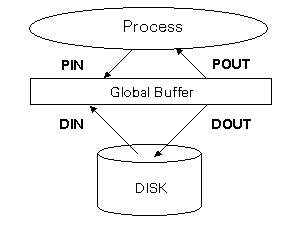
For Global Buffer partitions, statistics on each file are displayed. The DIN and DOUT fields indicate how many operations required data transfer from the disk to the buffer and from the buffer to the disk, respectively. The PIN and POUT report similar statistics for data transfers from a process to the buffer and from the buffer to a process, respectively.
The relationship between PIN, POUT, DIN and DOUT and the Global Buffer looks like this:
Figure 9-1: The relationship between PIN, POUT, DIN and DOUT and the Global Buffer
For Lock Manager partitions, the format of the report is identical to the one produced by empadm database_name lockstats.
The params option maps database files to specified shared memory partitions:
empadm database_name params params_file table_name [table_name ...]
The parameter file (params_file) is created by empshm params command. The params option will apply the parameter file to the table so that Empress will use the shared memory partition when accessing and/or locking the table.
A single parameter file can be used to map several tables to shared memory if a table list is specified. Once run, all accesses to the table will occur automatically via shared memory, as specified by the parameter file. The command DISPLAY table ALL from within the Interactive SQL Interface will show that the mapping to shared memory is in place.
To unmap a table from shared memory, you must map an empty file (or /dev/null) onto that table. For example:
empadm repairs params /dev/null loans personnel
unmaps from shared memory the tables loans and personnel.
The coordinfo option provides information about the coordinator:
empadm database_name coordinfo
The report includes details such as how the coordinator was configured when it was created, the current on-line backup state, the recovery log version number and a list of process information blocks which describe processes which are registered with the coordinator.
Here is sample output for the database named movies:
   Database: movies

   Header
       Max clients    Number of clients
              1024              1

   On-line Backup Status    Recovery Log
       Inactive
       Recovery Log Version Number = 0

   Process Information Blocks
      User Name   Client ID       Proc ID       Machine ID  Status
          smith    490243111        24669*    127.0.0.1      Inactive
The first section of the output shows that a maximum of 1024 processes may access the coordinator at one time and that only one process is accessing the database.
The second section reveals that nobody is performing an on-line backup, and that the current recovery log version is 0.
The last section lists information for each process currently accessing the coordinator. The User Name field shows the operating system user name of the owner of the current process. The Client ID field displays the Empress ID of the current process and the Proc ID field displays the operating system process ID of this process; an asterisk (*) is displayed beside the process ID of the current process. The Machine ID field displays the network address of the machine on which the process is running. Lastly, the Status field displays the coordinator status of the current process.
The coordclear option removes from the coordinator information about the client associated with the specified Empress process ID:
empadm database_name coordclear [-f] [empress_id ...]
Without -f specified, coordclear will only removed the client process IDs which are no longer active. If no clients process ID (empress_id) are specified, all non-active clients information will be removed from the coordinator.
If -f (force to remove) option is used, all clients information will be removed from the coordinator. When running the database integrity assurance checking utility (empclean), if the client information is cleared from the coordinator, empclean will assume that the client does not exist and will remove the client process. Use this option with caution.
The list of defunct empress_ids can be derived from an empadm database_name coordinfo command.
In the interest of speed, Empress compiles all information about tables and stores it in the data dictionary. The recompile_all and recompile options can be used to force a re-compilation of data dictionary entries:
   empadm database_name recompile_all
   empadm database_name recompile [table ...]
The recompile_all option recompiles the data dictionary information for all tables in the database. The name of each table is displayed as it is recompiled.
The recompile option recompiles the data dictionary information for tables whose compiled entry in the data dictionary is null. If a list of tables is specified, only the entries for those tables are recompiled.
The dblocation option allows you to determine the physical location of logical databases:
empadm database_name dblocation
If the database is accessed through a server, dblocation also displays the name of the host on which that server is running.
Below is an example for the database repairs which is in the user's home directory /home/staff/joe with the logical named repairs_db:
empadm repairs_db dblocation
will produce the following output:
/home/staff/joe/repairs
If database repairs resides on the machine with the host named gold, then the output of the above command will be:
gold:/home/staff/joe/repairs
The maxprocs option is used to change maximum number of simultaneous process of a database. The syntax of this command is:
| empadm database_name maxprocs | |licence |license |[N] |keep |
| [-f] | | | |
When licence or license is specified, the maximum number of simultaneous process of the database will be set to whatever the license key allows.
If empadm database_name maxprocs is used without specifying a number N, the maximum number of simultaneous process of the database will be set to the lower value of:
If number N is specified and N must less or equal to the number that license key allows, the maximum number of simultaneous process of the database will set to N. Otherwise, empadm prints an error message and exit.
Whenever the process limit is changed, the value of MSDBMAXPROCS in the data dictionary tabzero file will also be changed to reflect the current value. The keep option will refresh the setting of the maximum number of simultaneous process of the database to the value of MSDBMAXPROCS in the data dictionary tabzero file.
When maxprocs command is executed, other then setting the maximum number of simultaneous process to a database, it also affects the following areas:
The bigger the value of MSDBMAXPROCS, the bigger the coordinator file and the lock files would be. This affects the performance in comparison to the smaller value of MSDBMAXPROCS. For some databases that have less simultaneous users accessing the database will benefit in performance from setting smaller process limit.
The empadm database_name maxprocs command can only be executed when there is no active process. If empadm detects active process exists, it will print an error message and exit. If -f (force to execute) is used, empadm will print a warning message and proceed to make the changes. Use this option with caution.
The -help option of the empadm utility will display all options that are available. For example, the command:
empadm -help
will produce:
   *** Usage ***  empadm  [option] DATABASE command

   where option is:
    -help                     displays this message and exit
   and command is one of the following:
    coordinfo                 reports coordinator information
    coordclear [-f] [EID ...] removes coordinator entry where EID is Empress ID
    dbamode [on] [-i N|-q]    restricts access of DATABASE to DBA only
    dbamode off               releases the DBA only restriction of DATABASE
    dblocation                reports physical location of DATABASE
    lockbrief [TBL ...]       reports brief locking information
    lockclear [-f] [EID ...]  removes lock where EID is Empress ID
    lockinfo  [TBL ...]       reports locking information
    lockmanagers [TBL ...]    reports Lock Manager information
    lockremove                removes lock and lock files
    lockrststats              reset lock statistics
    locksactive [TBL ...]     reports a snapshot of the active locks
    lockstats [TBL ...]       provides a detailed report of Lock Manager statistics
    maxprocs [-f]             set no. of process limit of DATABASE to default value
    maxprocs license [-f]     set no. of process limit of DATABASE to maximum
    maxprocs licence [-f]     set no. of process limit of DATABASE to maximum
    maxprocs N [-f]           set no. of process limit of DATABASE to N
    maxprocs keep [-f]        uses the existing limit to remake the coordinator
    params FILE TBL ...       maps DATABASE files to shared memory using the
                              the parameter file FILE.
    recompile [TBL ...]       rebuilds the sys_dictionary record for the table TBL
    recompile_all             rebuilds the sys_dictionary record for each table
    shmclear                  clears the shared memory contents for the DATABASE
    shmcreate                 creates shared memory segments for DATABASE
    shminfo                   reports shared memory information
    shmrefresh                recreates shared memory segments of DATABASE
    shmremove                 removes shared memory segments of DATABASE
    shmrmall                  removes all shared memory segments of DATABASE
    shmrststats               reset the shared memory statistics of DATABASE
    shmstats                  reports the shared memory statistics of DATABASE
    shmzap                    removes shared memory segments and definitions
    singlemode [-i N | -q]["shell_command"]
                              allows the current process to access DATABASE in
                              single user mode