Figure 8-1: Empress Shared Memory
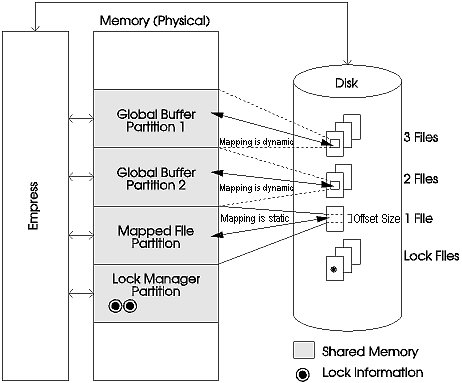
The Shared Memory feature provides users the ability to enhance the performance of the Empress RDBMS through the use of the system shared memory.
Shared memory is an operating system component that allows several processes to share a specified section of memory. Normally, each process has its own memory space and cannot access the memory space of another process. By using shared memory to reduce the file I/O, the database performance can be improved.
Empress uses shared memory in three different ways to provide enhanced performance: lock managers, global buffers and mapped files.
Figure 8-1: Empress Shared Memory
Empress uses locking to guarantee the information is correct when an access is made to a database. Locking prevents two users (or processes) from modifying the same data at the same time. It also prevents data from being read while it is being modified.
Normally, the lock information is stored in files. Locks are heavily accessed during database operations. Since interaction with system memory is significantly faster than I/O operations, the database performance can be improved by placing the lock information in shared memory.
Lock Managers allow placing of certain lock information in shared memory where processes can access it. Empress also allows the Lock Manager type (shared memory versus file) to be defined on a table-by-table basis. That is, some tables may be defined to use shared memory and some may continue to use files for managing locks.
Every time a process wishes to get data from a file, it must read that file. Global Buffers enable Empress to keep some or all parts of a file or many files in shared memory. This speeds up access and therefore increase performance.
Global Buffers are divided into blocks of memory. Depending on the file association to the Global Buffer, some or all of the blocks are assigned dynamically to parts of a file or files. If the file or files associated with a given Global Buffer contain more data than the Buffer can contain, then some of the blocks of the Buffer are overwritten with new data when required. This overwriting is managed by a least-recently-used (lru) algorithm. An lru algorithm assures that the Buffer block that was accessed least recently will be the one that is overwritten.
When data is written to a file that has a Global Buffer, the data is simultaneously written to the Global Buffer and the file. This is why the Global Buffers are called write-through buffers. This also means that the data in the Global Buffer will always reflect exactly the data in the file.
Mapped Files are similar to Global Buffers in that they store data from files in shared memory. However, a Mapped File in shared memory has only one file associated with it. Also a Mapped File is not divided into blocks. Instead, it is one large block of memory directly associated with a given section of a file. This means that the Mapped File is essentially a window into a given file. The window can be the entire file, part of the file beginning at the start of the file, or a section of the file beginning and ending at user-defined points.
Mapped Files must always have a one-to-one relationship with the file to which they are mapped. Any attempt to map two or more files to the same Mapped File will be allowed but will cause errors when the files are accessed.
Shared memory is a valuable resource on the system like many other resources. There is usually a trade-off between allocating large amounts of memory for shared memory in order to optimize performance of a database, and leaving sufficient memory available to the CPU and all processes to perform their tasks. Therefore, some general guidelines and suggestions are given below for the use of shared memory with a database:
Placing lock information in shared memory usually provides very significant performance gains. This is especially true if record-level locking or group-level locking is in place and the table is accessed frequently. Please note that locking for less frequently-accessed tables may still be done on disk.
Read-only or read-mostly files make the best candidates for placing in shared memory. When updates are made to a file which is mapped to shared memory, the in-memory image must be updated as well as the on-disk image. This is called write-through memory. Since an access to disk will always be required for updates to a file there are no gains to be made by using shared memory for updates, only losses incurred by the overhead of updating shared memory as well as disk.
Prime candidates, therefore, are files which are frequently read or which do not change much. Tables used for referential checks or tables used for reference only might be considered for placement in memory.
A read-to-write ratio greater than 50% may provide a rough guideline for consideration for placing the file in shared memory. The listing from empadm database shminfo shows the read ratio for both Mapped Files and Global Buffers.
The block size chosen for Mapped Files should not be smaller than the Empress block size for the system, usually 1024. This is because the block in memory will be smaller than the block of data that Empress must retrieve in each access, forcing Empress to go to disk each time even if part of the block is in shared memory.
If indices are used a lot then these can be placed in a Mapped File if the index is small enough (and not updated continuously) or in a Global Buffer if the index is large. If mapped to a Global Buffer, the section of the index needed will not always be in shared memory, but it may be available some of the time. The hit rate will be especially good if most users need a localized part of the index, such as the recent dates versus older dates.
This applies to files as well. The hit rate of large files in a Global Buffer can be improved if a particular part of the file is in use at one time, for example, the most recent additions to the end of a table.
sys_dictionary table inEmpress must be accessed each time any table is accessed, so all its files (main table, index and overflow file) should be considered for placement in a Global Buffer. The other Empress system tables are not normally placed in shared memory.
The use of shared memory on overflow files may be unpredictable since record lengths may vary a lot. The hit rate may be very low unless the Global Buffer is very large.
Do not place an index overflow file into shared memory without having the primary index file in as well. This is because access to the primary file is always required first in order to find the overflow segments. This is true even for an index configured with 0 bytes in the primary file.
The Global Buffer parameter MSPARTGBUFMAXFILES must always be chosen to be large enough to handle all files that may be required within that Global Buffer. When too many files are referenced within the Global Buffer, the system will fail. This is an important consideration especially when a default section is included in the parameter file. When a default is set up then all files associated with the table will be accessed through the Global Buffer. The Database Administrator must calculate what the maximum number of files can be, and set the variable accordingly.
In a network environment, shared memory should be installed on the machine where the database resides.
Statistics from the empadm database shminfo listing can provide some information for tuning shared memory.
Within Mapped Files the ratio of logical reads to logical writes indicates the extent of reading versus writing that occurs on the file. If the percentage of reads is high, this file is a good candidate for placement in shared memory. The read ratio is calculated for both Global Buffers and Mapped Files.
The read-hit ratio determines the percentage of reads that occur from the Mapped File or Global Buffer, not from disk. If this number is low the size of the Global Buffer or Mapped File should be increased, or the starting offset into the Mapped File should be changed, or shared memory should be removed from this file.
This section contains a quick guidelines to define, create, configure and use shared memory partitions with associated database tables. An option is also provided by empmkdb to map a new database to shared memory using default shared memory partition. Please refer to section Mapping Default Shared Memory to Database.
Steps for setting up shared memory:
empshm partitions partition_file
This utility will prompt you for information, as the result, a file containing ASCII text shared memory partitions information is created. This partition file is a temporary file which will be manually appended to the end of tabzero using the system editor (Step 6). The shared memory partitions information should be resided in tabzero. This is just a tool to automatically generate the information without great deal of typing.
Please refer to the section Defining Shared Memory Partitions for detail information and example.
If you want to place indices information in shared memory, they must all be named. If they are not named, you will have to drop and recreate them using the SQL DROP INDEX and CREATE INDEX commands.
Please refer to Empress SQL: Reference manual under Data Definition Command:
Create the parameter files which will map the file, indices and lock information for each table to particular shared memory partitions. This is done by running the following command at the operating system prompt:
empshm params param_file
Detail is described in the Defining Mapping Parameters to the Shared Memory section of this chapter.
Use the following command at the operating system prompt to ensure no other users (processes) are working in the database:
empadm database_name coordinfo
If no other users are working in the database clear all outstanding locks with the following command:
empclrlk database_name
empclrlk utility is described under the Manual Pages of this manual.
Now you are ready to create the shared memory partitions for the database but you must disable the database for other users. Issue the following command:
empadm database_name dbamode
This command will only allow Database Administrator (DBA) to access the database in single user mode. empadm utility is described under the Manual Pages of this manual.
Note that you can not reverse step 4 and 5 since empclrlk will clear all locks including the lock for the dbamode.
Append the partition file(s) to the end of tabzero by using the system editor. Several partition files describing different shared memory segments may be attached to a tabzero.
Create the shared memory partitions by:
empadm database_name shmcreate
Confirm that shared memory partition(s) were created correctly with:
empadm database_name shminfo
or using the UNIX command:
ipcs -m
All mappings can be made except for a mapping which places sys_dictionary lock file in memory. If this line:
MSPARTLOCKNAME=lock_manager_name
where lock_manager_name is a Lock Manager name, appears in the parameter file for sys_dictionary, it should be commented out by placing a ":" in the first character position of the line.
An example of a parameter file for sys_dictionary with the line commented out is provided below:
   MSPARTGBUFNAME=gbuf2

   MSPARAMLOCK
   :  MSPARTLOCKNAME=lockmgr2
   MSPARAMLOCKEND
If sys_dictionary table is one of the tables being mapped to shared memory then its parameter file must be appended to the end of tabzero. This is necessary so that access to sys_dictionary itself can be made. System editor is used to update the tabzero and the information must be presented in the following order:
For example:
   MSDBDICTPARAMS
      MSPARTGBUFNAME=gbuf2

      MSPARAMLOCK
      MSPARAMLOCKEND
   MSDBDICTPARAMSEND
If sys_dictionary lock file is also intended to place in memory, then the example above should look like:
   MSDBDICTPARAMS
      MSPARTGBUFNAME=gbuf2

      MSPARAMLOCK
   :        MSPARTLOCKNAME=lockmgr2
      MSPARAMLOCKEND
   MSDBDICTPARAMSEND
Please note that if sys_dictionary locking has been commented out during the "mapping" phase, it must remain commented out in tabzero until later (Step 13).
Map the parameter files to appropriate tables with the command:
empadm database_name params param_file table {table}
Verify that the associations were made correctly within the database by using the SQL command:
DISPLAY table ALL;
This command will show the shared memory information associated with that table.
Bring the database back up by logging out of dbamode.
If sys_dictionary locking should be handled in shared memory then uncomment the line that was commented out in step 9, i.e. in parameter file or in tabzero if applicable.
Then the new mapping of sys_dictionary to shared memory to include locking, can be made as follows:
empadm database params param_file sys_dictionary
The mapping of sys_dictionary locking cannot be done in the dbamode is because the dbamode has the effect of placing a lock on sys_dictionary. If while in dbamode the association of this locking is modified, then the unlock of the database cannot occur correctly. For this reason the mapping of all database files and locks to shared memory are done in dbamose, except for those relating to sys_dictionary.
The process of setting up shared memory is now complete and the database is ready for the uses.
The shared memory usage status can be checked by issuing the following command at the operating system prompt:
| empadm database_name | |shminfo |shmstats |
| | |
Should a problem arise, the shared memory partitions can be cleared and reset to their initial state using the command:
empadm database_name shmclear
To remove a shared memory partition, make sure there is no Empress activity on the database, then run the command:
empadm database_name shmremove
This command must be run if the shared memory definitions in tabzero are to be changed and before the tabzero is modified.
Shared Memory is divided into partitions. There are three type of partitions: Lock Manager, Global Buffer, and Mapped File. There can be any number of each type in shared memory but it is not necessary that all types be there. For example, shared memory could contain just one Lock Manager partition or it could contain three Lock Manager partitions, two Global Buffers and four Mapped Files. The only limitation on the number and size of each partition is the amount of memory in the system available for shared memory.
A partition file has a specific layout which is set up by empshm utility automatically. The example below shows how this utility works. User response is illustrated in the bold face.
In this example, a shared memory segment will be defined which will contain two Global Buffers, two Mapped Files and a Lock Manager. The command to create the partition file is:
empshm partitions part_file
and empshm will prompt for the following information:
   Enter your key number: 123456

   Is this partition to be used by sys_dictionary? n

   What type of partition do you want?
      LOCK for Lock Manager
      GBUF for Global Buffer
      MAPF for Mapped Files
      END to finish
   >   LOCK

   What is the partition name? Lock1

   What is the maximum number of processes that will access
   this Lock Manager? 64

   What is the maximum number of locks handled by this
   Lock Manager? 500

         MSPARTNAME=Lock1
         MSPARTTYPE=LOCK
               MSPARTLOCKNLOCKS=500
         MSPARTEND

   Is this information correct?   yes

   What type of partition do you want?
         LOCK for Lock Manager
         GBUF for Global Buffer
         MAPF for Mapped Files
         END to finish
   >   GBUF

   What is the partition name? Global1

   What is the number of files using this Global Buffer? 15

   What is the block size (in multiples of 512 bytes) in
   this Global Buffer? 2

   What is the number of blocks in this Global Buffer? 20

         MSPARTNAME=Global1
         MSPARTTYPE=GBUF
               MSPARTGBUFMAXFILES=15
               MSPARTGBUFBLOCKSIZE=1024
               MSPARTGBUFNBLOCKS=20
         MSPARTEND

   Is this information correct?
   yes

   What type of partition do you want?
         LOCK for Lock Manager
         GBUF for Global Buffer
         MAPF for Mapped Files
         END to finish
   >   GBUF

   What is the partition name? Global2

   What is the number of files using this Global Buffer? 15

   What is the block size (in multiples of 512 bytes) in
   this Global Buffer? 2

   What is the number of blocks in this Global Buffer? 20

         MSPARTNAME=Global2
         MSPARTTYPE=GBUF
               MSPARTGBUFMAXFILES=15
         MSPARTGBUFBLOCKSIZE=1024
         MSPARTGBUFNBLOCKS=20
   MSPARTEND

   Is this information correct?
   yes

   What type of partition do you want?
             LOCK for Lock Manager
             GBUF for Global Buffer
             MAPF for Mapped Files
             END to finish
   >   MAPF

   What is the partition name? Mapped1

   What is the size (in multiples of 512 bytes) of this
   Mapped File? 2

   What is the starting offset for this Mapped File? 0
         MSPARTNAME=Mapped1
         MSPARTTYPE=MAPF
               MSPARTMAPFSTART=0
               MSPARTMAPFSIZE=1024
   MSPARTEND

   Is this information correct?
   yes

   What type of partition do you want?
         LOCK for Lock Manager
         GBUF for Global Buffer
         MAPF for Mapped Files
         END to finish
   >   MAPF

   What is the partition name? Mapped2

   What is the size (in multiples of 512 bytes) of this
   Mapped File? 2

   What is the starting offset for this Mapped File? 0

         MSPARTNAME=Mapped2
         MSPARTTYPE=MAPF
               MSPARTMAPFSTART=0
               MSPARTMAPFSIZE=1024
         MSPARTEND

   Is this information correct?
   yes

   What type of partition do you want?
         LOCK for Lock Manager
         GBUF for Global Buffer
         MAPF for Mapped Files
         END to finish
   >   END
A file called part_file is created which contains the following information:
   MSSHMKEY=123456
   MSSHMPROTECTION=

         MSPARTNAME=Lock1
         MSPARTTYPE=LOCK
               MSPARTLOCKNLOCKS=500
         MSPARTEND

         MSPARTNAME=Global1
         MSPARTTYPE=GBUF
               MSPARTGBUFMAXFILES=15
               MSPARTGBUFBLOCKSIZE=1024
               MSPARTGBUFNBLOCKS=20
         MSPARTEND

         MSPARTNAME=Global2
         MSPARTTYPE=GBUF
               MSPARTGBUFMAXFILES=15
               MSPARTGBUFBLOCKSIZE=1024
               MSPARTGBUFNBLOCKS=20
         MSPARTEND

         MSPARTNAME=Mapped1
         MSPARTTYPE=MAPF
               MSPARTMAPFSTART=0
               MSPARTMAPFSIZE=1024
         MSPARTEND

         MSPARTNAME=Mapped2
         MSPARTTYPE=MAPF
               MSPARTMAPFSTART=0
               MSPARTMAPFSIZE=1024
         MSPARTEND

   MSSHMEND
The format of the partition file is as follow:
   Shared Memory Key
   Partition for Data Dictionary Indicator

      Partition Name -----------------------v
      Lock Manager Partition                |
         Maximum Processes                  |
         Number of Locks                    |
      End Lock Manager                      |
                                            |
            .                               |
            . (zero or more)                |
            .                               |
                                            |
      Partition Name                        |  Partition
      Global Buffer Partition               |      Definitions
         File Maximum                       |
         Block Size                         |
         Number of blocks                   |
      End Global Buffer                     |
                                            |
            .                               |
            . (zero or more)                |
            .                               |
                                            |
      Partition Name                        |
      Mapped File Partition                 |
         Offset                             |
         Size                               |
      End Mapped File      -----------------^

   End Shared Memory Definition Indicator
The contents of the file is discussed below.
The first entry in the partition file is the key. The key is a user-defined number that the system uses to identify a given shared memory block. This number is arbitrary, but each site should have a procedure to assign keys. All databases that want to use the same shared memory block must use the same key to identify it. It looks like this:
MSSHMKEY=123456
Next comes the Empress variable MSSHMPROTECTION. If this partition is used by sys_dictionary, this should be set to "on" to get special protection on the shared memory partition. If it is not used by sys_dictionary then this variable will be unset. It looks like this:
MSSHMPROTECTION=on
There can be any number of partitions in any order. All the partition definitions have the same first two lines. They are name and type, in that order. The partition name is any string of characters whose length is less than 32 (any more will be truncated). A partition name from the example looks like this:
   MSPARTNAME=Lock1
   MSPARTNAME=Global1
   MSPARTNAME=Global2
   MSPARTNAME=Mapped1
   MSPARTNAME=Mapped2
empshm partitions will calculate the size of a partition automatically. There are three partition types that can be chosen: LOCK, GBUF, MAPF for Lock Manager, Global Buffer, and Mapped File respectively. Partition type from the example looks like:
   MSPARTTYPE=LOCK
   MSPARTTYPE=GBUF
   MSPARTTYPE=GBUF
   MSPARTTYPE=MAPF
   MSPARTTYPE=MAPF
Each partition type has unique parameters that must be defined:
The Lock Manager parameter is: number of locks.
The number of locks is the maximum that this Lock Manager can handle. If there are no more locks available, an error message will be displayed and the process halted. The rule of thumb for determining this number is that it should be proportional to the number of database users and proportional to the total number of actively used records in the database. The entry looks like this:
MSPARTLOCKNLOCKS=500
The parameters unique to a Global Buffer are: maximum number of files, block size and number of blocks.
The file maximum is the ceiling on the number of files that can be accessed using this Global Buffer. The entries for both Global1 and Global2 in the example look like this:
MSPARTGBUFMAXFILES=15
The block size determines the size of each block in the Global Buffer. It should be a multiple of the file system block size for optimal input and output. Multiples of 512 bytes are a good starting point. The entries for both Global1 and Global2 in the example look like this:
MSPARTGBUFBLOCKSIZE=1024
The block number is the number of blocks in this Global Buffer. It should be chosen so that the most actively used data is always in the Global Buffer. This parameter will probably require tuning. The shared memory administrative program, empadm, will provide statistics to assist in the tuning. The entries for both Global1 and Global2 in the example look like this:
MSPARTGBUFNBLOCKS=20
A Mapped File partition has two unique parameters: starting offset and size. The starting offset is the offset from the start of the file where the mapping will begin (i.e., the start of the file window). The entries for both Mapped1 and Mapped2 in the example look like this:
MSPARTMAPFSTART=0
The size should be chosen to hold the most often used data, or if the file is small enough, perhaps even the entire file. The entries for both Mapped1 and Mapped2 in the example look like this:
MSPARTMAPFSIZE=1024
The end of each partition is indicated by the line:
MSPARTEND
The end of shared memory definition is indicated by the line:
MSSHMEND
After shared memory has been defined and the segment created, the files and locks from the database must be associated to the various shared memory partitions. A mapping parameter file must be created to hold details of how one table will map to shared memory. Each table in the database that maps to shared memory will have a mapping parameter file. However, it is not necessary that each table have a unique mapping parameter file.
It is possible to use the same mapping parameter file for different tables in a database, but the one-to-one association between a Mapped File and an actual database file must be maintained.
The mapping parameter file can be generated automatically using the utility empshm. An example is provided below.
This example will use the partitions defined in the previous example to set up a parameter file. The command to generate the parameter file is:
empshm params param_file
and empshm will prompt for the following information:
   Do you want to use Global Buffers for all the files in
   this table? yes

   Enter the name of the Global Buffer partition: Global1

   Do you want to specifically associate the main data file
   to a shared memory partition? yes

   Enter MAPF for a mapped file or GBUF for a global buffer: GBUF
   Enter the name of the 'global buffer' partition: Global2

   Do you want to specifically associate any variable-length data overflow
   files to a shared memory partition? yes

   What is the name of the attribute? attribute_1

   Enter MAPF for a mapped file or GBUF for a global buffer: GBUF

   Enter the name of the 'global buffer' partition: Global2

   Do you want to enter another attribute name? no

   Do you want to specifically associate any index files to a shared
   memory partition? yes

   What is the name of the index to be accessed? index_1

   Enter PRIMARY for a primary index, OVERFLOW for an
   overflow index, or BOTH for primary and overflow: PRIMARY

   Enter MAPF for a mapped file or GBUF for a global
   buffer: MAPF

   Enter the name of the 'mapped' partition: Mapped1

   Do you want to specifically associate an overflow index to a shared
   memory partition? yes

   Enter MAPF for a mapped file or GBUF for a global buffer: MAPF

   Enter the name of the 'mapped' partition: Mapped2

   Do you want to enter another index name? no

   Are there any Lock Manager Partitions defined in shared
   memory? yes

   What is the partition name of the Lock Manager? Lock1
A file called param_file is created which contains the following information:
   MSPARTGBUFNAME=Global1

   MSPARAMTABLE
         MSPARTGBUFNAME=Global2
   MSPARAMTABLEND

   MSPARAMATTRNAME=attribute_1
         MSPARTGBUFNAME=Global2
   MSPARAMATTRNAMEND

   MSPARAMINDEXNAME=index_1
         MSPARAMINDEXPRIMARY
               MSPARTMAPFNAME=Mapped1
         MSPARAMINDEXPRIMARYEND
         MSPARAMINDEXOVERFLOW
               MSPARTMAPFNAME= Mapped2
         MSPARAMINDEXOVERFLOWEND
   MSPARAMINDEXNAMEND

   MSPARAMLOCK
         MSPARTLOCKNAME= Lock1
   MSPARAMLOCKEND
File can be divided into five parts: default mapping, mapping of main data (.rel) file,
mapping of the variable-length data overflow (.dtf) files,
mapping of the index (.ix and .ixl) files and mapping of the lock (.lck) files. None of these sections are mandatory. However, the order is essential and at least one section must be included. There can be multiple tables, variable-length data overflow and index files. However, only one default mapping and one mapping for the lock files can exist in a given parameter file.
You can map all main data file, index files and overflow files that are associate to the table into one Global Buffer as default. This is to respond yes to the prompt:
   Do you want to use Global Buffers for all the files in
   this table? yes

   Enter the name of the Global Buffer partition: Global1
If this is all you intended to do, answer no to the rest of the prompt. The result mapping parameter file will look like this:
   MSPARTGBUFNAME=Global1

   MSPARAMLOCK
   MSPARAMLOCKEND
This will have all the files associate to the table in the shared memory except lock files. If Lock Manager partition is defined and you wish to include locking in the shared memory, then respond yes to the following prompt:
   Are there any Lock Manager Partitions defined in shared
   memory? yes

   What is the partition name of the Lock Manager? Lock1
Then you will have all files (including locking) that are associate to the table in the shared memory. The mapping parameter file will look like this:
   MSPARTGBUFNAME=Global1

   MSPARAMLOCK
       MSPARTLOCKNAME=Lock1
   MSPARAMLOCKEND
Whether you choose to use the default mapping or not, you can specifically assign the association between the main data file (all data in the table without the variable-length, ie. TEXT or BULK, overflow data) and the shared memory partition (either Global Buffer or Mapped File). This will override the default setting of the main data file. For example:
   Do you want to use Global Buffers for all the files in
   this table? yes

   Enter the name of the Global Buffer partition: Global1

   Do you want to specifically associate the main data file
   to a shared memory partition? yes

   Enter MAPF for a mapped file or GBUF for a global buffer: GBUF
   Enter the name of the 'global' partition: Global2

   Do you want to specifically associate any variable-length data overflow
   files to a shared memory partition? no

   Do you want to specifically associate any index files to a shared
   memory partition? no

   Are there any Lock Manager Partitions defined in shared
   memory? yes

   What is the partition name of the Lock Manager? Lock1
This produces the following mapping parameter file:
   MSPARTGBUFNAME=Global1

   MSPARAMTABLE
       MSPARTGBUFNAME=Global2
   MSPARAMTABLEND

   MSPARAMLOCK
       MSPARTLOCKNAME=Lock1
   MSPARAMLOCKEND
This defines the main data file of the table in Global2 Global Buffer partition, lock file in the Lock1 Lock Manager partition and the rest of the files, if exist, (such as index files and variable-length data overflow files) in the Global1 Global Buffer partition.
Whether you choose to use the default mapping or not, you can specifically assign the association between the variable-length, ie. TEXT or BULK, data overflow file and the shared memory partition (either Global Buffer or Mapped File). This will override the default setting of the main data file. For example:
   Do you want to use Global Buffers for all the files in
   this table? yes

   Enter the name of the Global Buffer partition: Global1

   Do you want to specifically associate the main data file
   to a shared memory partition? no

   Do you want to specifically associate any variable-length data overflow
   files to a shared memory partition? yes

   What is the name of the attribute? attribute_1

   Enter MAPF for a mapped file or GBUF for a global buffer: GBUF

   Enter the name of the 'global' partition: Global2

   Do you want to enter another attribute name? no

   Do you want to specifically associate any index files to a shared
   memory partition? no

   Are there any Lock Manager Partitions defined in shared
   memory? yes

   What is the partition name of the Lock Manager? Lock1
This produces the following mapping parameter file:
   MSPARTGBUFNAME=Global1

   MSPARAMATTRNAME=attribute_1
       MSPARTGBUFNAME=Global2
   MSPARAMATTRNAMEND

   MSPARAMLOCK
       MSPARTLOCKNAME=Lock1
   MSPARAMLOCKEND
This defines the variable-length data overflow file of the attribute name attribute_1 in Global2 Global Buffer partition, lock file in the Lock1 Lock Manager partition and the rest of the files (such as main data file and any index files) in the Global1 Global Buffer partition.
Whether you choose to use the default mapping or not, you can specifically assign the association between the index file and the shared memory partition (either Global Buffer or Mapped File). This will override the default setting of the main data file.
The index overflow file (.ixl) can share the same Global Buffer, or each can have its own association to a Global Buffer or Mapped File. Indices must be named to use this feature.
However you should be aware that if Mapped Files are used to access index files, it is possible for the index file to grow so that all parts of the file can no longer fit into the associated Mapped File.
For example, to assign both primary and overflow index to the same Global Buffer, use an entry like this:
   MSPARAMINDEXNAME=index_1
       MSPARTGBUFNAME= Global1
   MSPARAMINDEXNAMEND
To assign just the primary index to a Global Buffer use an entry like this:
   MSPARAMINDEXNAME=index_1
       MSPARAMINDEXPRIMARY
           MSPARTGBUFNAME=Global1
       MSPARAMINDEXPRIMARYEND
   MSPARAMINDEXNAMEND
To assign just the primary index to a Mapped File use an entry like this:
   MSPARAMINDEXNAME=index_1
       MSPARAMINDEXPRIMARY
           MSPARTMAPFNAME=Mapped1
       MSPARAMINDEXPRIMARYEND
   MSPARAMINDEXNAMEND
To assign just the overflow index to a Global Buffer use an entry like this:
   MSPARAMINDEXNAME=index_1
       MSPARAMINDEXOVERFLOW
           MSPARTGBUFNAME=Global1
       MSPARAMINDEXOVERFLOWEND
   MSPARAMINDEXNAMEND
To assign just the overflow index to a Mapped File use an entry like this:
   MSPARAMINDEXNAME=index_1
       MSPARAMINDEXOVERFLOW
           MSPARTMAPFNAME=Mapped1
       MSPARAMINDEXOVERFLOWEND
   MSPARAMINDEXNAMEND
Both primary and overflow indices can have it's own specific associations:
   MSPARAMINDEXNAME=index_1
       MSPARAMINDEXPRIMARY
           MSPARTGBUFNAME=Global1
       MSPARAMINDEXPRIMARYEND
       MSPARAMINDEXOVERFLOW
           MSPARTMAPFNAME=Mapped1
       MSPARAMINDEXOVERFLOWEND
   MSPARAMINDEXNAMEND
Regardless default mapping, if Lock Manager partition is defined and you wish to have locking of the table in the shared memory, you need to respond "yes" to the following prompt:
   Are there any Lock Manager Partitions defined in shared
   memory? yes

   What is the partition name of the Lock Manager? Lock1
The mapping parameter file will look like this:
   MSPARAMLOCK
       MSPARTLOCKNAME=Lock1
   MSPARAMLOCKEND
If default mapping is used and you do not wish to use shared memory to handle locking, an empty lock section must be included in the parameter file. For example:
   MSPARTGBUFNAME=Global1

   MSPARAMLOCK
   MSPARAMLOCKEND
Empress provides utility, empadm, to help the Database Administrator to manage shared memory. It is used for:
This utility is also used for:
The command syntax for temporarily disabling user access to the database is:
empadm database singlemode
This command can only be issued by the Database Administrator (DBA) and will place a database lock so that no one other than a single DBA process can access the database. After the lock is placed, another shell process is brought up. The shell is the one specified in the Empress variable MSSHELL. The Database Administrator should perform all necessary work on the database and on the shared memory configuration while in this shell. Any work that requires a quiet database such as backups or table alters can be done.
The database is re-enabled again by simply logging out of the singlemode shell process. The database lock will be removed.
singlemode should not be invoked when modifications will be made to the sys_dictionary locking. This is because singlemode disables the database by placing a lock on sys_dictionary. If the association for sys_dictionary locking is changed or if all locks on the database are cleared, then upon return from singlemode, the database lock cannot be released correctly.
If there are sys_dictionary locks that require clearing or if the association for its locking is changed in any way, this work must take place outside of singlemode. The Database Administrator must manually confirm that no other users are in the database while this work is in progress.
The command syntax for creating shared memory partitions from tabzero is:
empadm database shmcreate
Only the Database Administrator can run this command.
The definition of shared memory partitions is created by the utility empshm partitions. This produces a partition file which is appended to the tabzero file of the database. The partition information will provide details of each shared memory partition such as name, type (Global Buffer, Lock Manager or Mapped File), size, and other characteristics of the partition. There may be several partition files attached to the tabzero file.
The starting address of the shared memory partition can be provided in the partition file. A range of addresses (ex: 8000000 - 18000000) can also be given. In any case the system will attempt to attach at the exact address given or the high address of the range. If the attachment cannot be made there, the system will automatically decrement the address by 1 MB each time it fails thereby moving down the address space until a successful attachment is made or the range of free memory space is exhausted.
The permissions on the shared memory segments are set to allow read and write permissions to everyone. This may change in future versions.
The partitions will be created in shared memory as specified. They are not yet mapped to any database files. This is done with the "empadm database params" option.
Each database must have its own partitions set up in shared memory. This command therefore must be run on each database separately with unique partition information.
Please note that you will need to run this command again after a system crash since shared memory establishment will no longer exist after system crash.
To check that the shared memory partition was created as expected, the user can run "empadm database shminfo" or can use the standard UNIX command "ipcs -m -a" to list shared memory segments.
The command syntax for mapping database files and locks to specific shared memory partitions is:
empadm database params param_file table {table}
To run this command the user must have update privilege on sys_dictionary and sys_tables and must be the Database Administrator.
This command will associate specific files (such as the main index file for example) or all files (main data file, overflow files, index files) and locks to specific partitions in memory. This must be done for each table which will map to shared memory or which will have locking in shared memory. The parameter file is created by the utility empshm params.
The mappings can be verified by using the SQL command:
DISPLAY TABLE table_name ALL;
The parameters are stored in the data dictionary for each table. They can be easily changed by re-applying the empadm command with a different parameter file. The mapping to shared memory can be removed by using a parameter file which contains only a space or linefeed.
If sys_dictionary is mapped to shared memory, its parameter file must be placed in tabzero surrounded by the following delimiters:
   MSDBDICTPARAMS
        :
        : (copy the full parameter file for sys_dictionary here)
        :
   MSDBDICTPARAMSEND
This is required because sys_dictionary table contains information about all user tables in the database. Empress will access sys_dictionary before any other table in the database for information. Since sys_dictionary itself is a database table, all locking, indexing and shared memory features are applicable to this table. tabzero is an ASCII text file which contains information about sys_dictionary so that Empress will know to access index file, shared memory, ... etc. before accessing the sys_dictionary table.
Please note also that all table mappings other than that for locking on sys_dictionary should take place within dbamode while the database is temporarily disabled.
The command syntax for listing the database locking and shared memory information is:
| empadm database | |lockbrief |lockmangers |lockactive |lockinfo |shminfo |shmstats |
| | | | | | |
These commands can be run on a database that is currently in use.
The lockinfo option will produce a full listing of all locks currently held within the database, whether in shared memory or on file. The table name, type of lock, record number, status (read, update, etc.) and Empress ID of the process will be given for each lock. A summary of all users holding locks, along with their user name, process ID and host ID is also given.
The other lock listing provide shorter reports than lockinfo does. The lockactive report lists only all active locks. The lockbrief report lists all active locks plus active process information. The lockmanagers report lists all Lock Manager information plus all active locks.
The shminfo option provides basic details about the set up parameters of the partitions. The name, type of partition and location are provided. For Global Buffers, the size is given as well as the read hit ratio (percentage of reads that are done in shared memory without the need to go to disk) and the read ratio (percentage of reads to writes). For Mapped Files, the size and start address is given along with the read hit ratio and the read ratio. For Lock Managers, the size details are provided.
The shmstats option shows configuration details and raw statistics gathered. For Global Buffers, the DIN (disk in to shared memory), DOUT (shared memory out to disk), PIN (process in to shared memory) and POUT (shared memory out to process) figures are displayed. For Mapped Files, the statistics for read from shared memory, read from disk, write to shared memory, and write to disk are given.
The shmstats option also provides lock information including the number of processes acceding the lock partition, the maximum number of processes, the current number of locks, the maximum number of locks, and an indication of the efficiency of the hashing algorithm used for the Lock Manager. The number of hits on each has bucket is gathered. It is grouped on the basis of the number of hits. For each number of hits, the number of hash buckets having the same number of hits and the bucket number is printed. Also, the number of buckets with a hit percentage greater than 60% is printed. This will indicate whether the hashing function is evenly distributed or not. The maximum chain length for each hash bucket is gathered and grouped by chain length.
The command syntax for clearing locks is:
empadm database lockclear [empress_id {empress_id}]
This command requires that the user have read access to sys_dictionary. Only the Database Administrator can invoke this command without a list of Empress IDs. If a list of Empress IDs is given, the user must be either the Database Administrator or the owner of the processes attached to the IDs.
The lockclear option will clear locks whether they are stored in Lock Manager partitions in shared memory or on disk. If a list of Empress IDs is supplied, only the locks pertaining to those processes will be removed. If a list of Empress IDs is not supplied, all locks in shared memory and on disk for that database will be cleared.
The Empress ID is obtained by running the lockinfo option.
Please note that the Empress variable MSSHMPROTECTION does not prevent the commands "empadm database lockclear" or empclrlk from removing locks in that partition. This is in contrast to the empadm option shmremove and shmclear which will be prevented from clearing partitions that have this variable set.
Since locks cannot be protected, and because a database lock is required when in dbamode, the commands empadm database lockclear and empclrlk should not be used while in dbamode.
The command syntax for clearing shared memory is:
empadm database shmclear
The user must have read access to sys_dictionary and must be the Database Administrator.
The shmclear option will clear information in all shared memory partitions. This command is similar to empadm database shmremove followed by empadm database shmcreate. The shmclear option is useful when a program corrupts memory.
The variable MSSHMPROTECTION can protect shared memory partitions from the shmclear option. If this variable is set both shmremove and shmclear cannot touch the partition. This variable should be set to protect partitions which reference sys_dictionary. If this variable is set, the option shmrmall must be used to remove the partition.
The command syntax for resetting lock and shared memory statics information is:
| empadm database | |lockrststats |shmrststats |
| | |
The user must have read access to sys_dictionary and must be Database Administrator.
The lockrststats option will clear all information gathered so far regarding locks. (The gathered lock statistics are viewed using the shmstats option.) Statistics will begin to be gathered again after resetting.
The shmrststats option will clear information gathered for Mapped Files and Global Buffers. This option will not reinitialize the shared memory partitions itself, just the statistics associated with them. After running for some time, the new statistics can be viewed by running the empadm with the shmstats option.
The command syntax for removing shared memory partitions is:
| empadm database | |shmremove |shmrmall |shmzap |
| | | |
Only the Database Administrator can run these commands.
Since the shared memory segment is created with permissions much like a file, the user must have write permission on the shared memory segment in order to delete it.
Once the command has run, the shared memory segment is removed completely. That address space as well as unique partition IDs can be reused.
Before using the database again the partition information in tabzero must be completely removed. Otherwise, Empress will still attempt to use shared memory with the database.
The Empress variable MSSHMPROTECTION is provided in tabzero to prevent inadvertent removal of crucial shared memory partitions. If it is set to anything, the shmremove option will not remove those shared memory partitions; if it is unset, then shmremove will remove the partitions. It is recommended that this variable be set for partitions that map the table sys_dictionary to shared memory.
The option shmrmall is used to remove all partitions regardless of MSSHMPROTECTION. Please note that the Database Administrator should not be in dbamode when issuing shmrmall.
The option shmzap will remove all shared memory segments, even if the variable MSSHMPROTECTION is set. This includes the partition information in tabzero of all shared memory definitions. The database will be left without any connection to shared memory.
An option is provided by empmkdb to map a new database to shared memory. It will append a shared memory partition file to tabzero file which will in turn map all locks to a shared memory lock partition, map the coordinator to a shared memory Mapped File and map all tables to a shared memory Global Buffer. The usage is as follows:
empmkdb -shmem shm_key database_name
The shared memory key, shm_key, must be provided. This is a positive integer which uniquely identifies this shared memory block. Each database mapped to shared memory must have a unique shared memory key.
The partition file mapped by default to new databases is found in $EMPRESSPATH/rdbms/custom/shmzero. This file defines the Lock Manager, Mapped File and Global Buffer partitions that will be used.
If the default shared memory mapping is not desired, the user can either edit $EMPRESSPATH/rdbms/custom/shmzero, or can set the Empress variable MSSHMZERO to an alternate Mapping File.
Please be aware that the default shared memory mapping contains upper limits regarding the maximum number of simultaneous locks that can be supported (2000), and the maximum number of database files (500). If either of these limits is exceeded the database will produce error messages, and it will be necessary to remove the partitions and map larger ones to shared memory.
Shared memory cannot be added to a database with empmkdb once the database already exists. The command emprmdb will automatically remove shared memory partitions when the database is removed.