The design of both databases and the applications that run on them is typically constrained by two needs:
Since one of these objectives is usually achieved at the expense of the other, the challenge to Database Administrators and Application Developers is to reach a balance between them which best meets the needs of the system's users.
In most cases, data integrity is the primary concern. Processes which write to a database (e.g., insert, update, delete) have the potential to damage its integrity, and so must be regulated in their actions. With Empress, access to the database is mediated by the database engine, which governs a process's access to data, while maintaining its integrity by making the data secure from modification by any other processes. The mechanism which it uses to achieve this is known as locking.
The balance between process concurrency and speed which must be struck with locking is exhibited by processes which write to the database (either through insert, update or delete operations): any process performing these operations may cause data access restrictions to other processes, and hence can give rise to process bottlenecks. Empress allows users to tailor their applications so that these bottlenecks can be reduced by choosing locking schemes which are appropriate.
Database Administrators and Developers of database applications are the intended audience of this document, since the locking mechanism should ideally be invisible to the end user. This happy situation is achieved when:
By understanding locking in Empress, the trade-offs inherent in locking can be minimized, and solutions to lock contention issues can be realized.
In this document, we discuss locking in Empress as implemented in Version 8. Most other Empress versions (V6.x, V4.x) will be similar to what is described here, with differences occurring mostly in minor implementation details (such as new MSxxx variables, the timing of lock placement, etc.). Old versions of Empress (V1.x, V2.x) may differ in more substantial ways from what is described in this document.
This chapter covers the following topics:
Basic Aspects of Locking:
Miscellaneous Aspects of Locking:
Managing Locks:
Monitoring Locks:
Tuning Empress Locking:
In Empress, you can think of locks in any of three ways (categories) which correspond to rather broad divisions of the locking mechanisms on a logical and physical basis. The categories are as follows:
Table 12-1: Empress Locking Categories
| Category | Description |
| Operational | Locks on the tables and views in a database's schema can be controlled by the user by specifying broad protocols for locking these entities. These determine what sorts of locks (at the relational category) Empress will place when implicit lock placement occurs. A protocol is chosen by the user to ensure a desired amount of data integrity; typically, a trade-off exists between increased data integrity and decreased process concurrency. |
| Relational | The locks in this category deal with such lower-level entities as data files, index files, and records. Locks are placed on tables explicitly or implicitly and operational category locks are translated into a set of relational locks on lower-level objects. While locks in this category should be somewhat transparent to the user, the issues of concurrency and efficiency often require the user to be aware of its workings. |
| Physical | Locks in this category are actually manifested as entries in a file or a shared memory partition. |
The operational category defines a protocol by which locks are placed. The locks which get placed are described in the relational category, and the interaction between locks is determined by the physical category. The Lock Manager deals exclusively with physical locks, and so locking operation (and hence, conflict) can be understood as an interaction of physical locks. In turn, the presence of these physical locks can be understood from the relational and operational categories.
In general, while locks at the higher levels are implemented at the lower ones, locks at the lower levels cannot be associated directly with anything in the higher level: their operations are independent. For example, in the operational category there is the concept of table-level locking. However, in the relational category, there is no such entity as a table lock. Instead, there are collections of locks of various flavours which correspond to the concept of table-level locking.
All locking in Empress is defined on a per-table basis. Whenever a table is opened (to read or update a set of records), the sets of locks which will be placed are determined by the implicit lock level of the table, or by explicitly opening the table at a specific lock level or in a specific mode. Refer to the section Managing Locks in this document for a summary of the more common user commands explicitly affecting locking.
The lock level determines the scope of locking applied to a table. It is specified by the table creator, and can be modified by any authorized user (refer to the GRANT PRIVILEGE command in the Empress SQL: Reference manual). The possible lock levels are summarized in the following table:
Table 12-2: Lock Level
| Lock Level | Description |
| record | Each record is locked individually as needed; the lock is released when the next record is accessed. |
| group | All records in the group are locked; the locks are released when the next group is accessed. A group is the set of records which Empress must access to satisfy the WHERE clause. Note that in many cases this does not mean that just those records satisfying the WHERE clause are locked: if there is no indexing on the attributes in question, Empress must search the whole table for qualified attributes. In this case, group and table-level locking are identical. |
| table | When any table is opened (to access any number of records in that table), the entire table is locked. |
| null | When a table with null level locking is opened, no locks are placed on that table. |
Note, however, that record, group or table locks do not exist per se: these locks are conceptual, and define a scheme of locking which is carried out by placing a series of locks from the relational category.
Another aspect of the operational category is the open mode of a table. The possible modes in which any table may be opened are:
Table 12-3: Open Table Lock Mode
| Symbol | Mode | Description |
| r | read | A read lock will be placed on the table. Attempts to update, delete or insert will fail (since these require the table to have an update lock on it). |
| d | deferred | read locks are initially placed on a table. The table is not prevented from update, deletion or insertion operations. However, when these operations occur, the read lock which was initially placed on the table will be upgraded to an update lock. Once the operation is complete, this will be downgraded to a read lock. |
| u | update | An update lock will be placed on the table. |
| n | dirty read | No read lock will be placed (bypass any locks) when retrieving records. Attempts to update, delete or insert will fail. |
| N | deferred dirty read | An update lock will be placed on the table initially. If an update, insert or delete operation is performed, normal locking behavior applies. However, if a retrieval is performed, will get data bypass any locks. |
We begin by looking at the objects which are locked by Empress, since these are directly related to relational category locks.
In the course of servicing user requests, Empress must decide which objects it needs to access, and for what purpose (i.e., for reading or writing). For example:
INSERT INTO table_name VALUES (1, "abcdefghijklmnopqrstuv");
Where the first attribute is indexed, and the second attribute is of type TEXT. This operation causes Empress to:
Open the table:
Read the free record list of the table to find which free space in the .rel file can be used (or reused) for the insert;
Insert the record including insert the data into the overflow (.dtf) file, if necessary.
Update the free list;
Update the index;
Close the table:
In general, Empress may require access to any of the following objects in the course of its operation; and for each object, certain types of relational category locks are used:
Table 12-4 Relational Category Locks on the Objects
| Object | Lock Type |
|
ADMIN CRIT RECORD, ALLRECS |
| .dtf files | CRIT |
| .ix and .ixl files | CRIT |
Of these, the table header deserves special explanation: it contains a pointer to the free record list, as well as a free record counter.
| Every table has a free record list (referred to as the table's free list), which is a (singly) linked list of records which can be used to store new data. Thus, as records are deleted from a table, pointers to the deleted records are added to the end of the list (thus, deleting records does not make a .rel file physically smaller) and the information stored in the .rel file header is updated. Similarly, inserting records to a table also makes use of the free list (thus, inserting records does not necessarily make a .rel file larger). |
Any process which modifies a table's free list (for example, through insert or delete operations) must have exclusive access to it, since otherwise inconsistencies might arise which could compromise the integrity of the data. For this reason, Empress applies a CRIT lock during any of these operations.
Locks in the relational category are described in terms of their mode and type. There are two important points to be made regarding how lock type and mode affect conflict between locks:
Locks can be of various types, and locks of different types can never interfere. Only locks with the same type can cause locking conflict.
Within locks of the same type, the lock mode determines its compatibility with other locks.
The possible lock types are:
Table 12-5 Lock Types
| Type | Description |
| ADMIN | These are placed to indicate that a table is being used (i.e., opened for some reason). |
| CRIT | These are placed whenever a time-critical resource is used. Examples of such resources are indices, table free lists, and table overflow files. |
| RECORD_n | These are placed whenever the nth record in the table is accessed; n is the physical record number in the table. |
| ALLRECS | These are placed for efficiency. They indicate that at least one record in the table is being accessed. |
The possible lock modes are r and rr (for read operations), u and uu (for update operations). The compatibility of locks of the same type, but different mode, is given in the following table. Here, a yes at the intersection of column A and row B means that locks with modes A and B can co-exist. Similarly, no means that the desired lock B cannot co-exist with the existing lock A: the process desiring to place lock B must wait until the existing lock A is released by the process which placed it.
Table 12-6: Compatibility of Lock Modes of the Same Lock Type
| Lock Mode | rr |
r |
uu |
u | |
rr |
yes |
yes |
yes |
no | |
r |
yes |
yes |
no |
no | |
uu |
yes |
no |
yes |
no | |
u |
no |
no |
no |
no |
Note that a lock of any type may have mode r or u. Only a lock of type ALLRECS may have mode rr or uu.
The rr and uu lock modes were introduced with the ALLRECS lock type. An ALLRECS lock is acquired by Empress when any operation is done on a table. It indicates the presence of an operation (i.e., read or update) somewhere in the table, and was introduced to make the (operational) implicit table-level locking scheme more efficient.
Under the table-level locking scheme, read and update operations will attempt to acquire r and u ALLRECS locks (respectively); under record-level locking, read and update operations will first attempt to acquire rr and uu ALLRECS locks (respectively). Examination of the lock mode compatibility table (above) will show that u locks cannot co-exist, whereas uu locks can. By using ALLRECS locks, Empress can implement a table-level locking scheme, as well as a record-level locking scheme, using the same physical locking mechanism.
Occasionally, you may see a mode reported (see the section Monitoring Locks in this document) as rr|uu. This will only occur for ALLRECS type locks, since the "|" symbol means that both types of locks (rr and uu) are present. Thus, an ALLRECS rr|uu indicator would mean that some records in the table had read locks (r) on them, while others had update (u) locks.
Empress places relational category locks by sending lock requests to the Lock Manager (see the subsection Physical Category Locks ). Lock requests are sets of statements to the Lock Manager to place or release one or more locks on a given table. For each operation it is asked to perform, Empress chooses which sets of locks it needs to place or release for each step of that operation, and then sends a request to the lock manager to carry out this set of locking operations.
Every lock request has one of three results:
| a) | success, |
| b) | failure, because exclusive access to the Lock Manager was not attained, |
| c) | failure, because at least one of the locks requested to be placed was refused by the Lock Manager. |
In case a), all the individual requests succeed. In case b), none of the individual requests succeed. In case c), if any individual lock placement is refused (because of a conflict detected by the Lock Manager), then all lock placements in the request will fail. However, all lock releases in the request will succeed.
For example: suppose the placement of an ADMIN and CRIT lock on table table_name occurs in a single lock request. If the ADMIN lock could be successfully placed, but the CRIT lock could not, then the entire request would fail, and neither lock would be placed.
For more details on which relational category locks get placed in response to various SQL queries, see the section Monitoring Locks in this document.
The Empress Lock Manager deals exclusively with physical category locks. The task of the Lock Manager is to arbitrate the acquisition and release of locks. To the Lock Manager, a lock is simply an object with properties determining how it is acquired and released. Properties which are inherent to a lock include the following:
When the Lock Manager receives a request to place a lock, it gathers all this information and then checks whether the lock can be placed or not; the rules for determining this are given in the section Relational Category Locks.
If the lock cannot be placed, the Lock Manager will retry the operation through the Empress locking algorithm which is designed to avoid deadlock situations. A deadlock occurs when two or more processes are waiting to get records that the other has locked. Neither of the processes contending for a locked record will be able to continue unless they cooperate. Since any process which fails to acquire a lock (after repeated attempts) does not know whether the failure is due to a deadlock situation, it must release all its currently acquired locks to ensure that deadlock does not occur. By doing this, the records which it currently holds can be made available to other processes, and so prevent deadlocks in the system.
The locking algorithm is displayed in the figure below:
Figure 12-1: Locking Algorithm
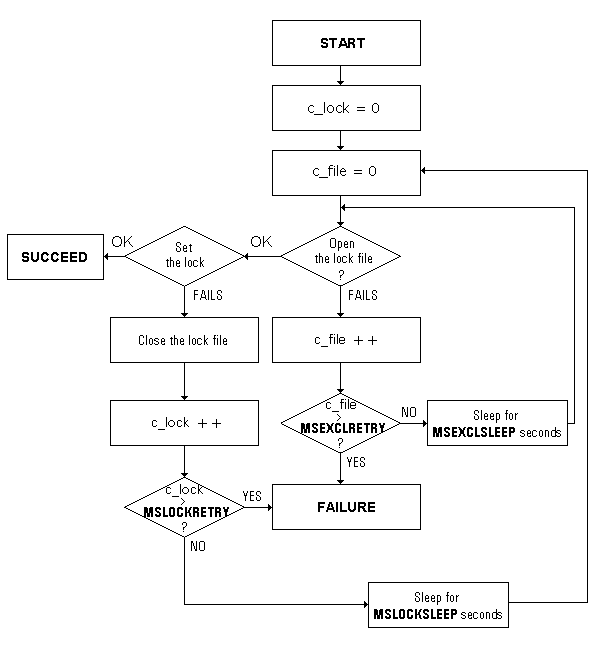
The algorithm retries a number of times to acquire a lock, and on each failure to do so it waits a certain amount of time before retrying. The number of retries and the amount of time waited after each failure can be set by the System Administrator. There are eight relevant MS variables; four have names which are prefixed with MS, and four with MSIA. The MSIAxxx variables are for use in interactive environments, while the MSxxx variables are used in batch environments. All these variables are defined in $EMPRESSPATH/config/initfile:
|
For situations in which lock contention is expected to be fierce, you can set the ...SLEEP parameters to different values for different processes in order to reduce the number of locking collisions.
In the special case of index files, Empress needs to set a critical read lock before proceeding. Two environment variables are provided to control behavior of Empress during the acquisition of this lock:
|
Most versions of Empress allow two physical implementations of a Lock Manager: File Lock Managers, and Shared Memory Lock Managers. However, every Empress Lock Manager can be described in terms of:
Furthermore, these parameters can be adjusted by the user to meet the needs of the applications which access the database (see the section Tuning Empress Locking).
File Lock Managers are the default physical locking implementation. In a database db, there will exist a lock directory db/_lock which will contain a number of files with names like xxxx.lck. The numbers xxxx correspond to the table number in the table's .rel file name. Thus, if table table_name corresponds to .rel file db/0092.rel, then (assuming a File Lock Manager) its lock file will be db/_lock/0092.lck. If a File Lock Manager is removed, the next time that Lock Manager is needed to hold a lock, it will be automatically created.
You can choose to put the locking for any given table into shared memory. Unlike File Lock Managers in which every xxxx.lck file corresponds one-to-one with a table, Shared Memory Lock Managers can contain locks for more than one table. Also unlike File Lock Managers, in the event of a system failure the shared memory partitions holding the Lock Managers must be re-created when the machine is restarted.
Shared Memory Lock Managers are created through the Empress utilities empadm and empshm. For details on how to use these utilities, refer to the chapter Shared Memory of this manual.
During a transaction, Empress places locks in exactly the same way as it does outside of a transaction. That is, a given SQL command (for example) on a particular table will result in the same sequence of lock placement requests (that is, the locks in each request are the same, and the requests come in the same order). However, Empress behaves differently inside a transaction in two important respects:
During a transaction, the sequence of lock release is different from normal behavior of Empress in that most locks which are placed during a transaction are maintained for the duration of that transaction. The exception to this rule is:
acquire a CRIT lock on tables where certain operations have occurred during the transaction:
undo any operations which have occurred on these tables,
release these CRIT locks,
release all remaining locks held by the transaction.
In the case of a commit, Empress takes the following locking actions:
acquire CRIT locks on all tables accessed during the transaction, if any write operations have occurred on any table.
update the header information in these tables (e.g., the free record list).
release these CRIT locks,
release all remaining locks held by the transaction.
The environment variable MSTRANSTABLELOCK is available for ensuring serializability of transactions. By default, it is turned off since its use incurs a strong concurrency penalty. Effectively, turning this variable on causes Empress to treat any tables involved in a transaction as if they have table-level locking. If transactions are not used, this variable has no effect.
When MSTRANSTABLELOCK is turned on, and a transaction is begun, Empress places ALLRECS locks on every currently open table. For every table opened during the transaction, these locks are also applied. The modes of these locks depend on the open mode of the table:
|
Only when the transaction is committed or rolled back are these locks
released.
12.3.2 Single User DBA Mode
An Empress database can be temporarily disabled by the Database Administrator (DBA) by issuing the command:
empadm database_name singlemodeThis command puts an ADMIN u lock on sys_dictionary, which prevents other users from accessing the database. This is because any database access needs to open sys_dictionary, and hence an ADMIN r lock on sys_dictionary is required: this lock will not be obtainable, since it will conflict with the ADMIN u lock placed by entering singlemode. Conversely, if any user is accessing the database, that user will have obtained an ADMIN r lock on sys_dictionary, and so the DBA will not be able to enter singlemode since the required ADMIN u lock will not be obtainable.
Note that when you are in DBA mode, you should not issue a global lock clearance command (such as empadm database_name lockclear), since this will effectively take you out of Single User DBA mode.
The Empress 4GL and Application Generator (AG) require special behavior with regard to locking. There are two requirements:
user applications (which are stored in the sys_4gl_xxx and sys_ag_xxx tables) need to be executable even when the application is being modified;
if an application is being modified by one user, no other user should be able to modify it at the same time.
Since the executable 4GL application and the application's definition (i.e., source code) are stored in different tables, Empress' record-level locking mechanism allows requirement (1) to be met. The normal Empress locking mechanism is insufficient, however, for the second requirement.
4GL applications are stored as sets of records in the following tables (there is a similar set of tables for the Application Generator; see the manual Empress 4GL: Administrator's Guide):
| sys_4gl_application sys_4gl_compile sys_4gl_domain |
sys_4gl_field sys_4gl_form sys_4gl_key |
sys_4gl_link sys_4gl_script sys_4gl_window |
Because 4GL applications are stored in this distributed fashion, the usual Empress locking scheme is not capable of ensuring that only one user will modify any part of a given application. Thus, an additional locking mechanism is needed.
Empress provides 4GL and AG locks, though these are not "locks" in the sense discussed above. These locks are simply attributes in the sys_4gl_application and sys_ag_definition tables. They are not examined through locking mechanism of Empress, but are instead examined by the 4GL and AG applications themselves. Thus, the 4GL and the AG impose a second level of locking on top of standard locking mechanism in Empress.
The attributes which represent locks in the 4GL and AG are lock in both sys_4gl_application and sys_ag_definition. These attributes are set to y if a user is editing an application. When set, another user would not be allowed to edit the application, but would be able to execute it.
To clear these locks, the user can use
   empclrlk -ag Database_name

   empclrlk -4gl Database_name
The empclrlk utility nulls the lock attribute in the appropriate table and, in the case of -ag, empties various sys_ag_xxx tables. Note that this utility also clears any regular database locks.
Empress can place locks implicitly or explicitly in a database. Implicit lock placement is used in most situations, since the details of lock placement/removal should be transparent to the user. However, Empress also allows users to place locks explicitly in some of its interfaces such as: Empress SQL, Empress 4GL and the mr C-programming layer.
The Report Writer, Fortran Interface, Embedded SQL (static and dynamic), and mx C programming interface do not provide an explicit lock placement mechanism.
The behavior of implicit lock placement scheme in Empress can be modified by certain environment variables.
In the normal progress of events, any locks which Empress places also get released. However, it sometimes happens that locks get left behind (usually, this is the result of a process which died and did not get a chance to clean up the locks it had placed), and this can cause problems for other processes by preventing them from accessing data. Because of this, it is sometimes necessary to clear locks manually, and this is done with the help of the empadm utility.
Finally, locks usually can be placed in either File or Shared Memory Lock Managers. File Lock Managers are the default, and are created at the time of table creation. Shared Memory Lock Managers are set up by the DBA after table creation, and must be re-created when your machine is rebooted.
The following is a synopsis of the most common user commands explicitly concerned with locking:
| SQL: |
| ||||||
| 4GL: |
| ||||||
| mr: |
mrlkrec (record_descriptor)
mrlktab (table_descriptor)
mrulrec (record_descriptor)
mrultab (table_descriptor)
The lock mode which is acquired depends on the open mode of the table. Recall that the possible table open modes are r (read), d (deferred), u (update), n (dirty read) and N (deferred dirty read). For more information, refer to :
|
When implicit locking is in effect, the locks which get placed depend on the following factors:
Operations in Empress can be divided into two broad categories:
For this discussion, we will further classify commands in the DML and DDL groups as being update or read operations.
Examples of these types of commands for some of interfaces in Empress are:
|
For each of these broad categories of operations, a number of implicit locks will be placed. The following table is an example showing which locks could be placed through the Interactive SQL Interface (note that some tables may not have indices, and hence would not place CRIT locks to flag usage of the .ix and .ixl files), but do not indicate the order of the operations (see the section Monitoring Locks in this document for examples of this).
DML Operation, Record-level locking:
|
DML Operation, Group-level locking:
|
DML Operation, Table-level locking:
|
DML Operation, Null-level locking:
|
DDL Operations:
|
The system tables (sys_dictionary, sys_tables, sys_attrs, sys_privs, and sys_attr_privs) are assumed to have their default lock levels (i.e., RECORD) in the above. If this is not the case (for example, the DBA can set the lock level on sys_tables to NULL), then certain operations will place locks differently from the description above.
The sys_dictionary table is created and maintained by Empress. It is a compiled version of sys_tables, sys_privs, sys_attrs, and sys_attr_privs tables.
In the DML operations, sys_dictionary is always accessed first since it stores the location and definition of the table(s) being queried or updated. Also, since table sys_dictionary is an Empress table like those created by the user, it too has implicit locking which occurs whenever it is accessed. The implicit locking which is applied to sys_dictionary is as follows:
|
where RECORD_n is the nth record in sys_dictionary, which corresponds to the .rel file number of the table involved in the operation. The .rel file number of a table is stored in attribute tab_number of the system table sys_tables. For example, suppose you have a database with a table tab. Then do the following select to find what table number this corresponds to:
SELECT tab_number FROM sys_tables WHERE tab_name = 'tab';
and suppose that tab_number = 19. Then, the sys_dictionary locking will show locks of type RECORD_19, indicating that the 19th record in sys_dictionary is being accessed (since this record contains the information for table tab).
Certain Empress operations (such as ALTER TABLE) transparently change the tab_number of a table, so you should not treat it as a fixed property of a table.
The open mode of a table affects implicit locking by placing different types of ADMIN locks on the opened table at the time of open. The C programming interfaces and the 4GL also allow the user to specify the open mode of a table.
A number of MSxxx environment variables affect the behavior of the locking mechanism. Some of these variables cause Empress to change the timing (rather than the order) of how locks are acquired and released. As such, variables like MSLKCOMMITADDEND, can be viewed as minor optimizing switches. Other variables (such as MSDBLOCKLEVEL, MSDBDICTLOCK) change which locks get placed implicitly.
The following are brief descriptions of the Empress variables related to locking. Included are: where the variables are usually set, the name of the variable, and a brief description. Although many Empress variables can be set in more than one place (with an environment setting typically overriding a setting in the $EMPRESSPATH/config/initfile), we list here the places where the variables are most often set: in the environment, in the $EMPRESSPATH/config/initfile, or in data dictionary tabzero.
| Name | Where | Description |
| MSDBDICTLOCK | tabzero | Can be set to NULL, RECORD, GROUP or TABLE level locking. It is the implicit locking level for sys_dictionary, and overrides the lock level shown in "DISPLAY sys_dictionary all" command. |
| MSDBLOCKLEVEL | tabzero | This is the implicit lock level assigned to new tables. Can be set to NULL, RECORD, GROUP or TABLE. |
| MSDBLOCKSTATS | tabzero | If set to anything, this causes Empress to accumulate statistics on locking, which then can be reported using the empadm database_name lockstats command. It is unset by default. |
| MSEXCLRETRY | initfile | This controls the number of times the lock file open is attempted. |
| MSEXCLSLEEP | initfile | This specifies the amount of time (in seconds, and with microsecond precision) to sleep between attempts to open the lock file. |
| MSFILELOCKMAXPROCS | initfile | The maximum number of processes that are allowed access to the File Lock Manager simultaneously. This value cannot normally be raised by the user, as its maximum value (the default) is determined by the Empress licence. |
| MSFILELOCKNBUCKETS | tabzero, initfile | The number of hash buckets used by Empress to store the locks in a lock file. |
| MSFILELOCKNLOCKS | tabzero, initfile | The maximum number of locks that may be stored in a single lock file at a given time. |
| MSIAEXCLRETRY | tabzero, initfile | Interactive version of MSEXCLRETRY. |
| MSIAEXCLSLEEP | tabzero, initfile | Interactive version of MSEXCLSLEEP. |
| MSIALOCKRETRY | tabzero, initfile | Interactive version of MSLOCKRETRY. |
| MSIALOCKSLEEP | tabzero, initfile | Interactive version of MSLOCKSLEEP. |
| MSINDEXRETRY | tabzero, initfile | Like MSLOCKRETRY, except applicable only to the acquisition of index critical locks for read operations. |
| MSINDEXSLEEP | tabzero, initfile | Like MSLOCKSLEEP, except applicable only to the acquisition of index critical locks for read operations. |
| MSLKCOMMITADDEND | tabzero | When set, causes the timing of lock placement to be more efficient for a sequence of insert operations when the table (to which the records are added) has record-level locking. |
| MSLOCKPLAN | environment | When set, lock placement/release is shown. When set to "t", the time of lock placement is also shown. |
| MSLOCKRETRY | tabzero, initfile | This controls the number of times acquisition of the lock is attempted. |
| MSLOCKSLEEP | tabzero, initfile | This specifies the amount of time (in seconds, and with microsecond precision) to sleep between attempts to acquire the lock. |
| MSLOCKSTATS | environment | When set, locking statistics for the process in question are reported when the process finishes. |
| MSPARTLOCKNAME | tabzero | Shared Memory Lock Manager partition name. |
| MSPARTLOCKNBUCKETS | tabzero | Number of hash function buckets in a Shared Memory Lock Manager. |
| MSPARTLOCKNLOCKS | tabzero | Total number of locks available in a Shared Memory Lock Manager. |
| MSTRANSTABLELOCK | tabzero, initfile | When set, this ensures serializability of transactions, at the cost of reduced process concurrency. When a transaction starts, all currently open tables have CRIT and ALLRECS locks applied; any tables opened during the transaction also have these locks applied. These trapped locks are released when the transaction is committed. |
| MSTRANSUFNGFL | tabzero | This is the number of records which will be acquired from the table's free list by a process for inserting into that table; it is set to 10 by default. |
The remainder of this section, we discuss certain of these variables which deserve special comment.
The variable MSLKCOMMITADDEND affects the timing of when locks are placed when inserting records into a table with record-level locking. In effect, it allows you to simulate the locking behavior associated with group-level locking. To illustrate, we consider the following mr program fragment:
     1    for (i=0; i N; i++)

     2    {
     3         mrputvi (rec_desc, attr_desc, i);
     4         mradd (rec_desc);
     5    }
     6
     7    mraddend (rec_desc);
The effect of setting MSLKCOMMITADDEND will be apparent from the following table (the notation here is the same as that used by MSLOCKPLAN):
   Line No.    MSLKCOMMITADDEND=x         MSLKCOMMITADDEND=

        4      [if ALLRECS uu lock
               does not exist, then
               get it:
               . -> ALLRECS uu ]          . -> ALLRECS uu
               . -> RECORD_n u            . -> RECORD_n u
               RECORD_n-1 u ->> .

               (add record)               (add record)

                                          RECORD_n u -> .

                                          ALLRECS uu -> .

       7       ALLRECS uu -> .
Thus, setting MSLKCOMMITADDEND causes Empress to:
Thus, setting this variable causes about half as many lock requests to be sent, and so will be more efficient when many inserts are done before mraddend() is called.
The variable MSTRANSUFNGFL is an integer which controls the number of records initially allocated from a table's free list when doing inserts. When Empress is asked to insert a record into a table, it acquires a set of records specified by MSTRANSUFNGFL from the table's free list and reserves them for insert. The idea is that if you are doing a series of consecutive inserts, then it is more efficient to acquire number of records specified by MSTRANSUFNGFL in a single lock request than it is to request and release locks individually, for each record inserted. The default value for MSTRANSUFNGFL is 10.
When Empress is asked to begin inserting records into a table, it acquires and locks (in a single request) the first available records specified by MSTRANSUFNGFL in the free list. If these records do not exist (this would occur if you were inserting into an empty table, for example), then they are created at the end of the .rel file. When the inserts are complete, any remaining records which were acquired and locked but not used are released for use by other processes. The beginning of the insert operation is signalled by the routine mradd() or mrtadd(); the end of insertion is signalled by invoking mraddend(). These routines are invoked - sometimes transparently - in all of interfaces in Empress.
The environment variable MSTRANSTABLELOCK can be turned on to ensure serializability of transactions (at the cost of lower concurrency of processes accessing the database) by trapping ALLRECS locks which get placed during a transaction, and releasing them only when the transaction is either committed or rolled back. This variable is turned off by default. Refer to Locking and Transactions of this manual.
Locks can be explicitly cleared by using the empadm and empclrlk commands. Their format are:
   empadm database_name lockclear [-f] [empress_id ...]

   empclrlk [-4gl] [-ag] [-recov] database_name [application ... ]
The empclrlk command is simply an interface to the empadm command, but which also allows the user to clear any 4GL or AG locks. Note, however, that in all cases, the empclrlk command clears normal locks as well. Both of these commands are discussed fully in the chapter Database Administration of this manual.
The procedure for creating Shared Memory Lock Managers is described in detail in the chapter Shared Memory of this manual.
Shared Memory Lock Managers are conceptually the same as file-based Lock Managers in Empress. However, note the following:
The main advantage to using Shared Memory Lock Managers is that they are faster than their file-based counterparts.
Users can determine what locks are being placed on tables by several mechanisms. These mechanisms can be divided into two groups: the internal and external lock monitors. The internal lock monitor gives information about locking carried out by a single Empress process, while the external lock monitor gives cumulative locking statistics about a single database.
The environment variable MSLOCKPLAN causes Empress to display what locks are being held on a table, and what locks are being added or deleted. In addition, timing information (accurate to the nearest second) is optionally available. This output is run on a per-process basis, and so cannot be used to monitor dynamically all locks being placed on a database by all processes. The (voluminous) output of this mechanism groups lock placement and release temporally, and in terms of lock requests.
The environment variable MSLOCKSTATS can be used to print out
the statistics concerned with lock and Lock Manager accesses. This
information is of use in trying to determine locking bottlenecks by
reporting the pattern of lock usage in an Empress process. Unlike
the MSLOCKPLAN variable which reports to the user as locks are
placed, MSLOCKSTATS reports only when the process ends.
12.5.1.1 MSLOCKPLAN
Setting the environment variable MSLOCKPLAN will cause Empress to report on locks as they are being placed and released. This is valuable for situations where the timing of lock placement is important. The following example shows the settings of this variable in the UNIX environment:
   setenv MSLOCKPLAN x           (standard locking information)

   setenv MSLOCKPLAN t           (standard locking information
	                          plus timing information)
An analysis of the MSLOCKPLAN output from a simple SELECT of a table t and attribute a with two records is shown below; this examples has record-level locking on both the data dictionary and the user tables. Note that each lock request is contained in a section of the output headed by the title LOCKS: Table #n.
   * SELECT * FROM t;

   LOCKS: Table #1
       ADMIN: . -> r       (indicate desire to read sys_dictionary)
     SUCCEEDED
   LOCKS: Table #1
       ADMIN: r            (still holding ADMIN read lock)
       CRIT: . -> r        (place read lock on index name sysdidx)
                           (search index for table name t)
     SUCCEEDED
   LOCKS: Table #1
       ADMIN: r            (still holding ADMIN read lock)
       CRIT: r -> .        (release lock on index; found table name t)
     SUCCEEDED
   LOCKS: Table #1
       ADMIN: r            (still holding ADMIN read lock)
       ALLRECS: . -> rr    (indicate desire to read a record in
                            sys_dictionary)
       RECORD 7: . -> r    (acquire a read lock on 7th. record in
                            sys_dictionary: this corresponds to the
                            record for table t)
     SUCCEEDED
   LOCKS: Table #7
       ADMIN: . -> r       (acquire ADMIN read lock on table t
                            i.e., rel file 0007.rel)
     SUCCEEDED
   LOCKS: Table #1
       ADMIN: r            (still holding ADMIN read lock on sys_dictionary)
       ALLRECS: rr -> .    (release sys_dictionary ALLRECS lock)
       RECORD 7: r -> .    (release sys_dictionary lock on record 7)
     SUCCEEDED

        a                  (print out the attribute header)

                           (If the table contained no records,
                            then the following section between the dashed
                            lines would be absent.)

                           ------------------------------------------
   LOCKS: Table #7
       ADMIN: r            (still holding ADMIN read lock on t)
       ALLRECS: . -> rr    (acquire ALLRECS rr lock on t to indicate
                            that you wish to read some record in t)
       RECORD 1: . -> r    (acquire a read lock on the first record)
     SUCCEEDED
        1                  (report the record found)
   LOCKS: Table #7
       ADMIN: r            (still holding ADMIN read lock on t)
       ALLRECS: rr         (still holding ALLRECS rr lock on t)
       RECORD 1: r -> .    (release lock on record which was found)
       RECORD 2: . -> r    (acquire lock on next qualified record)
     SUCCEEDED
        2                  (report the record found)
   LOCKS: Table #7
       ADMIN: r            (still holding ADMIN read lock on t)
       ALLRECS: rr -> .    (release ALLRECS rr lock on t. When
                            there are no more records, this lock will
                            be released.)
       RECORD 2: r -> .    (release lock on record which was found)

                            ------------------------------------------

   LOCKS: Table #7         (release the ADMIN lock on table t to
                            indicate that you are no longer reading it)
       ADMIN: r -> .
     SUCCEEDED
   LOCKS: Table #1         (release the ADMIN lock on table
                            sys_dictionary to indicate that you are
                            no longer reading it)
       ADMIN: r -> .
     SUCCEEDED
In this output one can see clearly the order in which locks are placed and released by a single process. This is different from the empadm command in which locks from all processes but from a single instant in time are reported. Recall that this output also shows lock requests: each lock request is grouped within a section headed by LOCKS: Table #n. In each of these sections, the currently held locks on the table are shown, and in addition the lock placements and releases contained in the current request are also shown (e.g., at the start of the example above, two separate requests are made to get an ADMIN and CRIT lock on sys_dictionary (Table #1); each of these requests is headed by LOCKS: Table #1).
The MSLOCKSTATS variable can be set in your environment to two values which are recognized:
In all cases, the output is to the standard error (UNIX), and is divided into two sections, corresponding to the inner and outer loops in the locking algorithm. The first section is titled Access statistics to locks, and gives the table and lock type (if requested) statistics; this corresponds to the inner loop of the locking algorithm. By table, the statistics gathered are:
There is one output line per table summarizing these items. If lock type statistics are being gathered, then this section also contains a column entitled Lock Item which breaks down the per-table statistics into types of locks; for each type of lock placed on that table, a separate line containing an access summary is printed.
Note that:
Since only lock requests can be summarized, the figures for the table summary will be less than or equal to the sum of the figures for each of the listed lock types.
The number of retried requests is only that number which eventually led to success; retries eventually leading to failure are not included.
The sum of the successful and failed requests should equal the total number of requests, for the table as a whole, and for each lock type.
The second part of the output is titled Access statistics to Lock Manager, and gives a report of accesses to the Lock Managers; this corresponds to the outer loop in the locking algorithm (see the section, Basic Aspects of Locking).
For each Lock Manager, a single line summary is printed with the following information:
Sample statistics output resulting from a brief SQL session follows:
   Access statistics to locks
   --------------------------

           Table #   Lock Item      #reqsts   #succ   #fail   #retries
           -------   ---------      -------   -----   -----   --------
                 6      -                 6       6       0          0
                     ADMIN                2       2       0          0
                     CRIT                 0       0       0          0
                     ALLRECS              2       2       0          0
                     Rec #1               2       2       0          0
                     Rec #2               2       2       0          0
                     Rec #3               2       2       0          0

                1       -                24      24       0          0
                     ADMIN                8       8       0          0
                     CRIT                 8       8       0          0
                     ALLRECS              8       8       0          0
                     Rec #6               2       2       0          0
                     Rec #8               6       6       0          0

   Access statistics to Lock Manager
   ---------------------------------

           Lock Man. Name    Type   #reqsts   #succ   #fail   #retries
           --------------    ----   -------   -----   -----   --------
           00006.lck         F            6       6       0          0
           00001.lck         F           24      24       0          0
The command empadm database_name lockinfo shows all locks on a database, who they belong to, and what table they are on. It also reports which Lock Managers are currently in use, and what the characteristics of these are. This is especially useful for investigating locks in Shared Memory Lock Managers. This command provides a snapshot of the locks at a moment in time.
The command empadm database_name lockstats shows more detailed information on overall access to the Lock Managers in a given database. This command provides cumulative information about Lock Manager access from any number of processes over a period of time. The period over which lock statistics is gathered can be controlled with the statistics reset command empadm database_name lockrststats.
This command is described in detail in the chapter Database Administration of this manual. Certain options which it takes allow any user to examine a database to see which locks have been placed, and also which processes placed the locks.
A sample of empadm output for the case of starting a transaction, and adding a single record to table t, is as follows:
   Lock Managers

   Table name             Lock Man. Name  Type     MAXPROCS  BUCKETS  NLOCKS
   sys_attr_privs         00005.lck       F              32       11     200
   sys_attrs              00003.lck       F              32       11     200
   sys_dictionary         00001.lck       F              32       11     200
   sys_privs              00004.lck       F              32       11     200
   sys_tables             00002.lck       F              32       11     200
   t                      00006.lck       F              32       11     200

   Active Locks

   Table name              Type       Record#      Status    Empress ID
   sys_dictionary          ADMIN          ---      r         1426877923
   sys_dictionary          RECORD           6      r         1426877923
   sys_dictionary          ALLRECS        ---      rr        1426877923
   t                       ALLRECS        ---      uu        1426877923
   t                       RECORD           3      u         1426877923
   t                       ADMIN          ---      r         1426877923

      Empress ID   User name       Process ID      Host ID
      1426877923   empress               3625      192.255.255.255
The output is reported in three sections:
Various combinations of this output can be had by using different options of the empadm command.
To enable the collection of lock statistics on a database, edit the database's tabzero file and change the MSDBLOCKSTATS line to:
MSDBLOCKSTATS=x (i.e., any value)
Once this is done, statistics will be accumulated; they can be examined by invoking empadm database_name lockstats, and they can be cleared (i.e., reset) by invoking empadm database_name lockrststats. The output of the lockstats option is a listing of lock statistics per table; each table's statistics are reported in four sections:
The Lock Manager's defining parameters are reported.
The maximum number of processes accessing the table concurrently, and the maximum number of locks held on the table concurrently, are reported. The efficiency indicates how well the hashing function is operating; it should be close to 100% for good operation.
The number of hits on each hash bucket is gathered, and is grouped together on a number-of-hits basis. For each number-of-hits, the number of hash buckets having this number is printed, as well as which buckets these were. In the example, 5 of 11 total buckets contained all the hits (buckets 2, 5, 6, 7 and 9). Also printed is the minimum number of buckets having 50%, 75% and 90% of all the hits. For the locking hash function to be efficient, the locks should be evenly distributed over the available hash buckets. In general, you need a long observation period for these statistics to be useful.
The maximum chain length is recorded, with the number of buckets having the same maximum chain length grouped together. The actual buckets which make up this set are reported as well. For more information on this, see the section Tuning Empress Locking.
A sample output for a user table "t" follows:
   Table name: t

           Lock Man. Name  Type     MAXPROCS NBUCKETS   NLOCKS
           00006.lck       F              32       11      200

           NPROCS  MAXNPROCS       CURNLKS MAXNLKS EFFICIENCY
                1          1             0       3       100%

           # buckets       % of hits
                   3             60%
                   4             80%
                   5            100%

           # hits          # buckets       bucket #
                0                  6         0,   1,   3,   4,   8,
                                            10
                2                  5         2,   6,   7,   5,   9

           Max. chain length       # buckets       bucket #
                           0               6         0,   1,   3,   4,  8,
                                                    10
                           1               5         2,   6,   7,   5,  9
This section describes the typical locks which occur for the common DML commands under various conditions:
Note that these scenarios are considered only outside of a transaction. The effect of transactions on locking is considered in the section Miscellaneous Aspects of Locking.
The following operations are done on a table t:
CREATE TABLE t (a int);
All the locks which are reported are on table t's Lock Manager; the locks for the data dictionary are not reported here. The locks are reported in the order in which they would be placed, and are usually annotated with a reason for their placement. Finally, note that MSTRANSUFNGFL=10 in these examples, and that all inserts are done on initially empty tables.
i) Insert
   Action     Type         Mode    Reason
   ------     ----         ----    ------

   acquire    ADMIN        r       -to indicate the table is opened.
   acquire    CRIT         u       -lock the free list
              ALLRECS      uu
              RECORD_n     u
                                   -insert the record
                                   -update the index file

   (repeat for each additional inserted record:)

   release    CRIT         u
              ALLRECS      uu
              RECORD_n     u
   acquire    CRIT         u
              ALLRECS      uu
              RECORD_n     u
                                   -insert the record
                                   -update the index file

   (end repeat section)

                                   -no more records, so release locks
   release    CRIT         u
              ALLRECS      uu
              RECORD_n     u
   acquire    CRIT         u       -update .rel file header
   release    CRIT         u
   release    ADMIN        r
ii) Select
   Action     Type         Mode    Reason
   ------     ----         ----    ------

   acquire    ADMIN        r
              CRIT         r       -read index file to find qualified records
   release    CRIT         r
   acquire    ALLRECS      rr

   (repeat for all qualified records:)

   acquire    RECORD_n     r
                                   -read the record
   release    RECORD_n     r

   (end repeat section)

   release    ALLRECS      rr
   release    ADMIN        r
iii) Update
   Action     Type         Mode    Reason
   ------     ----         ----    ------

   acquire    ADMIN        r       -indicate table is open
   acquire    ALLRECS      uu

   (repeat for all qualified records:)

   acquire    RECORD_n     u
   acquire    CRIT         u
                                   -update record and index
   release    CRIT         u
   release    RECORD_n     u

   (end repeat section)

   release    ALLRECS      uu
   release    ADMIN        r
iv) Delete
   Action     Type         Mode    Reason
   ------     ----         ----    ------

   acquire    ADMIN        r       -indicate table is open
   acquire    CRIT         r
                                   -find qualified records by traversing index.
   release    CRIT         r

   (repeat for all qualified records:)

   acquire    CRIT         u
              ALLRECS      uu
              RECORD_n     u
                                   -update index, delete record.
   release    RECORD_n     u
              ALLRECS      uu
              CRIT         u

   (end repeat section)

   acquire    CRIT         u
                                   -update .rel file header
   release    CRIT         u
   release    ADMIN        r
i) Insert
   Action     Type         Mode    Reason
   ------     ----         ----    ------

   acquire    ADMIN        r       -indicate table is open
   acquire    CRIT         u       -get available records from free list.
   release    CRIT         u

   (repeat for all records:)

   acquire    ALLRECS      uu
              RECORD_n     u
                                   -do insert
   release    ALLRECS      uu
              RECORD_n     u

   (end repeat section)

   acquire    CRIT         u
                                   -update free list
   release    CRIT         u
   release    ADMIN        r
ii) Select
   Action     Type         Mode    Reason
   ------     ----         ----    ------

   acquire    ADMIN        r       -indicate table is open
                                   -print header information
   acquire    ALLRECS      rr
              RECORD_n     r

   (repeat for all records:)

   release    RECORD_n     r
   acquire    RECORD_n+1   r
                                   -print record n contents

   (end repeat section)

   release    RECORD_n+1   r
   release    ALLRECS      rr
   release    ADMIN        r
iii) Update
   Action     Type         Mode    Reason
   ------     ----         ----    ------

   acquire    ADMIN        r       -indicate table is open
   acquire    ALLRECS      uu
              RECORD_n     u

   (repeat for all records:)

                                   -do update
   release    RECORD_n     u
   acquire    RECORD_n+1   u

   (end repeat section)

   release    RECORD_n+1   u
   release    ALLRECS      uu
   release    ADMIN        r
iv) Delete
   Action     Type         Mode    Reason
   ------     ----         ----    ------

   acquire    ADMIN        r       -indicate table is open
              ALLRECS      uu
              RECORD_n     u

   (repeat for all records:)

                                   -do delete of record
   release    RECORD_n     u
   acquire    RECORD_n+1   u

   (end repeat section)

   release    RECORD_n+1   u
              ALLRECS      uu
   acquire    CRIT         u
                                   -update .rel file header
   release    CRIT         u
   release    ADMIN        r
i) Insert
   Action     Type         Mode    Reason
   ------     ----         ----    ------

   acquire    ADMIN        r       -indicate table is open
   acquire    CRIT         u       -lock free list and index
   acquire    ALLRECS      uu
              RECORD_10    u
              RECORD_9     u
       ...
              RECORD_1     u
                                   -acquire MSTRANSUFNGFL (=10 by
                                    default) records from the free list.
                                   -insert record and update index
   release    CRIT         u       -release free list
   release    RECORD_1     u       -release lock on inserted record.

   (repeat for all qualified records:)

                                   -once MSTRANSUFNGFL records are inserted,
                                    Empress will go back and acquire another set
                                    of MSTRANSUFNGFL records from the free
                                    list in anticipation of inserting them
                                    into the table.
   acquire    CRIT         u       -lock free list and index
                                   -insert record and update index
   release    RECORD_2     u
   release    CRIT         u

   (end repeat section)

                                   -release all outstanding records:
   release    RECORD_3     u
              RECORD_4     u
       ...
              RECORD_10    u
   release    CRIT         u
   release    ALLRECS      uu
   release    ADMIN        r
ii) Select
   Action     Type         Mode    Reason
   ------     ----         ----    ------

   acquire    ADMIN        r       -indicate table is open

   (repeat for all qualified records:)

   acquire    CRIT         r       -lock index for reading
   release    CRIT         r
   acquire    ALLRECS      rr
   acquire    RECORD_2     r       -read the record
   release    RECORD_2     r
   release    ALLRECS      rr

   (end repeat section)

   release    ADMIN        r
iii) Update
   Action     Type         Mode    Reason
   ------     ----         ----    ------

   acquire    ADMIN        r       -indicate table is open
   acquire    CRIT         r       -lock index for read
   release    CRIT         r

   (repeat for all qualified records:)

   acquire    ALLRECS      uu
              RECORD_2     u
                                   -update record
   acquire    CRIT         u
                                   -update index and header
   release    CRIT         u
   release    ALLRECS      uu
              RECORD_2     u

   (end repeat section)

   release    ADMIN        r
iv) Delete
   Action     Type         Mode    Reason
   ------     ----         ----    ------

   acquire    ADMIN        r       -indicate table is open
   acquire    CRIT         r       -lock index for read to find qualified records
   release    CRIT         r

   (repeat for all qualified records:)

   acquire    ALLRECS      uu
   acquire    RECORD_n     u
                                   -update record
   acquire    CRIT         u
                                   -update index
   release    CRIT         u

   (end repeat section)

   release    ALLRECS      uu


              RECORD_n     u
   acquire    CRIT         u       -update .rel file header
   release    CRIT         u
   release    ADMIN        r
i) Insert
   Action     Type         Mode    Reason
   ------     ----         ----    ------

   acquire    ADMIN        r       -indicate table is open
   acquire    CRIT         u       -lock free list
   release    CRIT         u
   acquire    ALLRECS      uu
              RECORD_1     u
    ......

              RECORD_10    u
                                   -get and lock MSTRANSUFNGFL records
                                    in free list (or add these to free
                                    list if they do not already exist)

   (repeat for all records:)       -If more than MSTRANSUFNGFL records are
                                    inserted, then Empress will
                                    attempt to acquire u locks on the
                                    next available set of records.
                                    As records are inserted, these locks
                                    will be released as in the example.

                                   -do insert
   release    RECORD_1     u

   (end repeat section)

   release    RECORD_2     u       -release lock on next record in list.
   acquire    CRIT         u       -update .rel file header and free list
   release    CRIT         u
   release    ALLRECS      uu
   release    RECORD_3     u

    ......

              RECORD_10    u
                                   -release any outstanding record locks
   release    ADMIN        r
ii) Select
   Action     Type         Mode    Reason
   ------     ----         ----    ------

   acquire    ADMIN        r       -indicate table is open
   acquire    ALLRECS      r
                                   -select the record(s)
   release    ALLRECS      r
   release    ADMIN        r
iii) Update
   Action     Type         Mode    Reason
   ------     ----         ----    ------

   acquire    ADMIN        r       -indicate table is open
   acquire    ALLRECS      u
                                   -update record(s)
   release    ALLRECS      u
   release    ADMIN        r
iv) Delete
   Action     Type         Mode    Reason
   ------     ----         ----    ------

   acquire    ADMIN        r       -indicate table is open
   acquire    ALLRECS      u
                                   -delete record(s)
   release    ALLRECS      u
   acquire    CRIT         u
                                   -update free list, .rel file header
   release    CRIT         u
   release    ADMIN        r
i) Insert
   Action     Type         Mode    Reason
   ------     ----         ----    ------

   acquire    ADMIN        r       -indicate table is open
              ALLRECS      u       -lock records in table
   acquire    CRIT         u       -lock free list and get records
                                    from it.
   release    CRIT         u       -release free list
   acquire    CRIT         u       -lock index file
                                   -insert record(s) and modify index
   release    CRIT         u
   acquire    CRIT         u       -lock free list and .rel file header
                                   -update free list and header
   release    CRIT         u
   release    ALLRECS      u
   release    ADMIN        r
ii) Select
   Action     Type         Mode    Reason
   ------     ----         ----    ------

   acquire    ADMIN        r       -indicate table is open
              ALLRECS      r       -read lock on all records
              CRIT         r       -read lock on index
                                   -traverse index and do select
   release    CRIT         r
   release    ALLRECS      r
   release    ADMIN        r
iii) Update
   Action     Type         Mode    Reason
   ------     ----         ----    ------

   acquire    ADMIN        r       -indicate table is open
   acquire    ALLRECS      u       -lock all records in table
   acquire    CRIT         r       -traverse index to find qualified records
   release    CRIT         r
   acquire    CRIT         u
                                   -update the record(s) and index
   release    CRIT         u
   release    ALLRECS      u
   release    ADMIN        r
iv) Delete
   Action     Type         Mode    Reason
   ------     ----         ----    ------

   acquire    ADMIN        r       -indicate table is open
   acquire    ALLRECS      u       -lock all records in table
   acquire    CRIT         r       -traverse index to find all qualified records
   release    CRIT         r
   acquire    CRIT         u
                                   -delete record(s) and modify index file
   release    CRIT         u
   acquire    CRIT         u
                                   -update free list and .rel file header
   release    CRIT         u
   release    ALLRECS      u
   release    ADMIN        r
i) Insert
   Action     Type         Mode    Reason
   ------     ----         ----    ------

   acquire    ADMIN        r       -indicate table is open
              ALLRECS      u       -lock all records in table
              CRIT         u       -lock free list
                                   -insert record(s)
   release    CRIT         u
   acquire    CRIT         u
                                   -update free list and .rel file header
   release    CRIT         u
              ALLRECS      u
              ADMIN        r
ii) Select
   Action     Type         Mode    Reason
   ------     ----         ----    ------

   acquire    ADMIN        r       -indicate table is open
   acquire    ALLRECS      r
                                   -select record(s)
   release    ALLRECS      r
   release    ADMIN        r
iii) Update
   Action     Type         Mode    Reason
   ------     ----         ----    ------

   acquire    ADMIN        r       -indicate table is open
   acquire    ALLRECS      u       -lock all records in table
                                   -update record(s)
   release    ALLRECS      u
   release    ADMIN        r
iv) Delete
   Action     Type         Mode    Reason
   ------     ----         ----    ------

   acquire    ADMIN        r       -indicate table is open
   acquire    ALLRECS      u       -lock all records in table
   acquire    CRIT         u       -lock free list
                                   -delete record(s)
                                   -update free list and header count
   release    CRIT         u
   release    ALLRECS      u
   release    ADMIN        r
Note the similarity of this case to that of group-level locking. In the table-level locking case, the lock on the free list is held for the duration of the operation, whereas in the group-level locking case, that lock is acquired and held only at the end of the operation.
With Empress, locking can be adjusted to improve the performance of your database by taking a combination of the following steps:
The goal of tuning the locking mechanism is to improve performance by:
Choosing an implicit locking scheme for the tables in the database is often dictated by the operations which that table is expected to support. For example, if a table is to be used for look-up only, null-level locking may be sufficient. However, a table being accessed by multiple processes for both reading and writing would probably best be served with record-level locking.
When you have a choice of several acceptable implicit locking schemes, the number of lock requests should be minimized where possible. However, data integrity in the presence of concurrent processes generally implies an opposing trend:
|
Of these two considerations, that of concurrency will be of greatest importance to most users (since null level locking is usually not viable).
Locking parameters control the behavior of Empress in situations where locks cannot be obtained immediately, or in situations where the acquisition/release of locks can be made more efficient by bundling the requests together. A list of Empress' MSxxx variables which directly affect locking is given in the section Environment Variable. Of particular importance are:
the parameters affecting the physical locking scheme: the number of retries, and the time between retries (see the section, Basic Aspects of Locking),
the parameters describing the lock manager itself: the number of processes which can access it concurrently, and the maximum number of locks it can hold.
Adjusting the physical locking parameters has a number of effects:
Making the number of retries large will help to ensure that locks will be acquired eventually. However, in interactive applications (e.g., 4GL applications) this could result in the application's users waiting at their terminals for a lock to be acquired. In such applications it may be more user-friendly to reduce the number of retries and simply print a message in the case of lock acquisition failure. Note that there are separate parameters applicable to interactive and non-interactive use.
The sleep time between lock acquisition attempts should be set to a time appropriate to the application in question. If a number of processes are accessing a single database, then it may be reasonable to set the sleep times for each process to slightly different values to attempt to reduce the possibility of repeated lock collisions between different processes. Note also that the repeat times should not be made too much shorter or longer than the amount of time a process would be expected to hold onto an average lock.
The maximum number of processes and number of locks which a Lock Manager can hold linearly affects the size of that Lock Manager. In the case of File Lock Managers, large lock files should be avoided because more than one or two disk blocks would have to be read with every access of that Lock Manager. This consideration is absent with Shared Memory Lock Managers.
One of the most significant changes which can be made to locking in Empress to improve performance is to replace the default File Lock Managers with Shared Memory Lock Managers (note that Shared Memory Lock Managers may not be available in all versions of Empress). Shared Memory Lock Managers are much faster than their file-based counterparts: processes hold onto locks for less time overall, and this alleviates lock contention. In addition, for processes which need to place and release a large number of locks, individual process performance can be improved dramatically.
However, setting up Shared Memory Lock Managers is sometimes bewildering because of the (typically) large numbers of possible ways to do it.
To implement shared memory locking most effectively, you should first attempt to answer the following questions:
What is the maximum number of processes which will access each table at one time?
What is the maximum number of locks on each table at one time?
From the answers to these questions, you should be able to draw up a list which will allow you to determine what sort of lock managers are needed. Of course, the easiest route is to go to the extremes:
Assign a separate Lock Manager having the same characteristics to each table. This will probably be somewhat wasteful of your shared memory.
Assign a single Lock Manager for all tables. This will probably cause Lock Manager contention on a busy enough system.
We recommend a middle course:
Put sys_dictionary locking into its own partition, and do not put any other locking into that partition. Note that sys_dictionary is accessed every time a table is opened.
Identify the most heavily used tables, and give them their own Lock Managers, with individually adjusted sizes. You may find that combining a small number of tables to use the same Lock Manager may be useful, especially with applications that hold onto large numbers of locks through transactions.
Tables which are used less frequently can be lumped together into a few catch-all Lock Managers with appropriately adjusted sizes.
Tables which are used infrequently can be left as File Lock Managers.
It is also recommended that you create a script to do these steps automatically, since shared memory must be set up again after each system re-boot.
Lock Manager tuning starts by using the output of the lock monitoring commands. Recall that the locking mechanism works by placing and releasing locks in a Lock Manager, i.e., a file or shared memory partition. To do this, it needs to locate that lock, and for this purpose it uses a hashing scheme. Each Lock Manager uses a number of buckets, into which locks are placed. Now, since the locks in a given bucket form a chain (one bucket can have more than one lock), it should be clear that the Lock Manager will be most efficient if it needs to search (on average) only short chains: a Lock Manager which uses only 1 of n buckets for all its locks will be least efficient.
In addition to the detailed information of the lock request distribution across the hashing buckets, a simple Lock Manager efficiency index is provided. This number lies between 0% and 100%, and is a simple way to determine whether the lock hashing function, as used by your application, is working as desired. The best efficiency is 100%.
Note that, as mentioned above, the ideal situation is to have all lock requests spread out evenly across the hashing buckets. Now, in any given application, it may be acceptable to have a certain amount of fluctuation (say, 50%) away from this ideal (i.e., average) number of locks per bucket, but beyond which is unacceptable. The efficiency calculation contains the adjustable parameter (MSTHRESHCHAINLEN) which determines the acceptable amount of fluctuation in lock request distribution; lock requests exceeding this level are counted as being inefficient.
The default for MSTHRESHCHAINLEN is 1.5, which corresponds to counting lock requests as being inefficient when they fall into buckets containing 50% more than the average number of lock requests. This variable should be set to a value which is found to be suitable for the application being investigated at the time. It has absolutely no effect on the behavior of the locking mechanism; rather, it affects the way the locking efficiency is calculated.
The locking efficiency is calculated as follows:
efficiency = (1 - a/b) * 100%
where:
| a | the number of lock placement operations at time t which cause the hash bucket chain length to exceed the threshold chain length. |
| b | the total number of lock placement operations at time t. |
The threshold chain length is determined by:
   threshold chain length = MSTHRESHCHAINLEN * ideal_chain_length,

   ideal_chain_length = (total # locks at time t) / (# hash buckets available)
The locking efficiency index and the more detailed lock request distribution statistics can be examined to determine whether your locking is behaving properly. If, based on the lockstats output, you decide that you want to change the locking parameters, you have available two parameters which can be adjusted to change the behavior of the lock hashing function. These control the maximum number of locks which that lock manager can hold, and the number of hash buckets which it will use.
For the different manifestations of lock manager, the tuning variables are:
|
In practice, the number of locks MSxxxNLOCKS which you will need will be determined by the expected usage pattern of the database, and so is sometimes not a candidate for tuning. If it is adjusted, it is almost always made larger (since making it smaller might cause you to run out of locks). However, note that making MSFILELOCKNBUCKETS too large incurs a file i/o overhead for every block that must be read in from the lock file. Of course, this problem does not occur with the variable MSPARTLOCKNBUCKETS.
While the number of hashing buckets MSxxxNBUCKETS is a viable tuning parameter, Empress does not recommend that it be adjusted without consultation. If it does need adjusting, the following guidelines should be kept in mind:
In the case of File Lock Managers, you can adjust MSFILELOCKNBUCKETS (or MSFILELOCKNLOCKS) to the desired value just before the table is created. If the table has been created already, and you wish to adjust these values without having to re-create the table (say, through an ALTER command, or through SELECT FROM table_name INSERT INTO new_table_name). you can remove the old Lock Managers by hand (e.g., rm -f db/_lock/0027.lck), and then set MSFILELOCKNBUCKETS to the desired value prior to doing any operation on the table which would require a lock. In such a case, a missing File Lock Manager will be automatically created with the desired parameter values.